- JMP will suspend normal business operations for our Winter Holiday beginning on Wednesday, Dec. 24, 2025, at 5:00 p.m. ET (2:00 p.m. ET for JMP Accounts Receivable).
Regular business hours will resume at 9:00 a.m. EST on Friday, Jan. 2, 2026. - We’re retiring the File Exchange at the end of this year. The JMP Marketplace is now your destination for add-ins and extensions.
- RSS フィードを購読する
- トピックを新着としてマーク
- トピックを既読としてマーク
- このトピックを現在のユーザーにフロートします
- ブックマーク
- 購読
- ミュート
- 印刷用ページ
Discussions
Solve problems, and share tips and tricks with other JMP users.- JMP User Community
- :
- Discussions
- :
- Changing the names in legend of plot

- 新着としてマーク
- ブックマーク
- 購読
- ミュート
- RSS フィードを購読する
- ダイレクトリンクを取得
- 印刷
- 不適切なコンテンツを報告
Changing the names in legend of plot
Hi
I have 6 variables: Step1=12, Step2=13, Step3=10, A=500, B=900, C=1300.
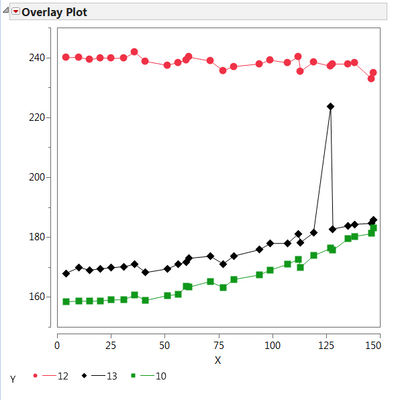
and I'm ploting col "x" vs first three variables ,that are names of columns, like below; but I want to change the name of them to variables A, B, and C in the legend of plot. (see pic). how can I do that? how can I change :Name("12") to show 500 (the value of A) instead of 12?
Thanks
t = current data table();
Overlay Plot(
X( :x ),
Y( Column( dt, Char(Step1)), Column( dt, Char(Step2)), Column( dt, Char(Step3)) ) ,
Connect Points( 1 ),
:Name("12")(Connect Color( 3), Overlay Marker Color( 3 ),
Overlay Marker( 12 ), Line Width( "Thin" )),
:Name("13")(Connect Color( 0 ), Overlay Marker Color( 0 ),
Overlay Marker( 16 ), Line Width( "Thin" )),
:Name("10")(Connect Color( 20 ), Overlay Marker Color( 20 ),
Overlay Marker( 15 ), Line Width( "Thin" )));


- 新着としてマーク
- ブックマーク
- 購読
- ミュート
- RSS フィードを購読する
- ダイレクトリンクを取得
- 印刷
- 不適切なコンテンツを報告
Re: Changing the names in legend of plot

- 新着としてマーク
- ブックマーク
- 購読
- ミュート
- RSS フィードを購読する
- ダイレクトリンクを取得
- 印刷
- 不適切なコンテンツを報告
Re: Changing the names in legend of plot
Yes, I think so.
When I have huge set of points. Graph Builder doesn't show one to one point connection (atleast I don't know of it).
I have tried to show what I mean in the attached example.
- 新着としてマーク
- ブックマーク
- 購読
- ミュート
- RSS フィードを購読する
- ダイレクトリンクを取得
- 印刷
- 不適切なコンテンツを報告
Re: Changing the names in legend of plot
Interesting, the script in your table does provide a different behaviour (bug-like) than when I start from scratch. This is true for JMP 12.2. and JMP 13.1. So please provide this also to our support team. Xan, did I miss something?
So, one workaround is to create it manually. May not the best, but for now ...

- 新着としてマーク
- ブックマーク
- 購読
- ミュート
- RSS フィードを購読する
- ダイレクトリンクを取得
- 印刷
- 不適切なコンテンツを報告
Re: Changing the names in legend of plot
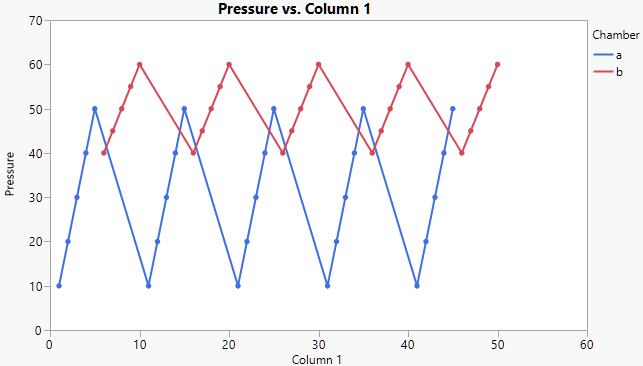
Thanks for providing the larger table. To keep the A and B lines separate, use the Overlay role. Here's a script.
Graph Builder(
	Variables( X( :Column 1 ), Y( :Pressure ), Overlay( :Chamber )),
	Elements( Points( X, Y, Legend( 7 ) ), Line( X, Y, Legend( 8 ) ) )
)- 新着としてマーク
- ブックマーク
- 購読
- ミュート
- RSS フィードを購読する
- ダイレクトリンクを取得
- 印刷
- 不適切なコンテンツを報告
Re: Changing the names in legend of plot
@sibanibisoyi wrote:
3) I know how to change the legends in Graph Builder.But as mentioned that I need to use Overlay Plot because I need connecting lines between the Points which is not possible in Graph Builder (as far as I know).
You can combine elements in Graph Builder by holding down the shift key when you select them in the top row of element icons. So turn on Points and then shift-click on Line. In the properties for Line there is a checkbox called "Row order" which will connect the point row-by-row if that's what you're going for. Otherwise it will connect them by unique x values.
- 新着としてマーク
- ブックマーク
- 購読
- ミュート
- RSS フィードを購読する
- ダイレクトリンクを取得
- 印刷
- 不適切なコンテンツを報告
Re: Changing the names in legend of plot
To me it's not fully clear how the data table looks like which is mentioned above. If we could have an example table it should be not that hard.
おすすめの記事
- © 2026 JMP Statistical Discovery LLC. All Rights Reserved.
- 利用規約
- 個人情報の取り扱いについて
- お問い合わせ