- Don’t miss your chance to experience Discovery Summit Europe at our best available rate! Early bird registration through 31 Oct.
- Graph Builder Toolbar streamlines interactive graphing. Creates shortcuts on Report and GraphBuilder Helpers toolbars. Download and install the extension.
- Subscribe to RSS Feed
- Mark Topic as New
- Mark Topic as Read
- Float this Topic for Current User
- Bookmark
- Subscribe
- Mute
- Printer Friendly Page
Discussions
Solve problems, and share tips and tricks with other JMP users.- User Community
- :
- Discussions
- :
- Re: Changing number of decimals in the tabulate

- Mark as New
- Bookmark
- Subscribe
- Mute
- Subscribe to RSS Feed
- Get Direct Link
- Report Inappropriate Content
Changing number of decimals in the tabulate
Hi,
How can I changed the number decimals in the tabulate function?
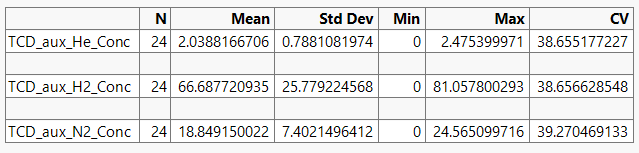
As example for the CV (RSD %), I would like to present this table with the values like 38.7, 38.7 and 39.3.

- Mark as New
- Bookmark
- Subscribe
- Mute
- Subscribe to RSS Feed
- Get Direct Link
- Report Inappropriate Content
Re: Changing number of decimals in the tabulate
Forgot to add,
and to keep these settings. So when I repeat the tabulate function the decimals stay the same.
And can I copy this table into Excel, to change the fonts and styles.


- Mark as New
- Bookmark
- Subscribe
- Mute
- Subscribe to RSS Feed
- Get Direct Link
- Report Inappropriate Content
Re: Changing number of decimals in the tabulate
Which JMP version are you using? In JMP18 you have these


- Mark as New
- Bookmark
- Subscribe
- Mute
- Subscribe to RSS Feed
- Get Direct Link
- Report Inappropriate Content
Re: Changing number of decimals in the tabulate
Thanks Jarno!
Yes that's true but with JMP17 isn't saved. So when you redo a tabulate you have to change the format again.
The only option is to work via a script, I think. I hoped it would be easier via a simple checkbox.

- Mark as New
- Bookmark
- Subscribe
- Mute
- Subscribe to RSS Feed
- Get Direct Link
- Report Inappropriate Content
Re: Changing number of decimals in the tabulate
Where do you find "Change Format" option?
- Mark as New
- Bookmark
- Subscribe
- Mute
- Subscribe to RSS Feed
- Get Direct Link
- Report Inappropriate Content
Re: Changing number of decimals in the tabulate
In the Tabulate window, scroll down to the bottom. You’ll find it in the lower-left corner right below “Default Statistics.”
Recommended Articles
- © 2026 JMP Statistical Discovery LLC. All Rights Reserved.
- Terms of Use
- Privacy Statement
- Contact Us