- Don’t miss your chance to experience Discovery Summit Europe at our best available rate! Early bird registration through 31 Oct.
- Image to Table JMP extension imports single or batch images as data tables. Useful to extract curves from pictures or convert image data to curve data to use in analyses like Functional Data Explorer. Download and install the extension.
- Subscribe to RSS Feed
- Mark Topic as New
- Mark Topic as Read
- Float this Topic for Current User
- Bookmark
- Subscribe
- Mute
- Printer Friendly Page
Discussions
Solve problems, and share tips and tricks with other JMP users.- User Community
- :
- Discussions
- :
- Changing number of decimals in the tabulate

- Mark as New
- Bookmark
- Subscribe
- Mute
- Subscribe to RSS Feed
- Get Direct Link
- Report Inappropriate Content
Changing number of decimals in the tabulate
Hi,
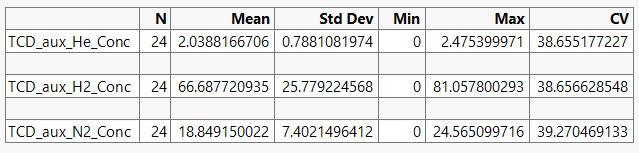
How can I changed the number decimals in the tabulate function?
As example for the CV (RSD %), I would like to present this table with the values like 38.7, 38.7 and 39.3.

- Mark as New
- Bookmark
- Subscribe
- Mute
- Subscribe to RSS Feed
- Get Direct Link
- Report Inappropriate Content
Re: Changing number of decimals in the tabulate
Forgot to add,
and to keep these settings. So when I repeat the tabulate function the decimals stay the same.
And can I copy this table into Excel, to change the fonts and styles.


- Mark as New
- Bookmark
- Subscribe
- Mute
- Subscribe to RSS Feed
- Get Direct Link
- Report Inappropriate Content
Re: Changing number of decimals in the tabulate
Which JMP version are you using? In JMP18 you have these


- Mark as New
- Bookmark
- Subscribe
- Mute
- Subscribe to RSS Feed
- Get Direct Link
- Report Inappropriate Content
Re: Changing number of decimals in the tabulate
Thanks Jarno!
Yes that's true but with JMP17 isn't saved. So when you redo a tabulate you have to change the format again.
The only option is to work via a script, I think. I hoped it would be easier via a simple checkbox.

- Mark as New
- Bookmark
- Subscribe
- Mute
- Subscribe to RSS Feed
- Get Direct Link
- Report Inappropriate Content
Re: Changing number of decimals in the tabulate
Where do you find "Change Format" option?
- Mark as New
- Bookmark
- Subscribe
- Mute
- Subscribe to RSS Feed
- Get Direct Link
- Report Inappropriate Content
Re: Changing number of decimals in the tabulate
In the Tabulate window, scroll down to the bottom. You’ll find it in the lower-left corner right below “Default Statistics.”
Recommended Articles
- © 2026 JMP Statistical Discovery LLC. All Rights Reserved.
- Terms of Use
- Privacy Statement
- Contact Us