cancel
Showing results for 
Show  only  | Search instead for 
Did you mean: 
  • JMP will suspend normal business operations for our Winter Holiday beginning on Wednesday, Dec. 24, 2025, at 5:00 p.m. ET (2:00 p.m. ET for JMP Accounts Receivable).
    Regular business hours will resume at 9:00 a.m. EST on Friday, Jan. 2, 2026.
  • We’re retiring the File Exchange at the end of this year. The JMP Marketplace is now your destination for add-ins and extensions.

Discussions

Solve problems, and share tips and tricks with other JMP users.
%3CLINGO-SUB%20id%3D%22lingo-sub-13055%22%20slang%3D%22en-US%22%20mode%3D%22NONE%22%3E%E6%9B%B4%E6%94%B9%E7%9B%B4%E6%96%B9%E5%9B%BE%E4%B8%AD%E9%98%B4%E5%BD%B1%E7%9A%84%E9%A2%9C%E8%89%B2%EF%BC%88%E5%9C%A8%E6%95%B0%E6%8D%AE%E8%A1%A8%E4%B8%AD%E9%80%89%E6%8B%A9%E5%80%BC%E6%97%B6%EF%BC%89%3C%2FLINGO-SUB%3E%3CLINGO-BODY%20id%3D%22lingo-body-13055%22%20slang%3D%22en-US%22%20mode%3D%22NONE%22%3E%26lt%3Bmeta%20http-equiv%3D%22Content-Type%22%20content%3D%22text%2Fhtml%3B%20charset%3DUTF-8%22%20%2F%26gt%3B%3CP%3E%E5%BD%93%E6%88%91%E5%88%9B%E5%BB%BA%E7%9B%B4%E6%96%B9%E5%9B%BE%E7%84%B6%E5%90%8E%E5%9C%A8%E6%88%91%E7%9A%84%E6%95%B0%E6%8D%AE%E8%A1%A8%E4%B8%AD%E9%80%89%E6%8B%A9%E6%9F%90%E4%BA%9B%E5%80%BC%E6%97%B6%EF%BC%8C%E7%9B%B4%E6%96%B9%E5%9B%BE%E4%B8%AD%E7%9A%84%E5%80%BC%E5%B0%86%E4%BB%A5%E9%98%B4%E5%BD%B1%E6%98%BE%E7%A4%BA%E3%80%82%26nbsp%3B%20%E6%88%91%E6%83%B3%E8%A6%81%E8%BF%99%E4%B8%AA%E9%98%B4%E5%BD%B1%EF%BC%8C%E4%BD%86%E6%98%AF%EF%BC%8C%E9%BB%98%E8%AE%A4%E6%83%85%E5%86%B5%E4%B8%8B%EF%BC%8C%E9%98%B4%E5%BD%B1%E6%98%BE%E7%A4%BA%E4%B8%BA%E6%B5%85%E7%81%B0%E8%89%B2%EF%BC%8C%E5%B8%A6%E6%9C%89%E6%B7%B1%E7%81%B0%E8%89%B2%E5%AF%B9%E8%A7%92%E7%BA%BF%E3%80%82%26nbsp%3B%20%E6%88%91%E5%AE%81%E6%84%BF%E9%98%B4%E5%BD%B1%E6%98%AF%E4%B8%80%E7%A7%8D%E7%BA%AF%E8%89%B2%EF%BC%8C%E5%A6%82%E6%9E%9C%E6%9C%89%E5%BF%85%E8%A6%81%E6%88%91%E5%8F%AF%E4%BB%A5%E6%94%B9%E5%8F%98%E3%80%82%26nbsp%3B%20%E6%9C%89%E5%8F%AF%E8%83%BD%E5%81%9A%E5%87%BA%E6%94%B9%E5%8F%98%E5%90%97%EF%BC%9F%E6%88%91%E5%8F%AF%E4%BB%A5%E7%9C%8B%E5%88%B0%E5%A6%82%E4%BD%95%E6%9B%B4%E6%94%B9%E7%9B%B4%E6%96%B9%E5%9B%BE%E4%B8%AD%E6%9D%A1%E5%BD%A2%E7%9A%84%E9%A2%9C%E8%89%B2%EF%BC%8C%E4%BD%86%E8%BF%9B%E8%A1%8C%E6%9B%B4%E6%94%B9%E5%AF%B9%E6%95%B0%E6%8D%AE%E5%80%BC%E7%AA%81%E5%87%BA%E6%98%BE%E7%A4%BA%E6%97%B6%E5%87%BA%E7%8E%B0%E7%9A%84%E9%98%B4%E5%BD%B1%E6%B2%A1%E6%9C%89%E5%BD%B1%E5%93%8D%EF%BC%8C%E6%88%91%E6%97%A0%E6%B3%95%E5%BC%84%E6%B8%85%E6%A5%9A%E6%88%91%E6%98%AF%E5%90%A6%E5%8F%AF%E4%BB%A5%E6%8E%A7%E5%88%B6%E6%96%B9%E5%BC%8F%E7%AA%81%E5%87%BA%E6%98%BE%E7%A4%BA%E7%9A%84%E6%95%B0%E6%8D%AE%E5%80%BC%E5%B8%A6%E6%9C%89%E9%98%B4%E5%BD%B1%E3%80%82%26nbsp%3B%20%E5%A6%82%E6%9E%9C%E5%8F%AF%E4%BB%A5%E6%9B%B4%E6%94%B9%E9%BB%98%E8%AE%A4%E5%80%BC%EF%BC%8C%E6%9C%89%E4%BA%BA%E5%8F%AF%E4%BB%A5%E6%8F%90%E4%BE%9B%E6%96%B9%E5%90%91%E5%90%97%EF%BC%9F%26nbsp%3B%3C%2FP%3E%3CP%3E%3C%2FP%3E%3CP%3E%E8%B0%A2%E8%B0%A2%EF%BC%81%3C%2FP%3E%3C%2FLINGO-BODY%3E%3CLINGO-SUB%20id%3D%22lingo-sub-13057%22%20slang%3D%22en-US%22%20mode%3D%22NONE%22%3ERe%EF%BC%9A%E6%9B%B4%E6%94%B9%E7%9B%B4%E6%96%B9%E5%9B%BE%E4%B8%AD%E9%98%B4%E5%BD%B1%E7%9A%84%E9%A2%9C%E8%89%B2%EF%BC%88%E5%9C%A8%E6%95%B0%E6%8D%AE%E8%A1%A8%E4%B8%AD%E9%80%89%E6%8B%A9%E5%80%BC%E6%97%B6%EF%BC%89%3C%2FLINGO-SUB%3E%3CLINGO-BODY%20id%3D%22lingo-body-13057%22%20slang%3D%22en-US%22%20mode%3D%22NONE%22%3E%3CP%3E%E6%98%AF%E7%9A%84%EF%BC%8C%E8%BF%99%E5%BE%88%E6%9C%89%E7%94%A8!!!!%E8%B0%A2%E8%B0%A2%E4%BD%A0%EF%BC%8C%E5%A8%84%E3%80%82%3C%2FP%3E%3C%2FLINGO-BODY%3E%3CLINGO-SUB%20id%3D%22lingo-sub-13056%22%20slang%3D%22en-US%22%20mode%3D%22NONE%22%3ERe%EF%BC%9A%E6%9B%B4%E6%94%B9%E7%9B%B4%E6%96%B9%E5%9B%BE%E4%B8%AD%E9%98%B4%E5%BD%B1%E7%9A%84%E9%A2%9C%E8%89%B2%EF%BC%88%E5%9C%A8%E6%95%B0%E6%8D%AE%E8%A1%A8%E4%B8%AD%E9%80%89%E6%8B%A9%E5%80%BC%E6%97%B6%EF%BC%89%3C%2FLINGO-SUB%3E%3CLINGO-BODY%20id%3D%22lingo-body-13056%22%20slang%3D%22en-US%22%20mode%3D%22NONE%22%3E%3CP%3E%E6%82%A8%E6%98%AF%E5%90%A6%E5%B0%9D%E8%AF%95%E6%9B%B4%E6%94%B9%E2%80%9C%E9%A6%96%E9%80%89%E9%A1%B9%E2%80%9D%26gt%3B%E2%80%9C%E5%9B%BE%E5%BD%A2%E2%80%9D%26gt%3B%E2%80%9C%E5%A1%AB%E5%85%85%E5%8C%BA%E5%9F%9F%E2%80%9D%EF%BC%9F%3C%2FP%3E%3CP%3E%3CSPAN%20class%3D%22lia-inline-image-display-wrapper%20lia-image-align-inline%22%20style%3D%22width%3A%20604px%3B%22%3E%3Cspan%20class%3D%22lia-inline-image-display-wrapper%22%20image-alt%3D%229146_Screen%20Shot%202015-06-30%20at%209.11.30%20PM.png%22%20style%3D%22width%3A%20331px%3B%22%3E%3Cimg%20src%3D%22https%3A%2F%2Fcommunity.jmp.com%2Ft5%2Fimage%2Fserverpage%2Fimage-id%2F1760i46C807D9FB9BCDC1%2Fimage-size%2Fmedium%3Fv%3Dv2%26amp%3Bpx%3D400%22%20role%3D%22button%22%20title%3D%229146_Screen%20Shot%202015-06-30%20at%209.11.30%20PM.png%22%20alt%3D%229146_Screen%20Shot%202015-06-30%20at%209.11.30%20PM.png%22%20%2F%3E%3C%2Fspan%3E%3C%2FSPAN%3E%3C%2FP%3E%3C%2FLINGO-BODY%3E
Choose Language Hide Translation Bar
everson_50
Level I

Changing color of shading in histograms (when values are selected in data table)

When I create a histogram and then select certain values in my in data table, the values are shaded in the histogram.  I want this shading, but, by default, the shading appears as a light gray, with darker gray diagonal lines.  I would rather the shading be in one solid color that I could change if necessary.  Is it possible to make that change?  I can see how I can change the colors of the bars in the histogram, but making that change has no impact on the shading that appears when data values are highlighted, and I can't figure out if I have any control over the way the highlighted data values are shaded.  If it's possible to change the defaults, can someone provide directions? 

Thank you!

1 ACCEPTED SOLUTION

Accepted Solutions
louv
Staff (Retired)

Re: Changing color of shading in histograms (when values are selected in data table)
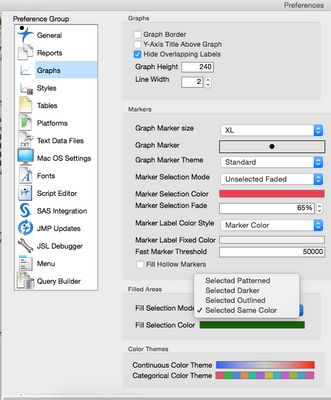
Have you tried to change the Preferences>Graphs>Filled Areas?

9146_Screen Shot 2015-06-30 at 9.11.30 PM.png

View solution in original post

2 REPLIES 2
louv
Staff (Retired)

Re: Changing color of shading in histograms (when values are selected in data table)

Have you tried to change the Preferences>Graphs>Filled Areas?

9146_Screen Shot 2015-06-30 at 9.11.30 PM.png

everson_50
Level I

Re: Changing color of shading in histograms (when values are selected in data table)

Yes, this worked!!!!  Thank you so much, Lou.

Recommended Articles