- Image to Table JMP extension imports single or batch images as data tables. Useful to extract curves from pictures or convert image data to curve data to use in analyses like Functional Data Explorer. Download and install the extension.
- Subscribe to RSS Feed
- Mark Topic as New
- Mark Topic as Read
- Float this Topic for Current User
- Bookmark
- Subscribe
- Mute
- Printer Friendly Page
Discussions
Solve problems, and share tips and tricks with other JMP users.- User Community
- :
- Discussions
- :
- Changing color of shading in histograms (when values are selected in data table)

- Mark as New
- Bookmark
- Subscribe
- Mute
- Subscribe to RSS Feed
- Get Direct Link
- Report Inappropriate Content
Changing color of shading in histograms (when values are selected in data table)
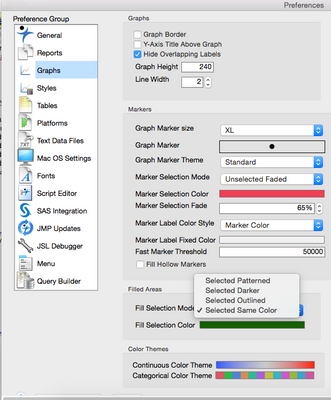
When I create a histogram and then select certain values in my in data table, the values are shaded in the histogram. I want this shading, but, by default, the shading appears as a light gray, with darker gray diagonal lines. I would rather the shading be in one solid color that I could change if necessary. Is it possible to make that change? I can see how I can change the colors of the bars in the histogram, but making that change has no impact on the shading that appears when data values are highlighted, and I can't figure out if I have any control over the way the highlighted data values are shaded. If it's possible to change the defaults, can someone provide directions?
Thank you!
Accepted Solutions


- Mark as New
- Bookmark
- Subscribe
- Mute
- Subscribe to RSS Feed
- Get Direct Link
- Report Inappropriate Content
Re: Changing color of shading in histograms (when values are selected in data table)
- Mark as New
- Bookmark
- Subscribe
- Mute
- Subscribe to RSS Feed
- Get Direct Link
- Report Inappropriate Content
Re: Changing color of shading in histograms (when values are selected in data table)
Have you tried to change the Preferences>Graphs>Filled Areas?
- Mark as New
- Bookmark
- Subscribe
- Mute
- Subscribe to RSS Feed
- Get Direct Link
- Report Inappropriate Content
Re: Changing color of shading in histograms (when values are selected in data table)
Yes, this worked!!!! Thank you so much, Lou.
Recommended Articles
- © 2026 JMP Statistical Discovery LLC. All Rights Reserved.
- Terms of Use
- Privacy Statement
- Contact Us