- Don’t miss your chance to experience Discovery Summit Europe at our best available rate! Early bird registration through 31 Oct.
- Graph Builder Toolbar streamlines interactive graphing. Creates shortcuts on Report and GraphBuilder Helpers toolbars. Download and install the extension.
- Subscribe to RSS Feed
- Mark Topic as New
- Mark Topic as Read
- Float this Topic for Current User
- Bookmark
- Subscribe
- Mute
- Printer Friendly Page
Discussions
Solve problems, and share tips and tricks with other JMP users.- User Community
- :
- Discussions
- :
- Re: Change the data filter display in JMP19

- Mark as New
- Bookmark
- Subscribe
- Mute
- Subscribe to RSS Feed
- Get Direct Link
- Report Inappropriate Content
Change the data filter display in JMP19
Hello,
I am currently migrating an application from JMP 18 to JMP 19. In the process, I have noticed a change in behavior (JSL) regarding the Data Filter.
In the application, I create a data filter with many columns (>10). I had gotten into the habit of changing the data filter’s display using the command << n col(3) to spread my more than 10 filters across 3 columns (less visually cluttered). In JMP18, this worked (see script below).
JMP18:
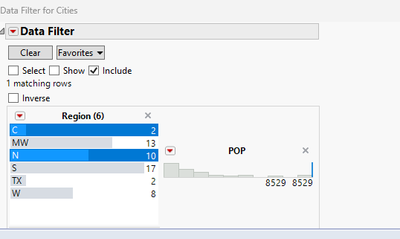
JMP19:

In JMP19, it has no effect... Has anyone else encountered this issue and found a workaround? Having the entire data filter displayed vertically is too cumbersome, yet I’d still like to use JMP’s data filter object, which is very convenient for selection.
Names Default To Here( 1 );
dt = Open( "$SAMPLE_DATA/Cities.jmp" );
obj = dt <<
Data Filter(
	Add Filter(
		columns( :Region, :POP ),
		Where( :Region == {"C", "N"} )
	),
	Mode( Select( 0 ), Show( 0 ), Include( 1 ) )
);

wait(0.1);

 (obj << report)[Lineup Box( 2 )] << ncol(2)
;
Try( (obj << report)[ListBoxBox( 1 )] << set size( 200, 150 ) );
Try( (obj << report)[Framebox( 1 )] << Frame Size( 200, 20 ) );
Thanks in advance !
Accepted Solutions


- Mark as New
- Bookmark
- Subscribe
- Mute
- Subscribe to RSS Feed
- Get Direct Link
- Report Inappropriate Content
Re: Change the data filter display in JMP19
There is at least one post in the JMP community regarding this same change -> JMP19 did change display box structure of filters and how the elements are placed within Lineup box. If I remember correctly there are really no good workarounds and I have built my own filters because of that.
- Mark as New
- Bookmark
- Subscribe
- Mute
- Subscribe to RSS Feed
- Get Direct Link
- Report Inappropriate Content
Re: Change the data filter display in JMP19
There is at least one post in the JMP community regarding this same change -> JMP19 did change display box structure of filters and how the elements are placed within Lineup box. If I remember correctly there are really no good workarounds and I have built my own filters because of that.
- Mark as New
- Bookmark
- Subscribe
- Mute
- Subscribe to RSS Feed
- Get Direct Link
- Report Inappropriate Content
Re: Change the data filter display in JMP19
Hello, thank you for your answer, I have thus add a suggestion in the Wishlist https://community.jmp.com/t5/JMP-Wish-List/Data-Filter-allow-specifying-number-of-columns-for-the-fi... in the mean time


- Mark as New
- Bookmark
- Subscribe
- Mute
- Subscribe to RSS Feed
- Get Direct Link
- Report Inappropriate Content
Re: Change the data filter display in JMP19
It looks like the LineupBox has changed to no longer position both of the 'columns' as each of the V List Boxes for the filters, if you run (obj<<report)[LineupBox(2)]<<get script it produces this:
Lineup Box(
	V List Box(
		SpacerBox,
		Border Box(
			Border Box(
				V List Box(
					Border Box(
						Tab Page Box(
							Title( "Region (6)" ),
							Closeable(),
							V List Box(
								V List Box(
									If Box( H List Box( FilterFieldBox ) ),
									V List Box( ListBoxBox )
								)
							)
						)
					),
					Border Box(
						Tab Page Box(
							Title( "POP" ),
							Closeable(),
							V List Box(
								Border Box(
									ScaleBox(
										V List Box(
											FrameBox,
											DFIntMinMaxBox(
												NumberEditBox, NumberEditBox
											)
										)
									)
								)
							)
						)
					)
				)
			)
		)
	)
)
You would expect both of the 'Border Box' items to be next in the heirachy after the LineUp Box to line up with the 'Cols'.
If you run (obj<<report)[LineupBox(2)]<<get n cols you can see it is set to the value of '2' that you set as well.
Thanks,
Ben
Recommended Articles
- © 2026 JMP Statistical Discovery LLC. All Rights Reserved.
- Terms of Use
- Privacy Statement
- Contact Us