- Image to Table JMP extension imports single or batch images as data tables. Useful to extract curves from pictures or convert image data to curve data to use in analyses like Functional Data Explorer. Download and install the extension.
- Subscribe to RSS Feed
- Mark Topic as New
- Mark Topic as Read
- Float this Topic for Current User
- Bookmark
- Subscribe
- Mute
- Printer Friendly Page
Discussions
Solve problems, and share tips and tricks with other JMP users.- User Community
- :
- Discussions
- :
- Change the data filter display in JMP19

- Mark as New
- Bookmark
- Subscribe
- Mute
- Subscribe to RSS Feed
- Get Direct Link
- Report Inappropriate Content
Change the data filter display in JMP19
Hello,
I am currently migrating an application from JMP 18 to JMP 19. In the process, I have noticed a change in behavior (JSL) regarding the Data Filter.
In the application, I create a data filter with many columns (>10). I had gotten into the habit of changing the data filter’s display using the command << n col(3) to spread my more than 10 filters across 3 columns (less visually cluttered). In JMP18, this worked (see script below).
JMP18:
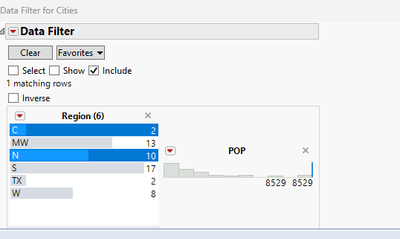
JMP19:

In JMP19, it has no effect... Has anyone else encountered this issue and found a workaround? Having the entire data filter displayed vertically is too cumbersome, yet I’d still like to use JMP’s data filter object, which is very convenient for selection.
Names Default To Here( 1 );
dt = Open( "$SAMPLE_DATA/Cities.jmp" );
obj = dt <<
Data Filter(
	Add Filter(
		columns( :Region, :POP ),
		Where( :Region == {"C", "N"} )
	),
	Mode( Select( 0 ), Show( 0 ), Include( 1 ) )
);

wait(0.1);

 (obj << report)[Lineup Box( 2 )] << ncol(2)
;
Try( (obj << report)[ListBoxBox( 1 )] << set size( 200, 150 ) );
Try( (obj << report)[Framebox( 1 )] << Frame Size( 200, 20 ) );
Thanks in advance !
Accepted Solutions


- Mark as New
- Bookmark
- Subscribe
- Mute
- Subscribe to RSS Feed
- Get Direct Link
- Report Inappropriate Content
Re: Change the data filter display in JMP19
There is at least one post in the JMP community regarding this same change -> JMP19 did change display box structure of filters and how the elements are placed within Lineup box. If I remember correctly there are really no good workarounds and I have built my own filters because of that.
- Mark as New
- Bookmark
- Subscribe
- Mute
- Subscribe to RSS Feed
- Get Direct Link
- Report Inappropriate Content
Re: Change the data filter display in JMP19
There is at least one post in the JMP community regarding this same change -> JMP19 did change display box structure of filters and how the elements are placed within Lineup box. If I remember correctly there are really no good workarounds and I have built my own filters because of that.
- Mark as New
- Bookmark
- Subscribe
- Mute
- Subscribe to RSS Feed
- Get Direct Link
- Report Inappropriate Content
Re: Change the data filter display in JMP19
Hello, thank you for your answer, I have thus add a suggestion in the Wishlist https://community.jmp.com/t5/JMP-Wish-List/Data-Filter-allow-specifying-number-of-columns-for-the-fi... in the mean time


- Mark as New
- Bookmark
- Subscribe
- Mute
- Subscribe to RSS Feed
- Get Direct Link
- Report Inappropriate Content
Re: Change the data filter display in JMP19
It looks like the LineupBox has changed to no longer position both of the 'columns' as each of the V List Boxes for the filters, if you run (obj<<report)[LineupBox(2)]<<get script it produces this:
Lineup Box(
	V List Box(
		SpacerBox,
		Border Box(
			Border Box(
				V List Box(
					Border Box(
						Tab Page Box(
							Title( "Region (6)" ),
							Closeable(),
							V List Box(
								V List Box(
									If Box( H List Box( FilterFieldBox ) ),
									V List Box( ListBoxBox )
								)
							)
						)
					),
					Border Box(
						Tab Page Box(
							Title( "POP" ),
							Closeable(),
							V List Box(
								Border Box(
									ScaleBox(
										V List Box(
											FrameBox,
											DFIntMinMaxBox(
												NumberEditBox, NumberEditBox
											)
										)
									)
								)
							)
						)
					)
				)
			)
		)
	)
)
You would expect both of the 'Border Box' items to be next in the heirachy after the LineUp Box to line up with the 'Cols'.
If you run (obj<<report)[LineupBox(2)]<<get n cols you can see it is set to the value of '2' that you set as well.
Thanks,
Ben
Recommended Articles
- © 2026 JMP Statistical Discovery LLC. All Rights Reserved.
- Terms of Use
- Privacy Statement
- Contact Us