- JMP will suspend normal business operations for our Winter Holiday beginning on Wednesday, Dec. 24, 2025, at 5:00 p.m. ET (2:00 p.m. ET for JMP Accounts Receivable).
Regular business hours will resume at 9:00 a.m. EST on Friday, Jan. 2, 2026. - We’re retiring the File Exchange at the end of this year. The JMP Marketplace is now your destination for add-ins and extensions.
- Subscribe to RSS Feed
- Mark Topic as New
- Mark Topic as Read
- Float this Topic for Current User
- Bookmark
- Subscribe
- Mute
- Printer Friendly Page
Discussions
Solve problems, and share tips and tricks with other JMP users.- JMP User Community
- :
- Discussions
- :
- Change the Legend Location in Graph Builder

- Mark as New
- Bookmark
- Subscribe
- Mute
- Subscribe to RSS Feed
- Get Direct Link
- Report Inappropriate Content
Change the Legend Location in Graph Builder
Is there a way to change the location of the legend from the default (right side) to somewhere on the plot in Graph Builder?
Accepted Solutions


 Community Manager
- Mark as New
- Bookmark
- Subscribe
- Mute
- Subscribe to RSS Feed
- Get Direct Link
- Report Inappropriate Content
Re: Change the Legend Location in Graph Builder
Hi @faraz,
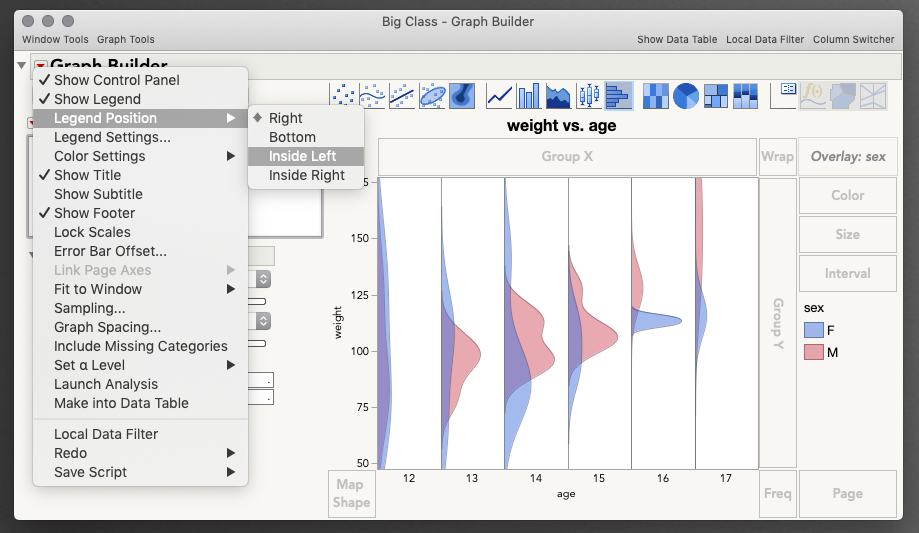
Absolutely. You will find those options under the Red Triangle next to Graph Builder at the top left > Legend Position:
Community Manager
- Mark as New
- Bookmark
- Subscribe
- Mute
- Subscribe to RSS Feed
- Get Direct Link
- Report Inappropriate Content
Re: Change the Legend Location in Graph Builder

- Mark as New
- Bookmark
- Subscribe
- Mute
- Subscribe to RSS Feed
- Get Direct Link
- Report Inappropriate Content
Re: Change the Legend Location in Graph Builder
Hi Julian,
My question is not related to the Legend location. I saw your plot with selected histogram plot but showing "distribution" graph on the graph builder. I try to do the same plot to display "distribution" instead of "histogram bin" but can not figure out how to do this. Would you provide some information how to do this?
thanks
Ken
Community Manager
- Mark as New
- Bookmark
- Subscribe
- Mute
- Subscribe to RSS Feed
- Get Direct Link
- Report Inappropriate Content
Re: Change the Legend Location in Graph Builder
Hi @kweng,
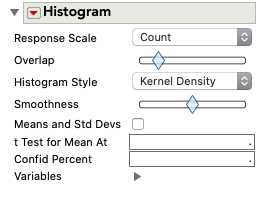
It's a neat display of data, isn't it? These kernel density histograms were added to Graph Builder in JMP 15. Once you are showing the Histogram element, toggle "Kernel Density" as the Histogram Style in the control panel on the left.
Here's a short video showing all the steps to make that graph using the Big Class sample data table.
I hope this helps!
- Mark as New
- Bookmark
- Subscribe
- Mute
- Subscribe to RSS Feed
- Get Direct Link
- Report Inappropriate Content
Re: Change the Legend Location in Graph Builder
Wow, that's very nice. Thanks bunch Julian!.
I think I need to upgrade my JMP 14 to JMP 15.
-Ken

- Mark as New
- Bookmark
- Subscribe
- Mute
- Subscribe to RSS Feed
- Get Direct Link
- Report Inappropriate Content
Re: Change the Legend Location in Graph Builder
Community Manager
- Mark as New
- Bookmark
- Subscribe
- Mute
- Subscribe to RSS Feed
- Get Direct Link
- Report Inappropriate Content
Re: Change the Legend Location in Graph Builder
Hi @Rajat,
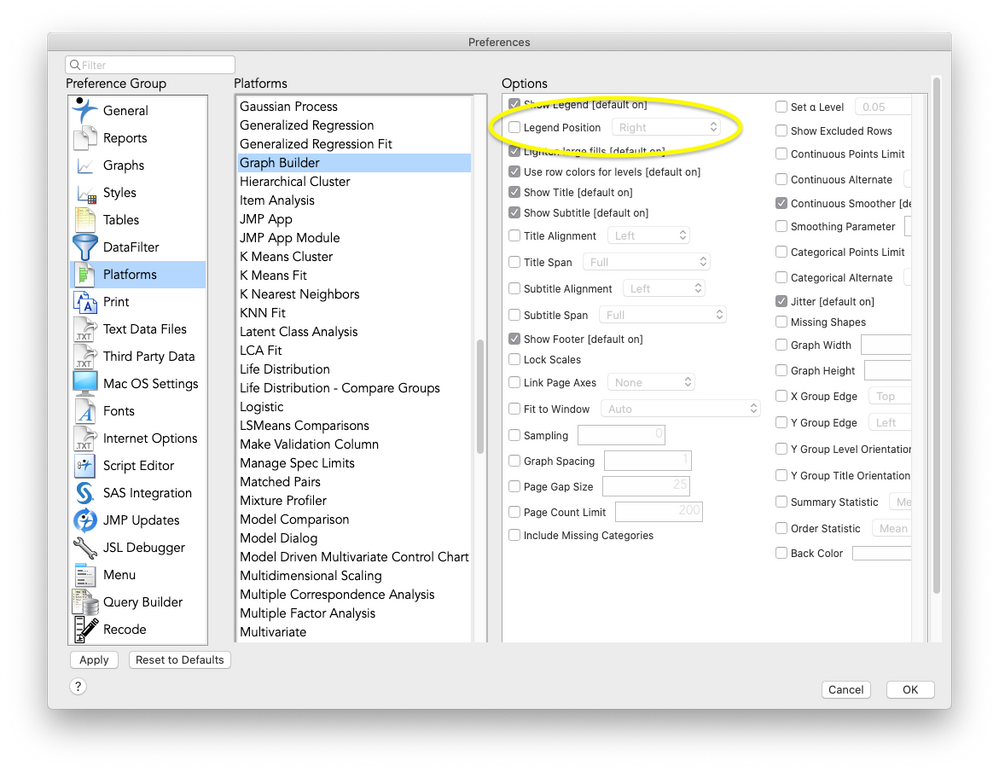
Absolutely! The place to find all the platform preferences is by going to File > Preferences. Next, select the Platforms group on the left, then select Graph Builder. Finally,check the box to specify the location for the legend by default. If you find that you're changing something in a platform regularly it's worth setting a preference for it.
I hope this helps!
@julian
- Mark as New
- Bookmark
- Subscribe
- Mute
- Subscribe to RSS Feed
- Get Direct Link
- Report Inappropriate Content
Re: Change the Legend Location in Graph Builder
Recommended Articles
- © 2026 JMP Statistical Discovery LLC. All Rights Reserved.
- Terms of Use
- Privacy Statement
- Contact Us