- JMP will suspend normal business operations for our Winter Holiday beginning on Wednesday, Dec. 24, 2025, at 5:00 p.m. ET (2:00 p.m. ET for JMP Accounts Receivable).
Regular business hours will resume at 9:00 a.m. EST on Friday, Jan. 2, 2026. - We’re retiring the File Exchange at the end of this year. The JMP Marketplace is now your destination for add-ins and extensions.
- Subscribe to RSS Feed
- Mark Topic as New
- Mark Topic as Read
- Float this Topic for Current User
- Bookmark
- Subscribe
- Mute
- Printer Friendly Page
Discussions
Solve problems, and share tips and tricks with other JMP users.- JMP User Community
- :
- Discussions
- :
- Calculation field subgroup count

- Mark as New
- Bookmark
- Subscribe
- Mute
- Subscribe to RSS Feed
- Get Direct Link
- Report Inappropriate Content
Calculation field subgroup count
Hello,
This is probably a newbie question, but I can't seem to find the answer. I am looking for a way to program a calculation field that would give me for each individual the total numbers of the subgroup to which he belongs. The subgroup is determined by 3 variables: Year of birth - Gender - Employment.
Example:
Row #1: 1930 - Woman - Nurse [17]
#2: 1930 - Woman - teacher [74]
#3: 1930 - Man - Plumber [49]
#4: 1930 - Woman - Nurse [17]
#5: 1930 - Man - Plumber [81]
#6: 1930 - Man - Lawyer [15]
#8: 1930 - Woman - teacher [74]
…
#333: 1931 - Woman - Nurse [63]
#334 1931 - Woman - teacher [134]
#335 : 1931 - Man - Plumber [128]
#336: 1931 - Woman - Nurse [63]
etc
I could of course get this information by doing a crosstab, but I need to have it in a column for each of the individuals in my population in order to calculate indicators.
Thanks a lot for your help..
- Tags:
- macOS
Accepted Solutions


 Community Manager
- Mark as New
- Bookmark
- Subscribe
- Mute
- Subscribe to RSS Feed
- Get Direct Link
- Report Inappropriate Content
Re: Calculation field subgroup count
A couple of ideas:
- You can use Tables->Summary to create the summary table, grouping by Year, Gender, and Employment. You can then drag the N column back to the source table and JMP will automatically join to put the summary value appropriate for each row back in original table.
The trick for dragging the column is to pause for just a moment after clicking before you start dragging.
- You can use the Col Number() column to count the number of non-missing values for a column by your Year, Gender, Employment columns.
Use the ^ in the toolbar at the top of the Formula Editor to add the additional arguments to Col Number().
Here's an example using Big Class.
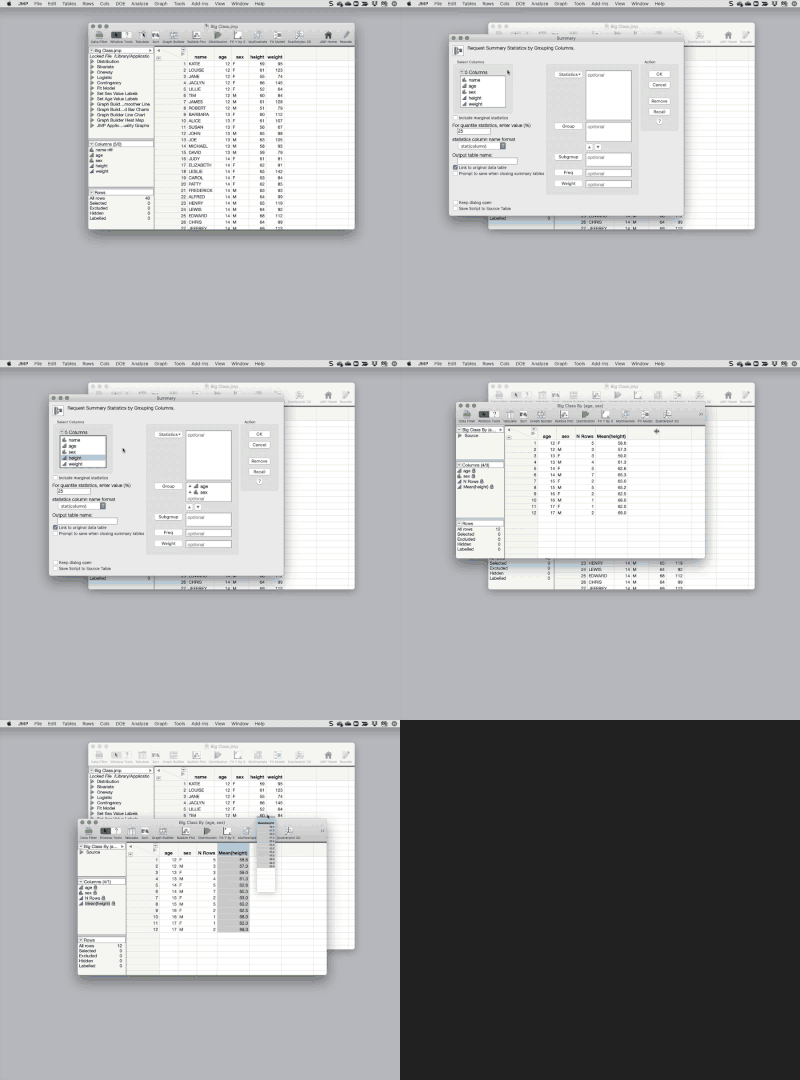
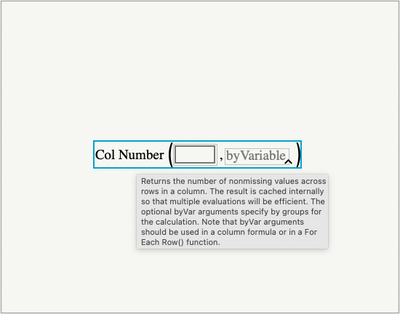
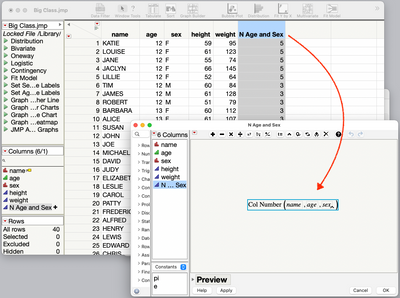
Let us know if this this confusing or this still doesn't get you what you're looking for.


- Mark as New
- Bookmark
- Subscribe
- Mute
- Subscribe to RSS Feed
- Get Direct Link
- Report Inappropriate Content
Re: Calculation field subgroup count
Hi @claude_bellavan ,
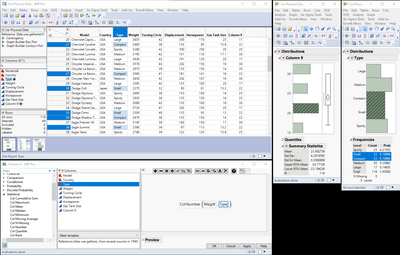
I'm not sure how your data table is organized (as this would probably affect how you accomplish what you're after). It seems to me that each entry (row) should have at least three columns: BY, Gender, Occupation -- I'm not following what the [17] and so on represent, but anyway, if you have your data table organized like the Car Physical Data.jmp file, you can create a column formula that does what I think you're trying to do. Take a look at the screenshot below where I've defined a column formula as Col Number(XCol, <byVar>), where the function returns the number of non-zero entries in the column XCol, but sorted by the byVar column. In this example, since both "Small" and "Compact" vehicle type have 22 entries, they're lumped together in the Column 9 output.
Hope this help!,
DS
- Mark as New
- Bookmark
- Subscribe
- Mute
- Subscribe to RSS Feed
- Get Direct Link
- Report Inappropriate Content
Re: Calculation field subgroup count
Sorry. The number between bracket is the result of the function that I need.
- Mark as New
- Bookmark
- Subscribe
- Mute
- Subscribe to RSS Feed
- Get Direct Link
- Report Inappropriate Content
Re: Calculation field subgroup count
The number in square brackets is the one I should get with the formula. Sorry if I wasn't clear enough.
C,
- Mark as New
- Bookmark
- Subscribe
- Mute
- Subscribe to RSS Feed
- Get Direct Link
- Report Inappropriate Content
Re: Calculation field subgroup count
Hello,
With the formula Col Number per group, I have to use a calculation field which is the concatenation of several variables otherwise I don't get exactly the right counts. I think it's because I have to use local filters to exclude certain subgroups.
The other method I've experimented is to create a second table from a crosstab and make a link. It's more static, however. But it's much simpler.
Thanks again
C.
Community Manager
- Mark as New
- Bookmark
- Subscribe
- Mute
- Subscribe to RSS Feed
- Get Direct Link
- Report Inappropriate Content
Re: Calculation field subgroup count
A couple of ideas:
- You can use Tables->Summary to create the summary table, grouping by Year, Gender, and Employment. You can then drag the N column back to the source table and JMP will automatically join to put the summary value appropriate for each row back in original table.
The trick for dragging the column is to pause for just a moment after clicking before you start dragging.
- You can use the Col Number() column to count the number of non-missing values for a column by your Year, Gender, Employment columns.
Use the ^ in the toolbar at the top of the Formula Editor to add the additional arguments to Col Number().
Here's an example using Big Class.
Let us know if this this confusing or this still doesn't get you what you're looking for.

- Mark as New
- Bookmark
- Subscribe
- Mute
- Subscribe to RSS Feed
- Get Direct Link
- Report Inappropriate Content
Re: Calculation field subgroup count
@Jeff_PerkinsonI wasn't able to get your option 1 working, using JMP16.2 Pro (also tried with JMP15.2.1 and JMP16.1 Pro) and Windows 10.
Community Manager
- Mark as New
- Bookmark
- Subscribe
- Mute
- Subscribe to RSS Feed
- Get Direct Link
- Report Inappropriate Content
Re: Calculation field subgroup count
@jthi, which part were you having trouble with, getting it to drag? It's a bit fussy, you have to click and hold still for a half a second or more so JMP knows you want to drag the column not drag out a selection. Notice the pause in the animated gif before I start to drag. If that's not it, give me some more information about what's not working for you.
- Mark as New
- Bookmark
- Subscribe
- Mute
- Subscribe to RSS Feed
- Get Direct Link
- Report Inappropriate Content
Re: Calculation field subgroup count
Ok, that was it! Not the only place where you might have to wait a bit (working on a file indexer using tree boxes...) after pressing mouse button.
Any idea if it would be possible to make the cursor change when you are able to start dragging, to give some visual indicator, because that is fairly useful feature (drag and drop) for reordering couple of columns directly from column headers.
- Mark as New
- Bookmark
- Subscribe
- Mute
- Subscribe to RSS Feed
- Get Direct Link
- Report Inappropriate Content
Re: Calculation field subgroup count
Many thanks.
Claude Bellavance
Recommended Articles
- © 2026 JMP Statistical Discovery LLC. All Rights Reserved.
- Terms of Use
- Privacy Statement
- Contact Us