- JMP will suspend normal business operations for our Winter Holiday beginning on Wednesday, Dec. 24, 2025, at 5:00 p.m. ET (2:00 p.m. ET for JMP Accounts Receivable).
Regular business hours will resume at 9:00 a.m. EST on Friday, Jan. 2, 2026. - We’re retiring the File Exchange at the end of this year. The JMP Marketplace is now your destination for add-ins and extensions.
- Subscribe to RSS Feed
- Mark Topic as New
- Mark Topic as Read
- Float this Topic for Current User
- Bookmark
- Subscribe
- Mute
- Printer Friendly Page
Discussions
Solve problems, and share tips and tricks with other JMP users.- JMP User Community
- :
- Discussions
- :
- Calculating Derivatives/Slopes in JMP

- Mark as New
- Bookmark
- Subscribe
- Mute
- Subscribe to RSS Feed
- Get Direct Link
- Report Inappropriate Content
Calculating Derivatives/Slopes in JMP
Hello again,
I have to columns of data, let's call them x and y. I want to calculate the center derivative of y with respect to x (dy/dx). If I am using the center derivative, that means I will be "missing" a point at the beginning and end of the dy/dx column.
For example, in row two of dy/dx, I want it to equal dy/dx = y3-y1/x3-x1 and on row three of dy/dx, I want it to equal dy/dx = y4-y2/x4-x2. I am having a hard time not using jmp like I would with excel, so I am not even sure if is possible to do this in the formula editor.
Thanks!
Accepted Solutions


- Mark as New
- Bookmark
- Subscribe
- Mute
- Subscribe to RSS Feed
- Get Direct Link
- Report Inappropriate Content
Re: Calculating Derivatives/Slopes in JMP
This code should give you some ideas. The column formula makes use of the LAG function:
dt = open("$sample_data\Big Class.jmp");
// Create formula column
// Height = X
// Weight = Y
// dy/dx = (y+1) - (y-1)/(x+1) - (x-1)
// y+1: lag(:weight, -1)
// y-1: lag(:weight, 1)
// x+1: lag(:height, -1)
// x-1: lag(:height, 1)
dt << New Column( "dy/dx",
Numeric,
Continuous,
Format( "Best", 12 ),
Formula( lag(:weight, -1) - lag(:weight, 1) / lag(:height, -1) - lag(:height, 1))
);

- Mark as New
- Bookmark
- Subscribe
- Mute
- Subscribe to RSS Feed
- Get Direct Link
- Report Inappropriate Content
Re: Calculating Derivatives/Slopes in JMP
natalie_,
The Formula Editor has a derivative option. You can access it by clicking the red triangle at the top of the Editor dialog.
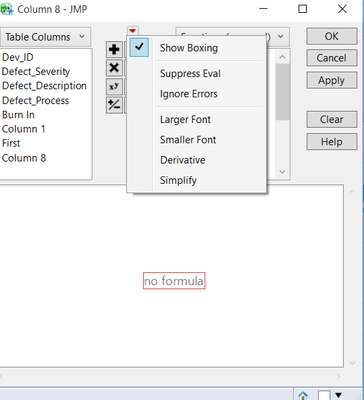
Hope this helps.
Dave
- Mark as New
- Bookmark
- Subscribe
- Mute
- Subscribe to RSS Feed
- Get Direct Link
- Report Inappropriate Content
Re: Calculating Derivatives/Slopes in JMP
This code should give you some ideas. The column formula makes use of the LAG function:
dt = open("$sample_data\Big Class.jmp");
// Create formula column
// Height = X
// Weight = Y
// dy/dx = (y+1) - (y-1)/(x+1) - (x-1)
// y+1: lag(:weight, -1)
// y-1: lag(:weight, 1)
// x+1: lag(:height, -1)
// x-1: lag(:height, 1)
dt << New Column( "dy/dx",
Numeric,
Continuous,
Format( "Best", 12 ),
Formula( lag(:weight, -1) - lag(:weight, 1) / lag(:height, -1) - lag(:height, 1))
);
- Mark as New
- Bookmark
- Subscribe
- Mute
- Subscribe to RSS Feed
- Get Direct Link
- Report Inappropriate Content
Re: Calculating Derivatives/Slopes in JMP
Thank you, it worked well.
I used it in a script, but I had to add As Column.
col <<Set Formula( (lag(As Column("Y"), -1) - lag(As Column("Y"),1))/(lag(As Column("X"),-1)-lag(As Column("X"),1)));
Recommended Articles
- © 2025 JMP Statistical Discovery LLC. All Rights Reserved.
- Terms of Use
- Privacy Statement
- Contact Us