- Don’t miss your chance to experience Discovery Summit Europe at our best available rate! Early bird registration through 31 Oct.
- Graph Builder Toolbar streamlines interactive graphing. Creates shortcuts on Report and GraphBuilder Helpers toolbars. Download and install the extension.
- JMP will suspend normal business operations for our Rest and Recharge Day on Friday, October 2, 2026.
Regular business hours will resume on Monday, October 5, 2026.
- Subscribe to RSS Feed
- Mark Topic as New
- Mark Topic as Read
- Float this Topic for Current User
- Bookmark
- Subscribe
- Mute
- Printer Friendly Page
Discussions
Solve problems, and share tips and tricks with other JMP users.- User Community
- :
- Discussions
- :
- Re: Best way to plot GraphBuilder plot with multiple Y variables using JSL

- Mark as New
- Bookmark
- Subscribe
- Mute
- Subscribe to RSS Feed
- Get Direct Link
- Report Inappropriate Content
Best way to plot GraphBuilder plot with multiple Y variables using JSL
All,
I'd like to ask for an input on the best way to script a GB plot with multiple parameters.
Let's say I have a table like this:
New Table( "Untitled 140",
	Add Rows( 12 ),
	New Column( "Category",
		Character,
		"Nominal",
		Set Values( {"A", "A", "A", "B", "B", "B", "C", "C", "C", "D", "D", "D"} )
	),
	New Column( "Value1",
		Numeric,
		"Continuous",
		Format( "Best", 12 ),
		Set Values( [1, 4, 2, 3, 6, 2, 3, 5, 4, 1, 3, 6] )
	),
	New Column( "Value2",
		Numeric,
		"Continuous",
		Format( "Best", 12 ),
		Set Values( [6, 3, 5, 2, 8, 6, 5, 2, 6, 3, 5, 4] )
	)
)
And I want to script a plot like this:
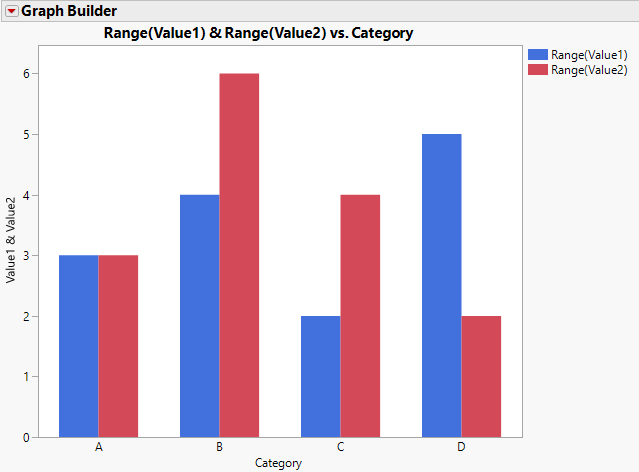
where the autogenerated script looks like this:
Graph Builder(
	Size( 522, 450 ),
	Show Control Panel( 0 ),
	Variables( X( :Category ), Y( :Value1 ), Y( :Value2, Position( 1 ) ) ),
	Elements( Bar( X, Y( 1 ), Y( 2 ), Legend( 4 ), Summary Statistic( "Range" ) ) )
);
with the catch that there is an arbitrary number of Y columns and the names are also arbitrary.
For plots like Variability plot I would something like this:
parameters = {:"Value1"n, :"Value2"n};
yExpr = Expr( Y() );
For Each( {value, index}, parameters, Insert Into( yExpr, Name Expr( value ), 1 ) );

Eval(
	Substitute(
			Expr(
				Variability Chart( placeholder, X( :Category ),  Std Dev Chart( 0 )  )
			),
		Expr( placeholder ), Name Expr( yExpr )
	)
);
where I receive the names of the columns as a list and then construct a Y expression and then put it into the script for the chart. It would give me a list of variability plots, but that's OK with me.
If I want to take the same route in case of the GB it looks like I will have to construct two expressions:
Y( :Value1 ), Y( :Value2, Position( 1 ) )and
Elements( Bar( X, Y( 1 ), Y( 2 ), Legend( 4 ), Summary Statistic( "Range" ) ) )Which is essentially the whole script.
My question: Is there a better way rather than making bunch of substitutions with expressions to assemble those two lines?
Thanks!
- Mark as New
- Bookmark
- Subscribe
- Mute
- Subscribe to RSS Feed
- Get Direct Link
- Report Inappropriate Content
Re: Best way to plot GraphBuilder plot with multiple Y variables using JSL
Ok, this is how I solved it, but is there a simpler way? Can't believe that to script such a simple thing I need to go into that kind of complexity...:
parameters = {:"Value1"n, :"Value2"n};

yExpr = Expr( Y() );
yExprPos = Expr( Y( Position( 1 ) ) );
barExpr = Expr(
	Bar( X, Summary Statistic( "Range" ) )
);
yNExpr = Expr( Y() );
variablesExpr = Expr(
	Variables( X( :Category ) )
);

For Each( {value, index}, parameters,
	Insert Into( yExpr, Name Expr( value ), 1 );
	yExprPos = Expr( Y( Position( 1 ) ) );
	Insert Into( yExprPos, Name Expr( value ), 1 );
	Insert Into( variablesExpr, Name Expr( yExprPos ) );
	//This is for Y(1) etc. in Bar()
	yNExpr = Expr( Y() );
	Insert Into( yNExpr, Name Expr( index ) );

	Insert Into( barExpr, Name Expr( yNExpr ), 2 );
);


//Name Expr( yExpr );
Show(Name Expr( variablesExpr ));
Show(Name Expr( barExpr ));

gbExpr = Expr(
	Graph Builder( Size( 522, 450 ), Show Control Panel( 0 ), placeholder1, Elements( placeholder2 ) )

);

Eval(
	Substitute(
		Substitute(
			Name Expr(gbExpr),
			Expr( placeholder1 ),
			Name Expr( variablesExpr )
		),
		Expr( placeholder2 ),
		Name Expr( barExpr )
	)
);

- Mark as New
- Bookmark
- Subscribe
- Mute
- Subscribe to RSS Feed
- Get Direct Link
- Report Inappropriate Content
Re: Best way to plot GraphBuilder plot with multiple Y variables using JSL
I have usually used similar methods as you to build such graph builders, this might be a good readRe: Can you construct this without writing expression a string?


- Mark as New
- Bookmark
- Subscribe
- Mute
- Subscribe to RSS Feed
- Get Direct Link
- Report Inappropriate Content
Re: Best way to plot GraphBuilder plot with multiple Y variables using JSL
This still uses loops to build those expressions, but it concatenates lists of arguments instead of substituting them:
Names default to here(1);

//call another function (f) with the arguments provided in a list (l)
do.call = function({l,f},
	Substitute(
		Name Expr(l),
		Expr({}),
		Name Expr(f)
	);
);

dt = New Table( "Data",
	Add Rows( 12 ),
	New Column( "Category", Character, "Nominal",
		Set Values( {"A", "A", "A", "B", "B", "B", "C", "C", "C", "D", "D", "D"} )
	),
	New Column( "Value1", Numeric, "Continuous", Format( "Best", 12 ),
		Set Values( [1, 4, 2, 3, 6, 2, 3, 5, 4, 1, 3, 6] )
	),
	New Column( "Value2", Numeric, "Continuous", Format( "Best", 12 ),
		Set Values( [6, 3, 5, 2, 8, 6, 5, 2, 6, 3, 5, 4] )
	)
);

vars = {:Value1, :Value2};

VarExpr = do.call(
	{ X( :Category ) } || transform each({v}, vars, eval expr( Y( Expr( Name Expr( v ) ), Position( 1 ) ) ) ),
	expr(Variables())
);

BarExpr = do.call(
	{ X } || transform each({v, i}, vars, eval expr( Y( Expr( i ) ) ) ) || { Legend( 4 ), Summary Statistic( "Range" ) },
	expr(Bar())
);

Eval( Eval Expr(
	dt << Graph Builder(
		Size( 522, 450 ),
		Show Control Panel( 0 ),
		Expr( Name Expr( VarExpr ) ),
		Elements( Expr( Name Expr( BarExpr ) ) )
	)
) );
- Mark as New
- Bookmark
- Subscribe
- Mute
- Subscribe to RSS Feed
- Get Direct Link
- Report Inappropriate Content
Re: Best way to plot GraphBuilder plot with multiple Y variables using JSL
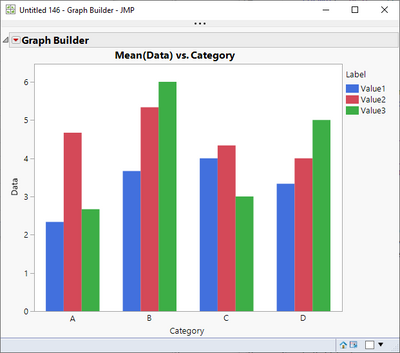
Don't forget the STACK command. Requires eval(parse()) but it's pretty clean otherwise. Here's an example with three columns to be plotted.
dt = New Table( "Test",
	Add Rows( 12 ),
	New Column( "Category",
		Character,
		"Nominal",
		Set Values( {"A", "A", "A", "B", "B", "B", "C", "C", "C", "D", "D", "D"} )
	),
	New Column( "Value1",
		Numeric,
		"Continuous",
		Format( "Best", 12 ),
		Set Values( [1, 4, 2, 3, 6, 2, 3, 5, 4, 1, 3, 6] )
	),
	New Column( "Value2",
		Numeric,
		"Continuous",
		Format( "Best", 12 ),
		Set Values( [6, 3, 5, 2, 8, 6, 5, 2, 6, 3, 5, 4] )
	),

	New Column( "Value3",
		Numeric,
		"Continuous",
		Format( "Best", 12 ),
		Set Values( [1, 4, 3, 6, 5, 7, 3, 4, 2, 8, 6, 1] )
	)
);

dt_cols = dt << get column names(string);
removefrom(dt_cols, 1);	// Remove Category

// Create the list of columns, like this: ":Value1, :Value2, :Value3"
col_list = ":" || concat items(dt_cols, ", :");

stack_str = evalinsert(
"\[dts = dt << Stack(invisible,
	columns( ^col_list^ ),
	Source Label Column( "Label" ),
	Stacked Data Column( "Data" ))]\");
eval(parse(stack_str));

dts << Graph Builder(
	Size( 518, 448 ),
	Show Control Panel( 0 ),
	Variables( X( :Category ), Y( :Data ), Overlay( :Label ) ),
	Elements( Bar( X, Y, Legend( 7 ) ) )
);
- Mark as New
- Bookmark
- Subscribe
- Mute
- Subscribe to RSS Feed
- Get Direct Link
- Report Inappropriate Content
Re: Best way to plot GraphBuilder plot with multiple Y variables using JSL
@pmroz here is the same code without Eval(Parse()). I agree this is much cleaner!
Names default to here(1);

dt = New Table( "Test",
	Add Rows( 12 ),
	New Column( "Category", Character, "Nominal",
		Set Values( {"A", "A", "A", "B", "B", "B", "C", "C", "C", "D", "D", "D"} ) ),
	New Column( "Value1", Numeric, "Continuous", Format( "Best", 12 ),
		Set Values( [1, 4, 2, 3, 6, 2, 3, 5, 4, 1, 3, 6] ) ),
	New Column( "Value2", Numeric, "Continuous", Format( "Best", 12 ),
		Set Values( [6, 3, 5, 2, 8, 6, 5, 2, 6, 3, 5, 4] ) ),
	New Column( "Value3", Numeric, "Continuous", Format( "Best", 12 ),
		Set Values( [1, 4, 3, 6, 5, 7, 3, 4, 2, 8, 6, 1] ) )
);

dt_cols = dt << get column references();
remove from(dt_cols, 1);	// Remove Category

dts = dt << Stack(invisible,
	columns( dt_cols ),
	Source Label Column( "Label" ),
	Stacked Data Column( "Data" )
);

dts << Graph Builder(
	Size( 518, 448 ),
	Show Control Panel( 0 ),
	Variables( X( :Category ), Y( :Data ), Overlay( :Label ) ),
	Elements( Bar( X, Y, Legend( 7 ) ) )
);
- Mark as New
- Bookmark
- Subscribe
- Mute
- Subscribe to RSS Feed
- Get Direct Link
- Report Inappropriate Content
Re: Best way to plot GraphBuilder plot with multiple Y variables using JSL
Nice! Thanks for adding that touch. Wish I'd have tried that myself!
Recommended Articles
- © 2026 JMP Statistical Discovery LLC. All Rights Reserved.
- Terms of Use
- Privacy Statement
- Contact Us