- JMP will suspend normal business operations for our Winter Holiday beginning on Wednesday, Dec. 24, 2025, at 5:00 p.m. ET (2:00 p.m. ET for JMP Accounts Receivable).
Regular business hours will resume at 9:00 a.m. EST on Friday, Jan. 2, 2026. - We’re retiring the File Exchange at the end of this year. The JMP Marketplace is now your destination for add-ins and extensions.
- Subscribe to RSS Feed
- Mark Topic as New
- Mark Topic as Read
- Float this Topic for Current User
- Bookmark
- Subscribe
- Mute
- Printer Friendly Page
Discussions
Solve problems, and share tips and tricks with other JMP users.- JMP User Community
- :
- Discussions
- :
- Adding numbers to columns

- Mark as New
- Bookmark
- Subscribe
- Mute
- Subscribe to RSS Feed
- Get Direct Link
- Report Inappropriate Content
Adding numbers to columns
Hi,
I am new to JSL Scripting.
Is there a way I could number all the columns using a jsl script? There are 100 columns in the data table and I want to concatenate number in the column names
On example, there are multiples columns that follow this type:-
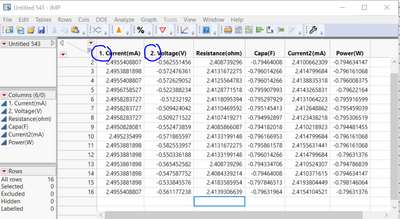
Looking for some feedback
Thanks,
Jay
Accepted Solutions


- Mark as New
- Bookmark
- Subscribe
- Mute
- Subscribe to RSS Feed
- Get Direct Link
- Report Inappropriate Content
Re: Adding numbers to columns
Hi @Jackie_ ,
You could use a short script to do this:
Names default to here(1);

dt = Open("$Sample_data/iris.jmp");

cols = dt << Get column names;

for(c = 1, c<= n items(cols), c++,
	Column(dt, c) << Set Name( char(c) || ". " || ( Column(dt, c) << Get Name ) )
);- Mark as New
- Bookmark
- Subscribe
- Mute
- Subscribe to RSS Feed
- Get Direct Link
- Report Inappropriate Content
Re: Adding numbers to columns
Hi @Jackie_ ,
You could use a short script to do this:
Names default to here(1);

dt = Open("$Sample_data/iris.jmp");

cols = dt << Get column names;

for(c = 1, c<= n items(cols), c++,
	Column(dt, c) << Set Name( char(c) || ". " || ( Column(dt, c) << Get Name ) )
);- Mark as New
- Bookmark
- Subscribe
- Mute
- Subscribe to RSS Feed
- Get Direct Link
- Report Inappropriate Content
Re: Adding numbers to columns
Thanks, @ih
I want to assign numbers only to a particular group of columns.
For eg: In this case, I want to serialize the column group "Tests". There are more than 100 columns in the tests groups. Please can you help me with the jsl?
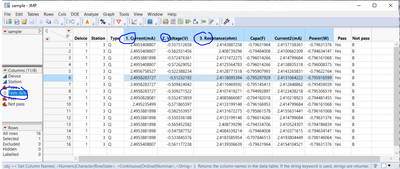
Many thanks,
Jack
- Mark as New
- Bookmark
- Subscribe
- Mute
- Subscribe to RSS Feed
- Get Direct Link
- Report Inappropriate Content
Re: Adding numbers to columns
If you are working interactively then the function get selected columns might help:
Names default to here(1);

dt = Open("$Sample_data/iris.jmp");

dt:Sepal length << Set Selected(1);
dt:Sepal width << Set Selected(1);

cols = dt << Get selected columns;

for(c = 1, c<= n items(cols), c++,
	Column(dt, c) << Set Name( char(c) || ". " || ( Column(dt, c) << Get Name ) )
);
Otherwise you could include an if statement in the for loop to ensure the name matches whatever criteria you have.


- Mark as New
- Bookmark
- Subscribe
- Mute
- Subscribe to RSS Feed
- Get Direct Link
- Report Inappropriate Content
Re: Adding numbers to columns
If you are using JMP16 you could also try with Transform Each (or For Each):
Names Default To Here(1);
dt = Open("$SAMPLE_DATA/Big Class.jmp");

Transform Each({value, idx}, dt << Get Column Names("String"),
	Column(dt, value) << Set Name(Char(idx) ||". " || value);
);
- Mark as New
- Bookmark
- Subscribe
- Mute
- Subscribe to RSS Feed
- Get Direct Link
- Report Inappropriate Content
Re: Adding numbers to columns
- Please take the time to read the Scripting Guide in the JMP Documentation Library available under the Help pull down menu.
- All you need to do, is to loop across the columns and change the column name
Names Default To Here( 1 );
dt = Current Data Table();

For( i = 1, i <= N Cols( dt ), i++,
	Column( dt, i ) << set name( Char( i ) || ". " || Char( Column( dt, i ) << get name ) )
);
Recommended Articles
- © 2025 JMP Statistical Discovery LLC. All Rights Reserved.
- Terms of Use
- Privacy Statement
- Contact Us