- JMP will suspend normal business operations for our Winter Holiday beginning on Wednesday, Dec. 24, 2025, at 5:00 p.m. ET (2:00 p.m. ET for JMP Accounts Receivable).
Regular business hours will resume at 9:00 a.m. EST on Friday, Jan. 2, 2026. - We’re retiring the File Exchange at the end of this year. The JMP Marketplace is now your destination for add-ins and extensions.
- Subscribe to RSS Feed
- Mark Topic as New
- Mark Topic as Read
- Float this Topic for Current User
- Bookmark
- Subscribe
- Mute
- Printer Friendly Page
Discussions
Solve problems, and share tips and tricks with other JMP users.- JMP User Community
- :
- Discussions
- :
- Add reference line to Y-group axis

- Mark as New
- Bookmark
- Subscribe
- Mute
- Subscribe to RSS Feed
- Get Direct Link
- Report Inappropriate Content
Add reference line to Y-group axis
Hello,
I am using graph builder (JMP 17) and have almost what I need. But I need to add a reference line.
This first image ('example') is what I currently have (I need all 3 viruses in 1 graph with lines and dots for the rates for both years).
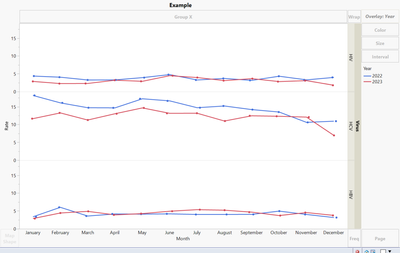
BUT, I need to add a reference line for each virus so that it looks like 'example with ref line' (below).
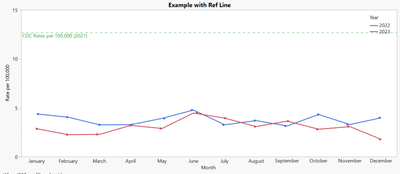
I don't know if it is possible. But essentially, I am trying to get a reference line to show up for each one my y-groups. I can use JSL if someone has something that will work using scripts.
- Tags:
- windows


- Mark as New
- Bookmark
- Subscribe
- Mute
- Subscribe to RSS Feed
- Get Direct Link
- Report Inappropriate Content
Re: Add reference line to Y-group axis
Based on what is the reference line plotted from? How does your data look like?
- Mark as New
- Bookmark
- Subscribe
- Mute
- Subscribe to RSS Feed
- Get Direct Link
- Report Inappropriate Content
Re: Add reference line to Y-group axis
The blue and red lines are my data, but I want to add in a CDC line (which is only available for the year and not monthly like my data) as the green line.
- Mark as New
- Bookmark
- Subscribe
- Mute
- Subscribe to RSS Feed
- Get Direct Link
- Report Inappropriate Content
Re: Add reference line to Y-group axis
Depending on how your data is formatted, you might be able to add it as a separate line graph or you could add reference lines through scripting.
- Mark as New
- Bookmark
- Subscribe
- Mute
- Subscribe to RSS Feed
- Get Direct Link
- Report Inappropriate Content
Re: Add reference line to Y-group axis
I don't want it as a separate line graph. I just don't know how to do the script for it.
- Mark as New
- Bookmark
- Subscribe
- Mute
- Subscribe to RSS Feed
- Get Direct Link
- Report Inappropriate Content
Re: Add reference line to Y-group axis
Is there a specific reason for not wanting separate line graph?
- Mark as New
- Bookmark
- Subscribe
- Mute
- Subscribe to RSS Feed
- Get Direct Link
- Report Inappropriate Content
Re: Add reference line to Y-group axis
It isn't really a line graph if there is only 1 data point (from the CDC). We just need it as a reference, not part of the actual data.
- Mark as New
- Bookmark
- Subscribe
- Mute
- Subscribe to RSS Feed
- Get Direct Link
- Report Inappropriate Content
Re: Add reference line to Y-group axis
You can go the complicated way of using graphic script
Names Default To Here(1);

dt = open("$SAMPLE_DATA/Big Class.jmp");

gb = dt << Graph Builder(
	Variables(X(:weight), Y(:height), Group Y(:sex)),
	Elements(Points(X, Y, Legend(11)))
);

fbs = Report(gb) << XPath("//FrameBox");
lines = {60, 65};

For Each({fb, idx}, fbs,
	Eval(EvalExpr(
		fb << Add Graphics Script(
			H Line(Expr(lines[idx]));
		);
	));
);
or easier option of adding new chart
Names Default To Here(1);

dt = open("$SAMPLE_DATA/Big Class.jmp");

dt << New Column("Line", Numeric, Continuous, << Set Each Value(
	If(:sex == "M", 65, 60)
));

gb = dt << Graph Builder(
	Size(567, 523),
	Show Control Panel(0),
	Variables(X(:weight), Y(:height), Y(:Line, Position(1)), Group Y(:sex)),
	Elements(Points(X, Y(1), Legend(8)), Line(Y(2), Legend(10)))
);
- Mark as New
- Bookmark
- Subscribe
- Mute
- Subscribe to RSS Feed
- Get Direct Link
- Report Inappropriate Content
Re: Add reference line to Y-group axis
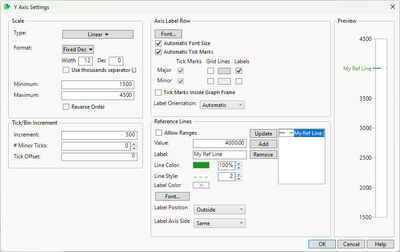
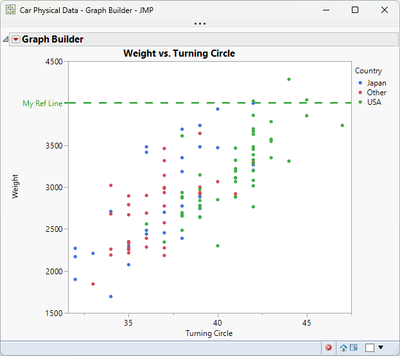
You can add the horizontal line in Graph Builder. Double-click on the Y axis and put a value in to the reference line section.
- Mark as New
- Bookmark
- Subscribe
- Mute
- Subscribe to RSS Feed
- Get Direct Link
- Report Inappropriate Content
Re: Add reference line to Y-group axis
But I need to do this for the Y-Group, not the Y-Axis.
Recommended Articles
- © 2025 JMP Statistical Discovery LLC. All Rights Reserved.
- Terms of Use
- Privacy Statement
- Contact Us