cancel
Showing results for 
Show  only  | Search instead for 
Did you mean: 
  • JMP will suspend normal business operations for our Winter Holiday beginning on Wednesday, Dec. 24, 2025, at 5:00 p.m. ET (2:00 p.m. ET for JMP Accounts Receivable).
    Regular business hours will resume at 9:00 a.m. EST on Friday, Jan. 2, 2026.
  • We’re retiring the File Exchange at the end of this year. The JMP Marketplace is now your destination for add-ins and extensions.

Knowledge Base

Choose Language Hide Translation Bar
How to Download JMP - Software Administrator

This guide uses JMP to refer to JMP, JMP Pro, JMP Live, and JMP Clinical.


As the software administrator for your site, you can package and deploy JMP according to your business needs. To download JMP 18,

  1. Sign in to My JMP.
  2. Click Manage Software.

    HowToDownload_Manage_Update2.png


  3. Locate the JMP product, then click Download.
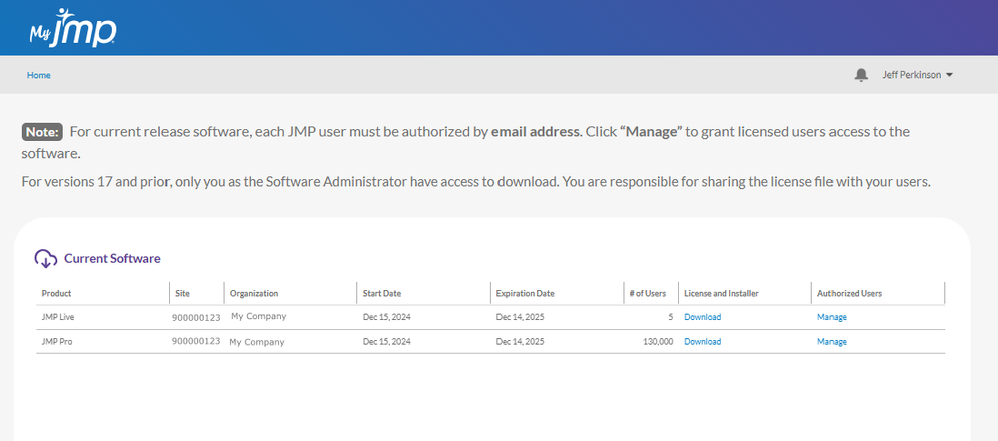
    HowToDownload_Manage_Update2aa_updated.png


  4. Below the installation instructions, click the download icon for the desired operating system.

    HowToDownload_Manage_Update4a.png


Comments

ok

ok