cancel
Showing results for 
Show  only  | Search instead for 
Did you mean: 

Knowledge Base

%3CLINGO-SUB%20id%3D%22lingo-sub-744029%22%20slang%3D%22en-US%22%20mode%3D%22UPDATE%22%3ESo%20laden%20Sie%20JMP%20%E2%80%93%20Softwareadministrator%20herunter%3C%2FLINGO-SUB%3E%0A%20%20%3CLINGO-BODY%20id%3D%22lingo-body-744029%22%20slang%3D%22en-US%22%20mode%3D%22UPDATE%22%3E%0A%20%20%20%3CP%3E%3CEM%3EIn%20diesem%20Handbuch%20wird%20JMP%20verwendet%2C%20um%20auf%20JMP%2C%20JMP%20Pro%2C%20JMP%20Live%20und%20JMP%20Clinical%20zu%20verweisen.%3C%2FEM%3E%3C%2FP%3E%20%0A%20%20%20%3CBR%20%2F%3E%20%0A%20%20%20%3CP%3EAls%20Softwareadministrator%20Ihrer%20Site%20k%C3%B6nnen%20Sie%20JMP%20entsprechend%20Ihren%20Gesch%C3%A4ftsanforderungen%20paketieren%20und%20bereitstellen.%20Um%20JMP%2018%20herunterzuladen%2C%3C%2FP%3E%20%0A%20%20%20%3COL%3E%20%0A%20%20%20%20%3CLI%3E%3CA%20href%3D%22https%3A%2F%2Fcommunity.jmp.com%2Ft5%2FAdministrator-Knowledge-Base%2FHow-to-Sign-in-to-My-JMP%2Fta-p%2F744059%22%20target%3D%22_self%22%3EBei%20%E2%80%9EMein%20JMP%E2%80%9C%20anmelden%3C%2FA%3E.%3C%2FLI%3E%20%0A%20%20%20%20%3CLI%3EKlicken%20Sie%20auf%20%3CSTRONG%3ESoftware%20verwalten%3C%2FSTRONG%3E%20.%3CBR%20%2F%3E%3CBR%20%2F%3E%20%3CSPAN%20class%3D%22lia-inline-image-display-wrapper%20lia-image-align-center%22%20image-alt%3D%22HowToDownload_Manage_Update2.png%22%20style%3D%22width%3A%20999px%3B%22%3E%3CSPAN%20class%3D%22lia-inline-image-display-wrapper%22%20image-alt%3D%22HowToDownload_Manage_Update2.png%22%20style%3D%22width%3A%20999px%3B%22%3E%3Cspan%20class%3D%22lia-inline-image-display-wrapper%22%20image-alt%3D%22HowToDownload_Manage_Update2.png%22%20style%3D%22width%3A%20999px%3B%22%3E%3Cimg%20src%3D%22https%3A%2F%2Fcommunity.jmp.com%2Ft5%2Fimage%2Fserverpage%2Fimage-id%2F82566i7242584DB332D9FD%2Fimage-size%2Flarge%3Fv%3Dv2%26amp%3Bpx%3D999%22%20role%3D%22button%22%20title%3D%22HowToDownload_Manage_Update2.png%22%20alt%3D%22HowToDownload_Manage_Update2.png%22%20%2F%3E%3C%2Fspan%3E%3C%2FSPAN%3E%3C%2FSPAN%3E%3CBR%20%2F%3E%3CBR%20%2F%3E%3CBR%20%2F%3E%3C%2FLI%3E%20%0A%20%20%20%20%3CLI%3E%3CSPAN%3ESuchen%20Sie%20das%20JMP-Produkt%20und%20klicken%20Sie%20dann%20auf%3C%2FSPAN%3E%3CSTRONG%20style%3D%22font-family%3A%20inherit%3B%22%3EHerunterladen%3C%2FSTRONG%3E%3CSPAN%3E.%3CBR%20%2F%3E%3CBR%20%2F%3E%3C%2FSPAN%3E%20%3CP%3E%3CSPAN%20class%3D%22lia-inline-image-display-wrapper%20lia-image-align-center%22%20image-alt%3D%22HowToDownload_Manage_Update2aa_updated.png%22%20style%3D%22width%3A%20999px%3B%22%3E%3CSPAN%20class%3D%22lia-inline-image-display-wrapper%22%20image-alt%3D%22HowToDownload_Manage_Update2aa_updated.png%22%20style%3D%22width%3A%20999px%3B%22%3E%3Cspan%20class%3D%22lia-inline-image-display-wrapper%22%20image-alt%3D%22HowToDownload_Manage_Update2aa_updated.png%22%20style%3D%22width%3A%20999px%3B%22%3E%3Cimg%20src%3D%22https%3A%2F%2Fcommunity.jmp.com%2Ft5%2Fimage%2Fserverpage%2Fimage-id%2F82593i285FD53A2DD5F26D%2Fimage-size%2Flarge%3Fv%3Dv2%26amp%3Bpx%3D999%22%20role%3D%22button%22%20title%3D%22HowToDownload_Manage_Update2aa_updated.png%22%20alt%3D%22HowToDownload_Manage_Update2aa_updated.png%22%20%2F%3E%3C%2Fspan%3E%3C%2FSPAN%3E%3C%2FSPAN%3E%3C%2FP%3E%20%3CBR%20%2F%3E%20%3CBR%20%2F%3E%20%3C%2FLI%3E%20%0A%20%20%20%20%3CLI%3E%3CSPAN%3EKlicken%20Sie%20unterhalb%20der%20Installationsanleitung%20auf%20das%20Download-Symbol%20f%C3%BCr%20das%20gew%C3%BCnschte%20Betriebssystem.%3CBR%20%2F%3E%3CBR%20%2F%3E%3C%2FSPAN%3E%3CSPAN%20class%3D%22lia-inline-image-display-wrapper%20lia-image-align-center%22%20image-alt%3D%22HowToDownload_Manage_Update4a.png%22%20style%3D%22width%3A%20965px%3B%22%3E%3CSPAN%20class%3D%22lia-inline-image-display-wrapper%22%20image-alt%3D%22HowToDownload_Manage_Update4a.png%22%20style%3D%22width%3A%20965px%3B%22%3E%3Cspan%20class%3D%22lia-inline-image-display-wrapper%22%20image-alt%3D%22HowToDownload_Manage_Update4a.png%22%20style%3D%22width%3A%20965px%3B%22%3E%3Cimg%20src%3D%22https%3A%2F%2Fcommunity.jmp.com%2Ft5%2Fimage%2Fserverpage%2Fimage-id%2F82568i7D77FB22EAD20357%2Fimage-size%2Flarge%3Fv%3Dv2%26amp%3Bpx%3D999%22%20role%3D%22button%22%20title%3D%22HowToDownload_Manage_Update4a.png%22%20alt%3D%22HowToDownload_Manage_Update4a.png%22%20%2F%3E%3C%2Fspan%3E%3C%2FSPAN%3E%3C%2FSPAN%3E%20%3CBR%20%2F%3E%20%3C%2FLI%3E%20%0A%20%20%20%3C%2FOL%3E%20%0A%20%20%20%3CBR%20%2F%3E%0A%20%20%3C%2FLINGO-BODY%3E%0A%20%0A%3CLINGO-SUB%20id%3D%22lingo-sub-746952%22%20slang%3D%22en-US%22%20mode%3D%22CREATE%22%3EBetreff%3A%20So%20laden%20Sie%20JMP%2018%20herunter%20-%20Softwareadministrator%3C%2FLINGO-SUB%3E%3CLINGO-BODY%20id%3D%22lingo-body-746952%22%20slang%3D%22en-US%22%20mode%3D%22CREATE%22%3E%3CP%3EOK%3C%2FP%3E%3C%2FLINGO-BODY%3E%0A%20%0A%20%0A%20%20%3CLINGO-SUB%20id%3D%22lingo-sub-910182%22%20slang%3D%22en-US%22%20mode%3D%22CREATE%22%20translate%3D%22no%22%3EBetreff%3A%20So%20laden%20Sie%20JMP%20herunter%20%E2%80%93%20Softwareadministrator%3C%2FLINGO-SUB%3E%0A%20%20%3CLINGO-BODY%20id%3D%22lingo-body-910182%22%20slang%3D%22en-US%22%20mode%3D%22CREATE%22%3E%0A%20%20%20%3CP%3EOK%3C%2FP%3E%0A%20%20%3C%2FLINGO-BODY%3E
Choose Language Hide Translation Bar
How to Download JMP - Software Administrator

This guide uses JMP to refer to JMP, JMP Pro, JMP Live, and JMP Clinical.


As the software administrator for your site, you can package and deploy JMP according to your business needs. To download JMP 18,

  1. Sign in to My JMP.
  2. Click Manage Software.

    HowToDownload_Manage_Update2.png


  3. Locate the JMP product, then click Download.
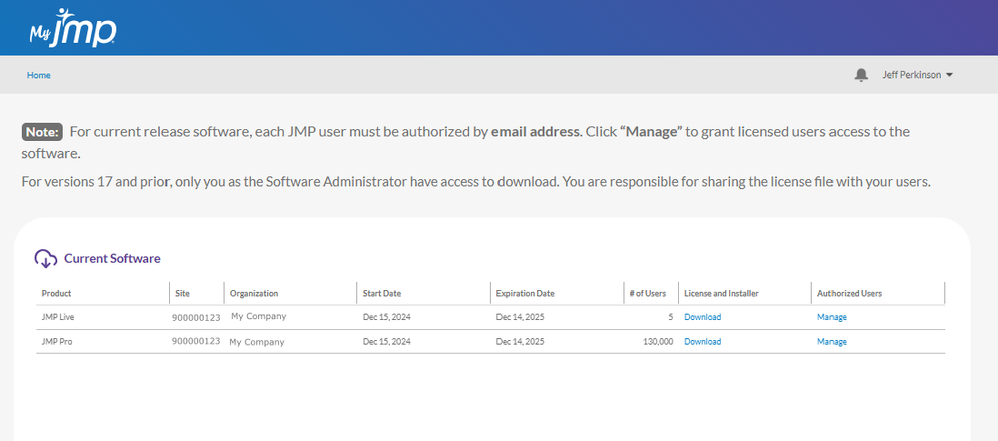
    HowToDownload_Manage_Update2aa_updated.png


  4. Below the installation instructions, click the download icon for the desired operating system.

    HowToDownload_Manage_Update4a.png


Comments

ok

ok