%3CLINGO-SUB%20id%3D%22lingo-sub-707228%22%20slang%3D%22en-US%22%20mode%3D%22UPDATE%22%3E%E6%A0%B9%E6%93%9A%E8%AE%8A%E6%95%B8%E5%BB%BA%E6%A8%A1%E9%A1%9E%E5%9E%8B%E5%8B%95%E6%85%8B%E8%AE%8A%E6%9B%B4%E5%9C%96%E5%BD%A2%E7%94%A2%E7%94%9F%E5%99%A8%E5%9C%96%E8%A1%A8%E9%A1%9E%E5%9E%8B%3C%2FLINGO-SUB%3E%3CLINGO-BODY%20id%3D%22lingo-body-707228%22%20slang%3D%22en-US%22%20mode%3D%22UPDATE%22%3E%3CDIV%20class%3D%22%22%3E%0A%3CDIV%20class%3D%22%22%3E%3CP%3E%3CSPAN%20class%3D%22lia-inline-image-display-wrapper%20lia-image-align-center%22%20image-alt%3D%22matth1_0-1702044403604.png%22%20style%3D%22width%3A%20791px%3B%22%3E%3Cspan%20class%3D%22lia-inline-image-display-wrapper%22%20image-alt%3D%22matth1_0-1702044403604.png%22%20style%3D%22width%3A%20791px%3B%22%3E%3Cimg%20src%3D%22https%3A%2F%2Fcommunity.jmp.com%2Ft5%2Fimage%2Fserverpage%2Fimage-id%2F59464i7859EB61B1C56D3D%2Fimage-dimensions%2F791x502%3Fv%3Dv2%22%20width%3D%22791%22%20height%3D%22502%22%20role%3D%22button%22%20title%3D%22matth1_0-1702044403604.png%22%20alt%3D%22matth1_0-1702044403604.png%22%20%2F%3E%3C%2Fspan%3E%3C%2FSPAN%3E%3C%2FP%3E%E6%9C%AC%E7%AF%80%E4%BB%8B%E7%B4%B9%E5%A6%82%E4%BD%95%E5%8B%95%E6%85%8B%E8%AE%8A%E6%9B%B4%E5%9C%96%E5%BD%A2%E7%94%A2%E7%94%9F%E5%99%A8%E4%B8%AD%E7%9A%84%E5%85%83%E7%B4%A0%E9%A1%9E%E5%9E%8B%EF%BC%8C%E5%8F%96%E6%B1%BA%E6%96%BC%E4%BD%BF%E7%94%A8%E8%80%85%E5%9C%A8%E5%88%97%E5%88%87%E6%8F%9B%E5%99%A8%E4%B8%AD%E9%81%B8%E6%93%87%E9%80%A3%E7%BA%8C%E6%88%96%E5%88%86%E9%A1%9E%20x%20%E8%BB%B8%E8%AE%8A%E6%95%B8%E3%80%82%E5%85%83%E7%B4%A0%E6%98%AF%E5%9C%A8%E5%9C%96%E5%BD%A2%E7%94%A2%E7%94%9F%E5%99%A8%E9%81%B8%E9%A0%85%E6%9D%BF%E9%A0%82%E9%83%A8%E9%A1%AF%E7%A4%BA%E7%82%BA%E5%9C%96%E7%A4%BA%E7%9A%84%E5%9C%96%E5%BD%A2%E9%A1%9E%E5%9E%8B%E3%80%82%E5%B0%8D%E6%96%BC%E9%80%A3%E7%BA%8C%E8%BC%B8%E5%85%A5%EF%BC%8C%E6%96%B0%E5%A2%9E%E4%BA%86%E4%B8%80%E5%80%8B%E5%96%AE%E9%81%B8%E6%8C%89%E9%88%95%EF%BC%8C%E8%AE%93%E4%BD%BF%E7%94%A8%E8%80%85%E5%8F%AF%E4%BB%A5%E5%9C%A8%E6%93%AC%E5%90%88%E7%B7%9A%E5%92%8C%E8%BC%AA%E5%BB%93%E4%B9%8B%E9%96%93%E9%80%B2%E8%A1%8C%E9%81%B8%E6%93%87%E3%80%82%E7%95%B6%E7%82%BA%E9%9D%9E%20JMP%20%E5%B0%88%E5%AE%B6%E4%B8%A6%E4%B8%94%E5%8F%AA%E9%9C%80%E8%A6%81%E6%9C%89%E9%99%90%E6%95%B8%E9%87%8F%E7%9A%84%E9%81%B8%E9%A0%85%E7%9A%84%E4%BA%BA%E5%BB%BA%E7%AB%8B%E4%BA%92%E5%8B%95%E5%BC%8F%E5%9C%96%E8%A1%A8%E6%99%82%EF%BC%8C%E6%AD%A4%E7%A7%98%E8%A8%A3%E9%9D%9E%E5%B8%B8%E6%9C%89%E7%94%A8%E3%80%82%3C%2FDIV%3E%0A%3CHR%20%2F%3E%0A%3CDIV%20class%3D%22lia-message-template-solution-zone%22%3E%0A%3CDIV%20class%3D%22lia-message-template-diagnosis-zone%22%3E%3CFONT%20size%3D%224%22%3E%3CSTRONG%3E%E5%8E%9F%E6%96%99%EF%BC%9A%3C%2FSTRONG%3E%3C%2FFONT%3E%3CUL%3E%3CLI%3E%E5%9C%96%E5%BD%A2%E7%94%A2%E7%94%9F%E5%99%A8%3C%2FLI%3E%3CLI%3E%E8%A1%A8%E9%81%94%E5%BC%8F%E8%99%95%E7%90%86%3C%2FLI%3E%3C%2FUL%3E%3CSTRONG%3E%3CSTRONG%3E%E7%AF%84%E4%BE%8B%E8%B3%87%E6%96%99%E8%A1%A8%3C%2FSTRONG%3E%3C%2FSTRONG%3E%E2%80%93%20%E5%A4%A7%E7%8F%AD%3CSTRONG%3E%3CSTRONG%3E%E9%9B%A3%E5%BA%A6%3C%2FSTRONG%3E%3C%2FSTRONG%3E%E2%80%93%20%E5%9B%B0%E9%9B%A3%3C%2FDIV%3E%0A%3CDIV%20class%3D%22lia-message-template-solution-zone%22%3E%3CFONT%20size%3D%224%22%3E%3CSTRONG%3E%E8%85%B3%E6%AD%A5%3C%2FSTRONG%3E%3C%2FFONT%3E%3CBR%20%2F%3E%0A%3COL%3E%0A%3CLI%3EStart%20with%20%3CFONT%20face%3D%22courier%20new%2Ccourier%22%3E%E5%90%8D%E7%A8%B1%E9%A0%90%E8%A8%AD%E7%82%BA%E6%AD%A4%E8%99%95(1)%3C%2FFONT%3E%20and%20open%20%3CFONT%20face%3D%22helvetica%22%3E%E5%A4%A7%E7%8F%AD%3C%2FFONT%3E.%0A%3CPRE%3E%3CCODE%20class%3D%22%20language-jsl%22%3ENames%20Default%20To%20Here(%201%20)%3B%0Adt%20%3D%20Open(%20%22%24SAMPLE_DATA%2FBig%20Class.jmp%22%20)%3B%3C%2FCODE%3E%3C%2FPRE%3E%0A%3C%2FLI%3E%0A%3CLI%3ECreate%20a%20function%20which%20sends%20a%20message%20to%20the%20%3CFONT%20face%3D%22helvetica%22%3E%E5%9C%96%E5%BD%A2%E7%94%A2%E7%94%9F%E5%99%A8%3C%2FFONT%3E%20platform%20that%20removes%20the%20existing%20element%20then%20adds%20a%20new%20one.%20It%20assumes%20that%20the%20%3CFONT%20face%3D%22helvetica%22%3E%E7%A9%8D%E5%88%86%3C%2FFONT%3E%20element%20is%20already%20displayed%20and%20is%20element%20number%201%2C%20therefore%20the%20element%20to%20be%20removed%20is%20number%202.%20%0A%3CPRE%3E%3CCODE%20class%3D%22%20language-jsl%22%3E%2F%2F%20This%20function%20changes%20the%20type%20of%20chart%20being%20displayed.%0A%2F%2F%20It%20takes%20a%20reference%20to%20a%20Graph%20Builder%20report%20(gbr)%20and%20the%20chart%20type%20required%20(gr)%0A%2F%2F%20At%20the%20moment%20it%20assumes%20the%20Points%20element%20will%20always%20be%20included%0AchangeElement%20%3D%20function(%20%7Bgbr%2C%20gr%7D%2C%0A%09%7Bdefault%20local%7D%2C%0A%09Eval(%0A%09%09Substitute(%0A%09%09%09Expr(%0A%09%09%09%09gbr%20%26lt%3B%26lt%3B%20remove%20element(%201%2C%201%2C%202%20)%20%26lt%3B%26lt%3B%20add%20element(%201%2C%201%2C%20%7BType(%20__aa__%20)%2C%20X%2C%20Y%7D%20)%0A%09%09%09)%2C%20Expr(%20__aa__%20)%2C%20gr%0A%09%09)%0A%09)%0A)%3B%3C%2FCODE%3E%3C%2FPRE%3E%0A%3C%2FLI%3E%0A%3CLI%3ECreate%20the%20new%20window%20which%20contains%20the%20column%20switcher%20(%3CFONT%20face%3D%22courier%20new%2Ccourier%22%3ECS%3C%2FFONT%3E)%20to%20change%20the%20x-axis%2C%20a%20radio%20box%20(%3CFONT%20face%3D%22courier%20new%2Ccourier%22%3ERB%3C%2FFONT%3E)%20to%20control%20the%20element%20type%20for%20continuous%20variables%2C%20and%20the%20Graph%20Builder%20(%3CFONT%20face%3D%22courier%20new%2Ccourier%22%3E%E5%9C%8B%E6%A8%99%3C%2FFONT%3E).%3CBR%20%2F%3E%0A%3CPRE%3E%3CCODE%20class%3D%22%20language-jsl%22%3Erb_out%20%3D%20%22Line%20of%20Fit%22%3B%20%0Awin1%20%3D%20New%20Window(%20%22Demo%22%2C%0A%09Text%20Box(%0A%09%09%22Column%20switching%20between%20continuous%20and%20nominal%20variables%20will%20change%20line%20of%20fit%20to%20box%20plots%22%2C%0A%09%09%26lt%3B%3CSET%20wrap%3D%22%22%3E%3C%2FSET%3E%3C%2FCODE%3E%3C%2FPRE%3E%3CCODE%20class%3D%22%20language-jsl%22%3E%0A%3CP%3E%E5%88%97%E5%88%87%E6%8F%9B%E5%99%A8%E6%98%AF%E5%9C%A8%E5%9C%96%E5%BD%A2%E7%94%9F%E6%88%90%E5%99%A8%E5%A4%96%E9%83%A8%E7%89%B9%E6%84%8F%E5%89%B5%E5%BB%BA%E7%9A%84%EF%BC%8C%E5%9B%A0%E6%AD%A4%E6%88%91%E5%80%91%E5%8F%AF%E4%BB%A5%E7%A8%8D%E5%BE%8C%E5%89%B5%E5%BB%BA%E4%B8%80%E5%80%8B%E5%87%BD%E6%95%B8%EF%BC%8C%E4%BB%A5%E4%BE%BF%E5%9C%A8%E5%88%87%E6%8F%9B%E5%99%A8%E6%9B%B4%E6%94%B9%E6%99%82%E6%8E%A1%E5%8F%96%E6%93%8D%E4%BD%9C%E3%80%82%3C%2FP%3E%0A%3C%2FCODE%3E%3C%2FLI%3E%3CCODE%20class%3D%22%20language-jsl%22%3E%0A%3C%2FCODE%3E%3C%2FOL%3E%3CCODE%20class%3D%22%20language-jsl%22%3E%0A%3COL%20start%3D%226%22%3E%0A%3CLI%3ELink%20the%20column%20switcher%20%3CFONT%20face%3D%22courier%20new%2Ccourier%22%3ECS%3C%2FFONT%3E%20to%20the%20Graph%20Builder%20%3CFONT%20face%3D%22courier%20new%2Ccourier%22%3E%E5%9C%8B%E6%A8%99%3C%2FFONT%3E%0A%3CPRE%3E%3CCODE%20class%3D%22%20language-jsl%22%3Ecs%20%26lt%3B%26lt%3B%20link%20platform(%20gb%20)%3B%3C%2FCODE%3E%3C%2FPRE%3E%0A%3C%2FLI%3E%0A%3CLI%3ECreate%20a%20Column%20Switch%20Handler.%20The%20function%20post%20is%20called%20by%20the%20handler%20once%20the%20change%20has%20been%20completed.%20The%20format%20comes%20directly%20from%20the%20Scripting%20Index.%20%3CBR%20%2F%3E%0A%3CPRE%3E%3CCODE%20class%3D%22%20language-jsl%22%3Epost%20%3D%20Function(%20%7BpreviousColumn%2C%20currentColumn%2C%20switcher%7D%2C%0A%09gbr%20%3D%20Report(%20gb%20)%5BGraphBuilderBox(%201%20)%5D%3B%0A%09If(%20Column(%20dt%2C%20cs%20%26lt%3B%26lt%3B%20get%20current%20)%20%26lt%3B%26lt%3B%20get%20modeling%20type%20%3D%3D%20%22Continuous%22%2C%0A%09%09changeElement(%20gbr%2C%20rb_out%20)%2C%0A%09%09changeElement(%20gbr%2C%20%22Box%20Plot%22%20)%0A%09)%3B%0A)%3B%0Acs%20%26lt%3B%26lt%3B%20Make%20Column%20Switch%20Handler(%201%2C%20post%20)%3B%3C%2FCODE%3E%3C%2FPRE%3E%0A%3CP%3E%E8%AB%8B%E6%B3%A8%E6%84%8F%EF%BC%8C%E5%88%87%E6%8F%9B%E5%AE%8C%E6%88%90%E4%B9%8B%E5%89%8D%E4%B8%8D%E9%9C%80%E8%A6%81%E7%99%BC%E7%94%9F%E4%BB%BB%E4%BD%95%E4%BA%8B%E6%83%85%EF%BC%8C%E5%9B%A0%E6%AD%A4%3CFONT%20face%3D%22courier%20new%2Ccourier%22%3EMake%20Column%20Switch%20Handler%3C%2FFONT%3E%E7%9A%84%E7%AC%AC%E4%B8%80%E5%80%8B%E5%8F%83%E6%95%B8%E4%B8%8D%E5%9F%B7%E8%A1%8C%E4%BB%BB%E4%BD%95%E6%93%8D%E4%BD%9C%E3%80%82%3C%2FP%3E%0A%3C%2FLI%3E%0A%3CLI%3EFinally%2C%20start%20the%20column%20switcher%20running%20for%20demo%20purposes.%0A%3CPRE%3E%3CCODE%20class%3D%22%20language-jsl%22%3Ecs%20%26lt%3B%26lt%3B%20run()%3B%3C%2FCODE%3E%3C%2FPRE%3E%0A%3C%2FLI%3E%0A%3C%2FOL%3E%0A%3CP%3E%E6%BD%9B%E5%9C%A8%E7%9A%84%E8%AE%8A%E5%8C%96%EF%BC%9A%3C%2FP%3E%0A%3CUL%3E%0A%3CLI%3E%E5%BB%BA%E7%AB%8B%E4%B8%80%E5%80%8B%E3%80%8C%E9%A0%90%E3%80%8D%E6%9B%B4%E6%94%B9%E5%87%BD%E6%95%B8%EF%BC%8C%E8%A9%B2%E5%87%BD%E6%95%B8%E8%BF%AD%E4%BB%A3%E5%9C%96%E5%BD%A2%E7%94%A2%E7%94%9F%E5%99%A8%E4%B8%AD%E7%9A%84%E7%8F%BE%E6%9C%89%E5%85%83%E7%B4%A0%EF%BC%88%E4%BD%BF%E7%94%A8%3CFONT%20face%3D%22courier%20new%2Ccourier%22%3E%26lt%3B%26lt%3B%20Get%20Elements%3C%2FFONT%3E%20%EF%BC%89%EF%BC%8C%E6%89%BE%E5%88%B0%E9%9C%80%E8%A6%81%E5%88%AA%E9%99%A4%E7%9A%84%E5%85%83%E7%B4%A0%E4%B8%A6%E4%BB%A5%E7%A8%8B%E5%BC%8F%E8%A8%AD%E8%A8%88%E6%96%B9%E5%BC%8F%E8%A8%AD%E5%AE%9A%3CSPAN%3E%26lt%3B%26lt%3B%3C%2FSPAN%3E%20%3CSPAN%3Eremove%20element%20%E4%B8%AD%E7%9A%84%E7%AC%AC%E4%B8%89%E5%80%8B%E5%8F%83%E6%95%B8%EF%BC%88%E8%80%8C%E4%B8%8D%E6%98%AF%E4%BE%9D%E8%B3%B4%E5%AE%83%EF%BC%89%E6%98%AF%E7%AC%AC%E4%BA%8C%E5%80%8B%E5%85%83%E7%B4%A0%EF%BC%89%E3%80%82%3C%2FSPAN%3E%3C%2FLI%3E%0A%3C%2FUL%3E%0A%3C%2FCODE%3E%3C%2FDIV%3E%3CCODE%20class%3D%22%20language-jsl%22%3E%0A%3C%2FCODE%3E%3C%2FDIV%3E%3CCODE%20class%3D%22%20language-jsl%22%3E%0A%3C%2FCODE%3E%3C%2FDIV%3E%3C%2FLINGO-BODY%3E%3CCODE%20class%3D%22%20language-jsl%22%3E%3CLINGO-LABS%20id%3D%22lingo-labs-707228%22%20slang%3D%22en-US%22%20mode%3D%22UPDATE%22%3E%3CLINGO-LABEL%3E%E8%87%AA%E5%8B%95%E5%8C%96%E5%92%8C%E8%85%B3%E6%9C%AC%E7%B7%A8%E5%AF%AB%3C%2FLINGO-LABEL%3E%3CLINGO-LABEL%3E%E7%94%9C%E9%BB%9E%3C%2FLINGO-LABEL%3E%3C%2FLINGO-LABS%3E%3C%2FCODE%3E
Dynamically Change Graph Builder Chart Type Depending on Variable Modeling Type
Created:
Dec 8, 2023 03:56 PM
| Last Modified: Dec 12, 2023 5:47 AM
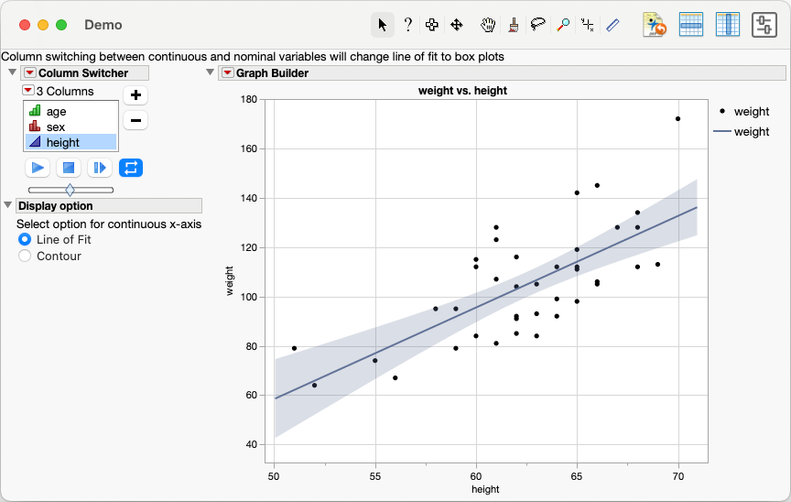
This recipe shows how to change the element type in Graph Builder dynamically, depending on whether the user selects a continuous or categorical x-axis variable in the Column Switcher. Elements are the graph types that appears as icons at the top of the Graph Builder palette. For continuous inputs, a radio button is added letting the user select between a Line of Fit and Contour. This recipe is useful when creating interactive charts for people who are not JMP experts and only need a limited number of options.
Ingredients:
- Graph Builder
- Expression Handling
Sample Data Table – Big Class
Difficulty – Hard
Steps
- Start with Names Default to Here(1) and open Big Class.
Names Default To Here( 1 );
dt = Open( "$SAMPLE_DATA/Big Class.jmp" );
- Create a function which sends a message to the Graph Builder platform that removes the existing element then adds a new one. It assumes that the Points element is already displayed and is element number 1, therefore the element to be removed is number 2.
// This function changes the type of chart being displayed.
// It takes a reference to a Graph Builder report (gbr) and the chart type required (gr)
// At the moment it assumes the Points element will always be included
changeElement = function( {gbr, gr},
{default local},
Eval(
Substitute(
Expr(
gbr << remove element( 1, 1, 2 ) << add element( 1, 1, {Type( __aa__ ), X, Y} )
), Expr( __aa__ ), gr
)
)
);
- Create the new window which contains the column switcher (cs) to change the x-axis, a radio box (rb) to control the element type for continuous variables, and the Graph Builder (gb).
rb_out = "Line of Fit";
win1 = New Window( "Demo",
Text Box(
"Column switching between continuous and nominal variables will change line of fit to box plots",
<<set wrap( 1000 )
),
H List Box(
V List Box(
cs = dt << column switcher( :height, {:age, :sex, :height} ),
Outline Box( "Display option",
Text Box( "Select option for continuous x-axis" ),
rb = Radio Box(
{"Line of Fit", "Contour"},
rb_out = rb << get selected();
if( Column( dt, cs << get current ) << get modeling type == "Continuous",
changeElement( Report( gb )[GraphBuilderBox( 1 )], rb_out )
)
)
)
),
gb = dt << Graph Builder(
Size( 534, 454 ),
Show Control Panel( 0 ),
Variables( X( :height ), Y( :weight ) ),
Elements( Points( X, Y, Legend( 3 ) ), Line Of Fit( X, Y, Legend( 5 ) ) )
)
)
);
The column switcher is deliberately created outside the Graph Builder so we can later create a function to take action when the switcher changes.
- Link the column switcher cs to the Graph Builder gb
cs << link platform( gb );
- Create a Column Switch Handler. The function post is called by the handler once the change has been completed. The format comes directly from the Scripting Index.
post = Function( {previousColumn, currentColumn, switcher},
gbr = Report( gb )[GraphBuilderBox( 1 )];
If( Column( dt, cs << get current ) << get modeling type == "Continuous",
changeElement( gbr, rb_out ),
changeElement( gbr, "Box Plot" )
);
);
cs << Make Column Switch Handler( 1, post );
Note that nothing needs to happen before the switch is completed, so the first argument of Make Column Switch Handler does nothing.
- Finally, start the column switcher running for demo purposes.
cs << run();
Potential variation:
- Create a "pre" change function which iterates over the existing elements in the Graph Builder (using << Get Elements), finds the one that needs to be removed and programmatically sets the third argument in << remove element (rather than relying on it being the second element).