- JMP will suspend normal business operations for our Winter Holiday beginning on Wednesday, Dec. 24, 2025, at 5:00 p.m. ET (2:00 p.m. ET for JMP Accounts Receivable).
Regular business hours will resume at 9:00 a.m. EST on Friday, Jan. 2, 2026. - We’re retiring the File Exchange at the end of this year. The JMP Marketplace is now your destination for add-ins and extensions.
JMPer Cable
A technical blog for JMP users of all levels, full of how-to's, tips and tricks, and detailed information on JMP features- JMP User Community
- :
- Blogs
- :
- JMPer Cable
- :
- New Features in JMP Live 17
- Subscribe to RSS Feed
- Mark as New
- Mark as Read
- Bookmark
- Subscribe
- Printer Friendly Page
- Report Inappropriate Content


 Community Manager
JMP Live 17 integrates even more seamlessly into your analytic workflow by giving you more insight into your data and greater control over how you organize your content. I asked JMP Live Product Manager Dieter Pisot (@dieter_pisot) and JMP Live Principal Software Developer Aurora Tiffany-Davis (@Aurora_TiffanyD) to tell us more about their top favorite new features in JMP Live 17.
Here are the top four:
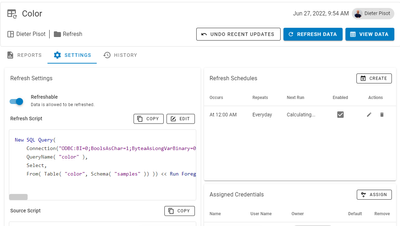
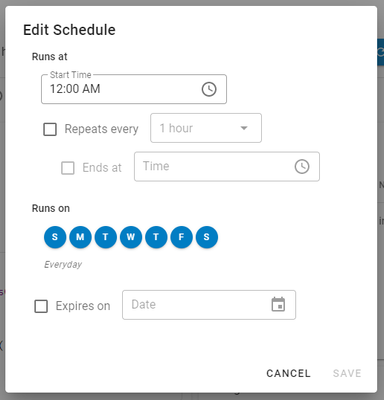
- Data Refresh and Scheduling. Report publishers are now able to refresh their report data directly from JMP Live, and they have an easy way to schedule the refresh of their data within JMP Live.
- Data Focus
- JMP Live Spaces
- Nested Folders and Groups
Data Refresh and Scheduling
What problems do the changes solve for our users?
- Site administrators do not need to install JMP PV on a separate server just to run refresh scripts
- There is no need to use and learn the Windows Task Scheduler.
What are the impacts this can make on users’ work and on organizations?
- Everything can now be managed in one place – JMP Live.
- Users will not need to learn Windows Task scheduler or ask their IT department to set up tasks for them.
Here is an example:
Data Focus
What changed?
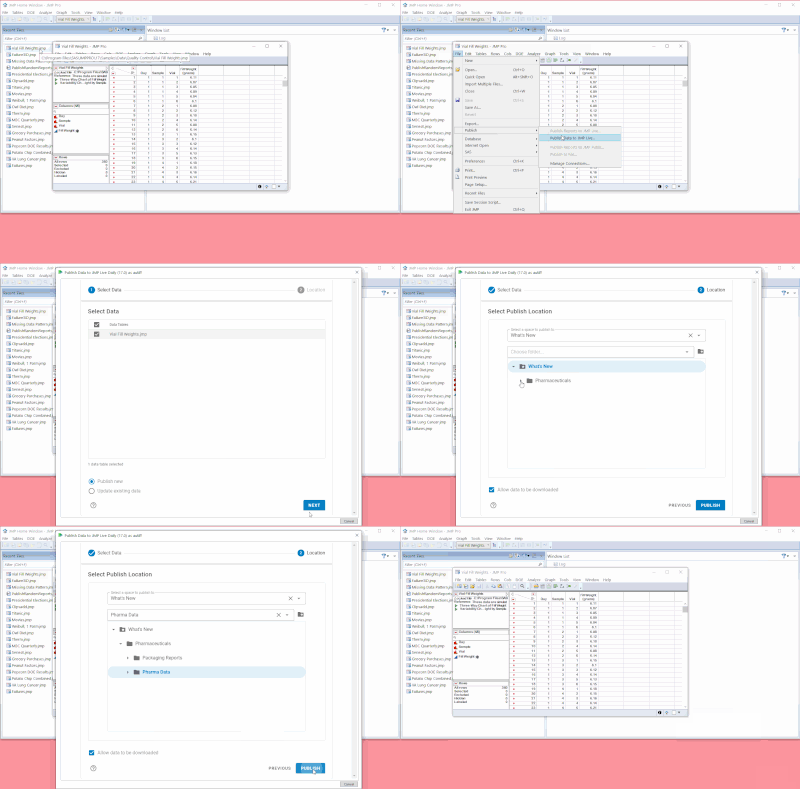
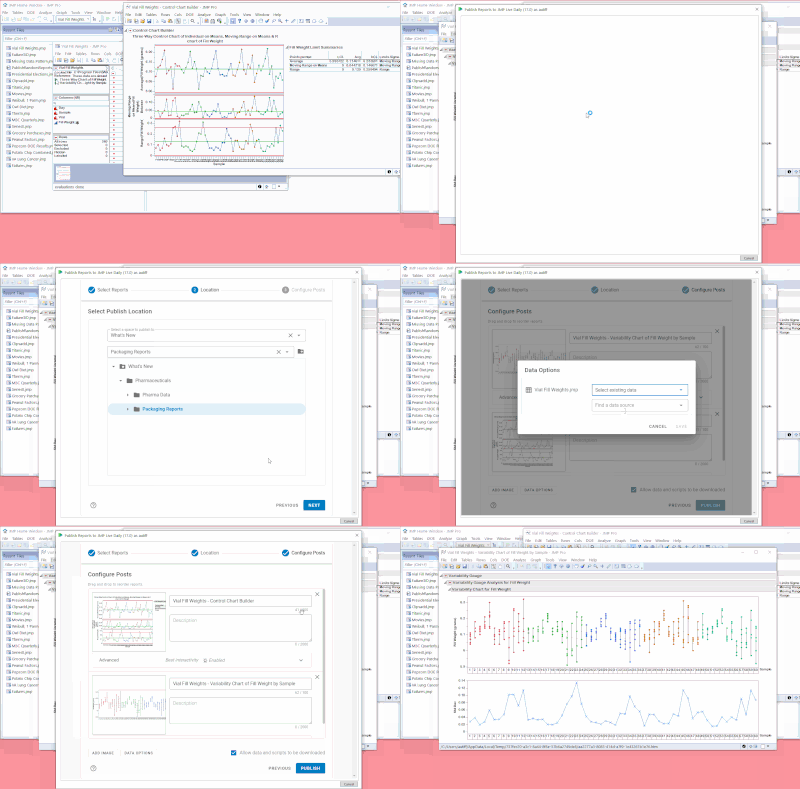
Data has been elevated to a "first-class citizen." A JMP user can publish data directly to JMP Live (without a report). A JMP user can publish a report that uses existing JMP Live data; the report and the data do not have to be in the same folder. Also, a JMP user can preview data in JMP Live before downloading it.
What problems does the change solve for our users?
New options give JMP users more flexibility in what and where they can publish.
Examples of how it might work
Publishing data directly to JMP Live (without a report)
Publishing a report which uses existing JMP Live data
Previewing data in JMP Live before downloading it
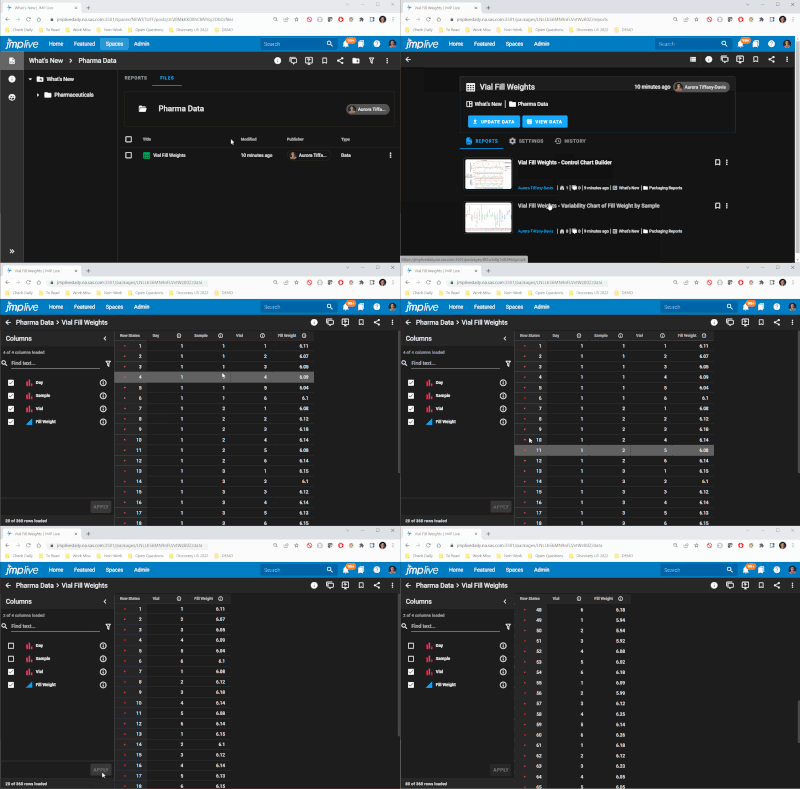
What are the impacts this can make on users’ work and on organizations?
The new publish options in JMP Live 17 support a workflow in which some users produce data, other users produce reports analyzing that data, and still other users get to use and communicate about those reports. Of course, if there are users who want to produce and use data and reports, that is still possible.
What do you think will surprise or delight users about this?
Users will see that data has been elevated to a "first-class citizen" that users can publish directly, preview, bookmark, comment and collaborate on, reference in new reports, etc. I think this will delight data nerds!
JMP Live Spaces
What changed?
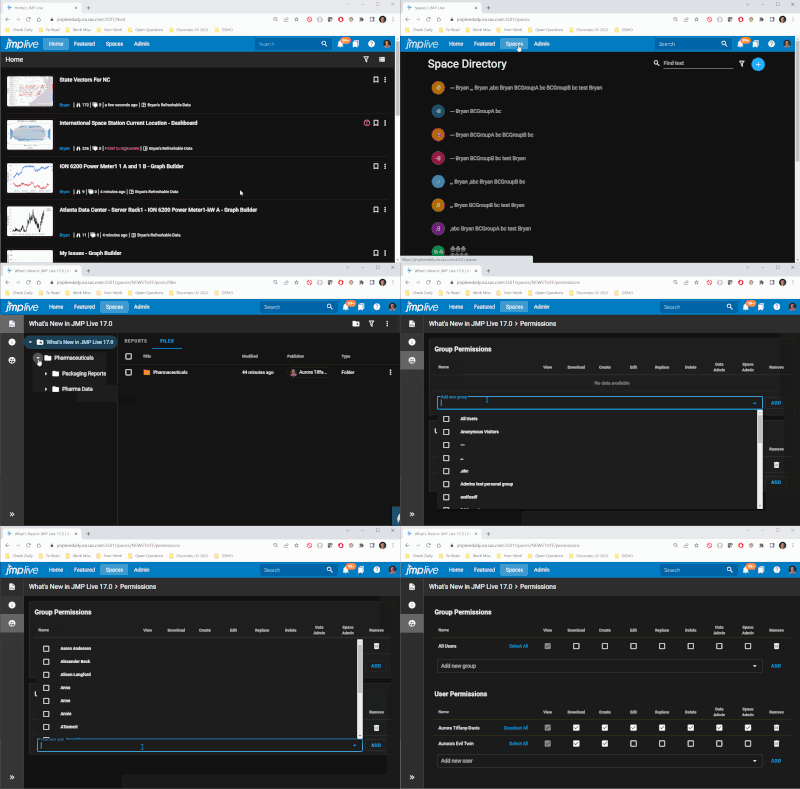
Data and reports are published to spaces. A "space" is just a place to put related content. Users with admin rights create spaces and decide who has access to the data and reports in them. Some spaces will be set up for existing JMP Live users automatically during the migration to 17.0.
What problems does the change solve for our users?
Previously, a JMP user needed to decide, each time they published a report, which users and groups the report would be shared with. There wasn't an easy way to give users extra collaboration privileges (like editing or updating their colleague's reports). The "space" concept takes some of the load off of the JMP user who publishes content. And it opens up new possibilities for collaboration.
What are the impacts this can make on users’ work and on organizations?
- The new JMP Live "spaces" define who can access (publish / edit / delete / etc.) JMP Live reports and data. Here are the highlights:
- The publisher has less work to do.
- The admin has more work to do but can delegate that work to other users.
- The admin has more ability to fine-tune access.
What do you think will surprise or delight users about this?
Users who publish to JMP Live may be pleased to simply select a location and not have to think about exactly who the content should be shared with. Users may be delighted to have more collaboration opportunities—to edit, replace, or grant access to a space.
Nested Folders and Groups
What changed?
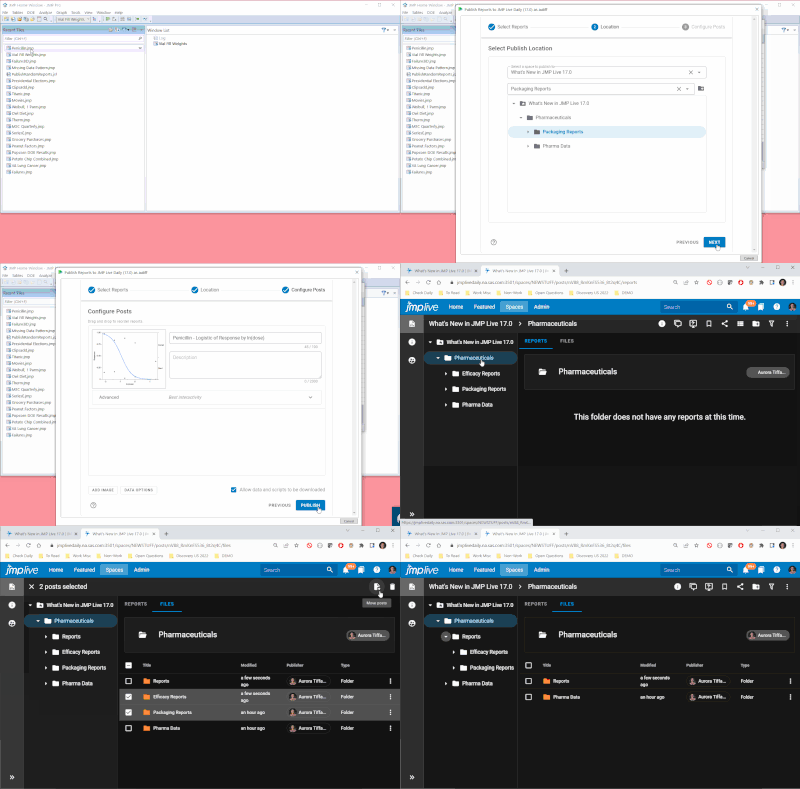
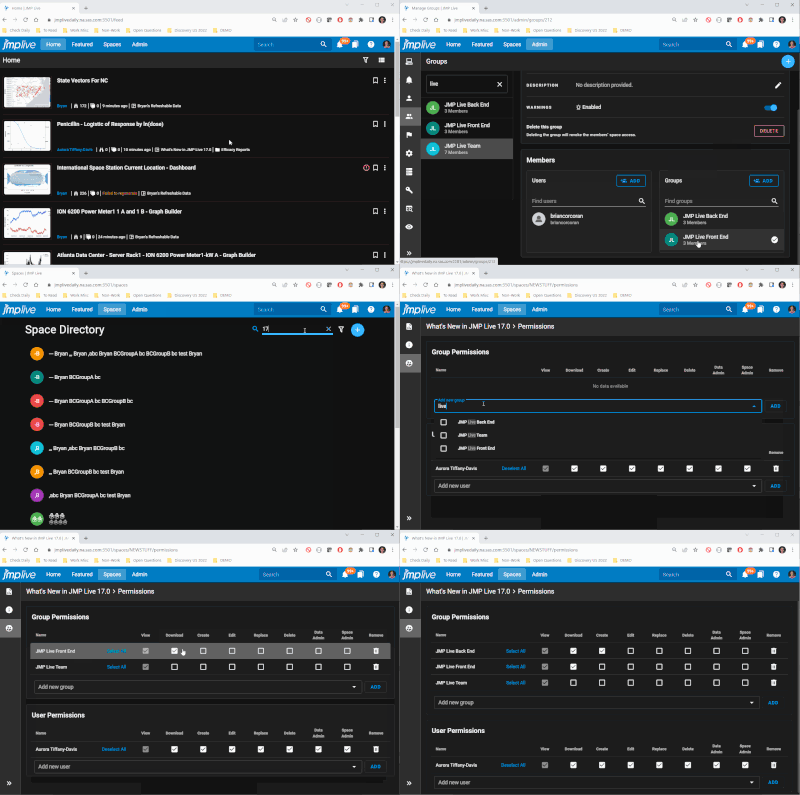
Users can now establish folders within folders. Admins can now establish user groups within user groups.
What problems does the change solve for our users?
Previously, both folders and groups were one level only. This might not have been the best match for an organization's content and teams.
An example of how nested folders might work
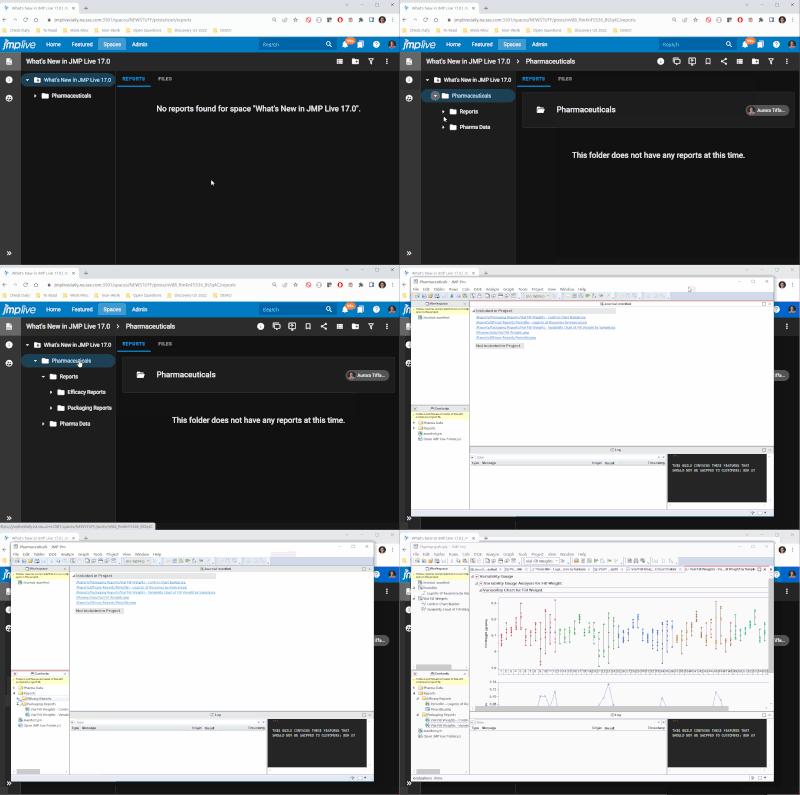
An example of how nested groups might work
What are the impacts this can make on users’ work and on organizations?
- JMP users who publish to JMP Live have more control over folder structure, and they can create a structure that allows JMP Live users browsing for interesting reports or data to find related content more easily. JMP Live users can also download just one report, just one folder with related content, or a higher-level folder with lots of content. The folder structure is then mirrored in the downloaded JMP Project.
- Users with admin rights can create a user group structure in JMP Live that represents the actual user groups in the organization, such as "Engineering" --> "Quality Engineering" --> "Widget Production Team." Individual users or groups at any level of the hierarchy can have customized access to a space, such as when all engineers need to be able to view reports but only quality engineers need to be able to edit them.
What do you think will surprise or delight users about this?
The "Open In JMP" option for reports and nested folders will delight users. First, it's faster than "Download as JMP Project" (which is still available). Second, the JMP Live folder structure is mirrored in the JMP Project, which helps the user better understand how the reports and data are related.
- © 2025 JMP Statistical Discovery LLC. All Rights Reserved.
- Terms of Use
- Privacy Statement
- Contact Us
You must be a registered user to add a comment. If you've already registered, sign in. Otherwise, register and sign in.