cancel
Showing results for 
Show  only  | Search instead for 
Did you mean: 

JMPer Cable

A technical blog for JMP users of all levels, full of how-to's, tips and tricks, and detailed information on JMP features
%3CLINGO-SUB%20id%3D%22lingo-sub-42917%22%20slang%3D%22en-US%22%20mode%3D%22NONE%22%20mode%3D%22NONE%22%20mode%3D%22NONE%22%3EHow%20to%20make%20a%20bar%20chart%20in%20JMP%3C%2FLINGO-SUB%3E%3CLINGO-BODY%20id%3D%22lingo-body-42917%22%20slang%3D%22en-US%22%20mode%3D%22NONE%22%20mode%3D%22NONE%22%20mode%3D%22NONE%22%3E%3CP%3EHere's%20an%20animated%20GIF%20showing%20how%20to%20make%20a%20basic%20bar%20chart%20in%20%3CA%20href%3D%22https%3A%2F%2Fwww.jmp.com%2Fen_us%2Fsoftware%2Fdata-analysis-software.html%3Futm_campaign%3Daw%26amp%3Butm_source%3Dbl%26amp%3Butm_medium%3Dreferral%22%20target%3D%22_self%22%20rel%3D%22noopener%20noreferrer%22%3EJMP%3C%2FA%3E%20with%20some%20minor%20customizations.%3CBR%20%2F%3E%3CBR%20%2F%3E%3C%2FP%3E%0A%3CP%3E%3CSPAN%20class%3D%22lia-inline-image-display-wrapper%20lia-image-align-center%22%20image-alt%3D%22BarChart.gif%22%20style%3D%22width%3A%20700px%3B%22%3E%3CSPAN%20class%3D%22lia-inline-image-display-wrapper%22%20image-alt%3D%22BarChart.gif%22%20style%3D%22width%3A%20700px%3B%22%3E%3CSPAN%20class%3D%22lia-inline-image-display-wrapper%22%20image-alt%3D%22BarChart.gif%22%20style%3D%22width%3A%20700px%3B%22%3E%3CSPAN%20class%3D%22lia-inline-image-display-wrapper%22%20image-alt%3D%22BarChart.gif%22%20style%3D%22width%3A%20700px%3B%22%3E%3Cspan%20class%3D%22lia-inline-image-display-wrapper%22%20image-alt%3D%22BarChart.gif%22%20style%3D%22width%3A%20700px%3B%22%3E%3Cimg%20src%3D%22https%3A%2F%2Fcommunity.jmp.com%2Ft5%2Fimage%2Fserverpage%2Fimage-id%2F7098iA59E5C6F16F3C8BA%2Fimage-dimensions%2F700x425%3Fv%3Dv2%22%20width%3D%22700%22%20height%3D%22425%22%20role%3D%22button%22%20title%3D%22BarChart.gif%22%20alt%3D%22BarChart.gif%22%20%2F%3E%3C%2Fspan%3E%3C%2FSPAN%3E%3C%2FSPAN%3E%3C%2FSPAN%3E%3C%2FSPAN%3E%3C%2FP%3E%0A%3CP%3E%26nbsp%3B%3C%2FP%3E%0A%3CP%3E%26nbsp%3B%3C%2FP%3E%0A%3CP%3E%3CSTRONG%3ESteps%3A%3C%2FSTRONG%3E%3C%2FP%3E%0A%3COL%3E%0A%3CLI%3EOpen%20Graph%20Builder.%3C%2FLI%3E%0A%3CLI%3EDrag%20category%20variable%20(Type)%20to%20the%20X%20axis.%3C%2FLI%3E%0A%3CLI%3ESwitch%20element%20type%20from%20Points%20to%20Bar%2C%20producing%20a%20bar%20chart%20by%20count.%3C%2FLI%3E%0A%3CLI%3EDrag%20a%20measure%20variable%20(Horsepower)%20to%20the%20Y%20axis.%3C%2FLI%3E%0A%3CLI%3EChange%20summary%20statistic%20as%20desired.%3C%2FLI%3E%0A%3CLI%3EAdd%20label%20if%20desired.%3C%2FLI%3E%0A%3CLI%3EClick%20Done%2C%20closing%20the%20control%20panel.%3C%2FLI%3E%0A%3CLI%3ERight-click%20on%20legend%20to%20change%20color%20as%20desired.%3C%2FLI%3E%0A%3C%2FOL%3E%3C%2FLINGO-BODY%3E%3CLINGO-TEASER%20id%3D%22lingo-teaser-42917%22%20slang%3D%22en-US%22%3E%3CP%3E%26nbsp%3B%3C%2FP%3E%0A%3CP%3E%3CSPAN%20class%3D%22lia-inline-image-display-wrapper%20lia-image-align-center%22%20image-alt%3D%22BarChartFinal.png%22%20style%3D%22width%3A%20400px%3B%22%3E%3CSPAN%20class%3D%22lia-inline-image-display-wrapper%22%20image-alt%3D%22BarChartFinal.png%22%20style%3D%22width%3A%20400px%3B%22%3E%3CSPAN%20class%3D%22lia-inline-image-display-wrapper%22%20image-alt%3D%22BarChartFinal.png%22%20style%3D%22width%3A%20400px%3B%22%3E%3CSPAN%20class%3D%22lia-inline-image-display-wrapper%22%20image-alt%3D%22BarChartFinal.png%22%20style%3D%22width%3A%20400px%3B%22%3E%3Cspan%20class%3D%22lia-inline-image-display-wrapper%22%20image-alt%3D%22BarChartFinal.png%22%20style%3D%22width%3A%20400px%3B%22%3E%3Cimg%20src%3D%22https%3A%2F%2Fcommunity.jmp.com%2Ft5%2Fimage%2Fserverpage%2Fimage-id%2F7099i3847F8964B4ED353%2Fimage-size%2Fmedium%3Fv%3Dv2%26amp%3Bpx%3D400%22%20role%3D%22button%22%20title%3D%22BarChartFinal.png%22%20alt%3D%22BarChartFinal.png%22%20%2F%3E%3C%2Fspan%3E%3C%2FSPAN%3E%3C%2FSPAN%3E%3C%2FSPAN%3E%3C%2FSPAN%3E%3C%2FP%3E%0A%3CP%3E%26nbsp%3B%3C%2FP%3E%0A%3CP%3E%3CSPAN%3ESee%26nbsp%3Ban%20animated%20GIF%20showing%20how%20to%20make%20a%20basic%20bar%20chart%20in%20JMP%20with%20some%20minor%20customizations.%3C%2FSPAN%3E%3C%2FP%3E%0A%3CP%3E%26nbsp%3B%3C%2FP%3E%3C%2FLINGO-TEASER%3E
Choose Language Hide Translation Bar
XanGregg
Staff
How to make a bar chart in JMP

Here's an animated GIF showing how to make a basic bar chart in JMP with some minor customizations.
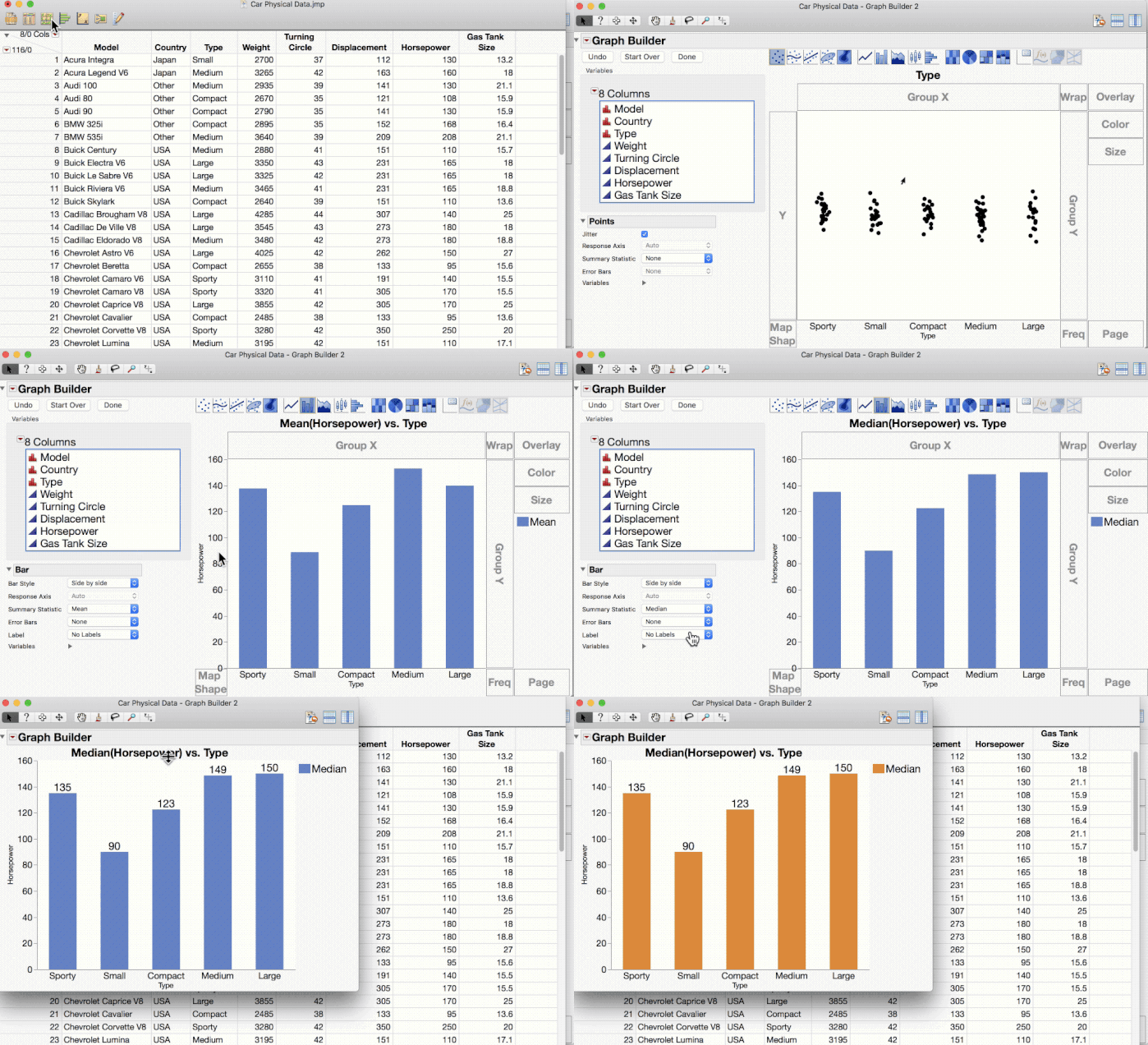
BarChart.gif


Steps:

  1. Open Graph Builder.
  2. Drag category variable (Type) to the X axis.
  3. Switch element type from Points to Bar, producing a bar chart by count.
  4. Drag a measure variable (Horsepower) to the Y axis.
  5. Change summary statistic as desired.
  6. Add label if desired.
  7. Click Done, closing the control panel.
  8. Right-click on legend to change color as desired.
Last Modified: Sep 5, 2017 10:33 AM