cancel
Showing results for 
Show  only  | Search instead for 
Did you mean: 
  • Sign-in to the JMP Community will be unavailable intermittently Dec. 6-7 due to a system update. Thank you for your understanding!
  • We’re retiring the File Exchange at the end of this year. The JMP Marketplace is now your destination for add-ins and extensions.
  • JMP 19 is here! Learn more about the new features.

JMP Wish List

We want to hear your ideas for improving JMP. Share them here.
Choose Language Hide Translation Bar

the most important DataView? NON-excluded rows!

☐ cool new feature
☑ could help many users!

☐ removes a „bug“

☐ nice to have

☐ nobody needs it


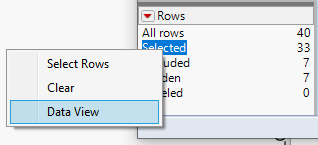
The rows summary table on the bottom left of a table is very useful to get DataViews (subsets) for selected rows, excluded rows and so on.
The Data View 


Unfortuntely, in my daily work it's much more often that I need a subset of non-excluded rows than of excluded rows.
So, I go:

1)HolgerSp_1-1665845167027.png
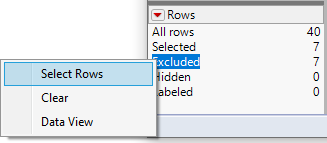
 

2) HolgerSp_4-1665845387249.png


3) 

hogi_2-1666128990005.png


my wish: an additional entry for non-excluded rows,
like this
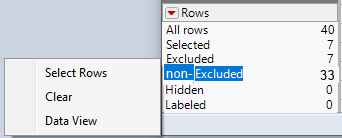
HolgerSp_5-1665845822500.png

and by this: the opportunity to generate a DataView for non-excluded rows.


Additional benefit:

One can directly see the number of actually used (= non-excluded) rows and doesn't have to calculate it (all rows - excluded)


more wishes submitted by  hogi_2-1702196401638.png

10 Comments
Status changed to: Acknowledged

@hogi - Thank you for your suggestion! We have captured your request and will take it under consideration.

SamGardner
Level VII
Status changed to: Investigating
 
SamGardner
Level VII

I have been think about this one for a while, and on my short holiday I decided to work on a scripted approach to do this.  

We are looking into this, however, to make this easier to. 

SamGardner_0-1671042490068.png


 Here is my script:

/***************************************************
SCRIPT NAME:  Row Selector Viewer

AUTHOR(s):
Sam Gardner, JMP Statistical Discovery LLC

JMP VERSION:  
Built with JMP 17.0 and tested with JMP 16.2

PURPOSE: 
To allow the user to be able to easily subset and see rows that are selected or excluded or hidden, OR unselected or unexcluded or unhidden

SPECIFICATION:
Views of the desired subset of the current data table are created using linked subsets and data box views within a report window.  Upon selecting an option, an invisible linked
subset of the desired rows to view is created, and then a new data view in a  data box is displayed in the scripted report window.

USAGE: 
Must be run with a data table open.
Upon running, choose the subset of the rows to view by selecting the check boxes.  Note that this current version
only allows subsetting based in Selected/Excluded/Hidden or Unselected/Unexcluded/Unhidden

ASSUMPTIONS: None.

SCRIPT REVISION HISTORY:

VERSION	DATE		DESCRIPTION
1.0		2022 Dec 14	First Version

NOTES:
N/A

TO DO:
N/A

FUTURE IMPROVEMENT IDEAS:
None at this time.
***************************************************/

Names Default To Here( 1 );

dt = Current Data Table();

// function definitions

/*
// Loc Inverse Function
// This function converts a vector of positive integers (locvals) into an
// indicator vector of a specified length, n,  with the values
// v[I] = 1 if I is in locvals, and 0 otherwise
// example
//      Loc Inverse(6, [1,3])
// returns
//      [1, 0, 1, 0, 0, 0]
*/

Loc Inverse = Function( {n, locvals},
	v = J( n, 1, 0 );
	v[locvals] = 1;
	v;
);
Loc Inverse( 6, [1, 3] );
/*
// this gets the indicators of selected rows in the data table
LocInverse( N Rows( dt ), dt << Get Selected Rows );
// this gets the indicators of the excluded rows in the data table
Loc Inverse( N Rows( dt ), dt << GetExcludedRows );
// this gets the indicators of the hidden rows in the data table
Loc Inverse( N Rows( dt ), dt << GetHiddenRows );
*/

nw = New Window( "Row Selector Viewer",
	<<On Close(
		Try(
			Close( dt_sub, nosave );
			Clear Symbols( dt_sub );
		)
	),
	vb = H List Box(
		V List Box(
			Text Box(
				"You can choose option from either the left or right set of check boxes.  If no options are selected then the entire table is shown.",
				<<Set Wrap( 200 )
			),
			pbleft = Panel Box( "Choose Rows",
				H List Box(
					cbleft = Check Box(
						{"Selected", "Excluded", "Hidden"},
						Print( cbleft << get selected );
						Print( cbleft << get selected indices );
            	
						viewchoice = cbleft << get selected;
						RowstoView = J( N Rows( dt ), 1, 0 );
						If( N Items( viewchoice ) > 0,
							For( i = 1, i <= N Items( viewchoice ), i++,
								RowstoView = RowstoView | Match( viewchoice[i],
									"Selected",
										cbright << Set All( 0, run script( 0 ) );
										Loc Inverse( N Rows( dt ), dt << Get Selected Rows );,
									"Excluded",
										cbright << Set All( 0, run script( 0 ) );
										Loc Inverse( N Rows( dt ), dt << Get Excluded Rows );,
									"Hidden",
										cbright << Set All( 0, run script( 0 ) );
										Loc Inverse( N Rows( dt ), dt << Get Hidden Rows );
								)
							);
							RowstoView = Loc( RowstoView );
							Print( RowstoView );
						,
							RowstoView = 1 :: N Rows( dt );
							Print( RowstoView );
						);
						If( !Is Empty( dt_sub ),
							Close( dt_sub, nosave );
							Clear Symbols( dt_sub );
						);
						selectedrows = dt << get selected rows;
						dt << clear select;
						dt << select rows( RowstoView );
					
						dt_sub = dt << Subset( Output Table( "Data View" ), Selected Rows( 1 ), Selected Columns Only( 0 ), Linked, Private );
						dt << clear select;
						dt << select rows( selectedrows );
						pbright << Append( dt_sub << new data box() );
            	
					),
					cbright = Check Box(
						{"Unselected", "Unexcluded", "Unhidden"},
						viewchoice = cbright << get selected;
						RowstoView = J( N Rows( dt ), 1, 1 );
						If( N Items( viewchoice ) > 0,
							For( i = 1, i <= N Items( viewchoice ), i++,
								RowstoView = RowstoView & Match( viewchoice[i],
									"Unselected",
										cbleft << Set All( 0, run script( 0 ) );
										!(Loc Inverse( N Rows( dt ), dt << Get Selected Rows ));,
									"Unexcluded",
										cbleft << Set All( 0, run script( 0 ) );
										!(Loc Inverse( N Rows( dt ), dt << Get Excluded Rows ));,
									"Unhidden",
										cbleft << Set All( 0, run script( 0 ) );
										!(Loc Inverse( N Rows( dt ), dt << Get Hidden Rows ));
								)
							);
							RowstoView = Loc( RowstoView );
							Print( RowstoView );
						,
							RowstoView = 1 :: N Rows( dt );
							Print( RowstoView );
						);
						If( !Is Empty( dt_sub ),
							Close( dt_sub, nosave );
							Clear Symbols( dt_sub );
						);
						selectedrows = dt << get selected rows;
						dt << clear select;
						dt << select rows( RowstoView );
						dt_sub = dt << Subset( Output Table( "Data View" ), Selected Rows( 1 ), Selected Columns Only( 0 ), Linked, Private );
						dt << clear select;
						dt << select rows( selectedrows );
						pbright << Append( dt_sub << new data box() );
					)
				)
			),
			Button Box( "Close Viewer", nw << close window )
		),
		pbright = Panel Box( "Data View", )
	)
);

dt_sub = dt << Subset( All Rows, Selected Columns Only, Linked, Private );
pbright << Append( dt_sub << new data box() );


hogi
Level XIII

I found this in the outbox - don't know if I posted it somewhere else?


In the same context - please also allow the user to  send

dt << Get nonExcluded Rows();

to a data table:
https://community.jmp.com/t5/Discussions/col-lt-lt-get-values-for-non-excluded-rows/m-p/556579/highl... 


fastes single-line command for this important piece of code is ~ factor 10 slower:

allRows = dt << get rows where( Excluded() == 0 );


And first asking for the non-excluded rows and then "inverting" the list adds ~ 30% to the time budget


hogi
Level XIII

@SamGardner.

Thank you for the code - really nice menus.
should definitely go to the Subset menu of Jmp 18 :)

We could ask @julian if he wants to add it to the Dynamic subset Add-In as well :)


Concerning my post here, I actually thought about something much tinier - just to add an option for the non-excluded rows to the menu on the lower left of a data table.

To be honest, I am already so used to selecting the excluded rows and then to invert the selection - I would say that such a feature comes would come too late for me.

But as many of my posts - the wishes are not mainly for myself, but more for my co-workers ... and all the other users in the community :)


hogi_0-1671056214547.png


hogi
Level XIII

With the introduction of QuickSelect Toolbar  it got a bit easier: 

hogi_0-1671641024953.png


The click count reduced from 

- select excluded rows (2 clicks)

- invert selection (rows - row selection - invert row selection = 3 clicks)

- data view for selected rows (2 clicks)

➜ 7 clicks 


to 

- select excluded rows (2 clicks)

- invert (1 click)

- data view for selected rows (2 clicks) with the new Quickselect Toolbar: 1 click
5 4 clicks


Outlook:

with non-excluded added to the menu on the bottom left, it will be 2 clicks :)

hogi_1-1671641079863.png

hogi
Level XIII

Hm, how about:

- don't add "non-Excluded" to the overview table

- but add Select non-excluded to the right click contect menu of Excluded
hogi_0-1673358375025.png

are there users who use the hidden functionality?

then add a similar option to select non-hidden rows


hogi
Level XIII
hogi
Level XIII

@Sarah-Sylvestre 
with all these options available, from my point of view the topic can be closed.


There are other much more important entries in the wish list.


Status changed to: Archived

Thank you for the update @hogi