cancel
Showing results for 
Show  only  | Search instead for 
Did you mean: 
  • Learn how to build custom Python data connectors and further customize JMP’s Data Connector Framework with the Python Data Connector Demo, available now in the JMP Marketplace!
  • See how to create experiments to support product design and ID useful product features. Register for June 12 webinar, 2pm US Eastern Time.

JMP Wish List

We want to hear your ideas for improving JMP. Share them here.
Choose Language Hide Translation Bar

functionality to cut the connection between a linked table and the main table

https://community.jmp.com/t5/Discussions/linked-data-table-how-to-cut-the-quot-link-quot/m-p/573180#...


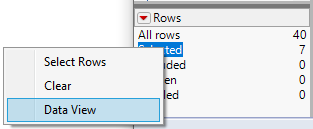
Summary Tables and Subsets have an option to "link" the new table to the original data table.

"Data views" have such a link enabled by default.
hogi_0-1669301883143.png


Cool:

Row Selections and changes to the values are automatically linked between the tables.


But sometimes one needs to remove such a link 
- to add additional rows to the main table

- edit entries in the columns which were used for summary grouping

- to rename columns of the linked table

...


my wish: 

remove the link via right click on 

hogi_1-1669301883132.png

and click on a command like "cut the link".


workarounds:

- generate a (100%) subset of the linked table and delete the linked table itself

- a Links cannot be saved, so, one can save the tables, close both tables and open the "linked" table again - without the link.


more wishes submitted by  hogi_2-1702196401638.png

9 Comments
Status changed to: Acknowledged

Hi @hogi, thank you for your suggestion! We have captured your request and will take it under consideration.

mia_stephens
Staff
Status changed to: Investigating
 
hogi
Level XIII

Another application for an easily accessible function to cut the link between data tables:

If plots are exported as Interactive HTML files, they get significantly larger if they are linked to another table,
see this comment by @John_Powell_JMP 

https://community.jmp.com/t5/Discussions/interactive-HTML-file-size/m-p/596368/highlight/true#M80004 


Cutting the link can reduce the file size from several MB to 1.5MB (minimum size due to interactive HTML overhead?).


hogi
Level XIII

Another application:

  • pre-select a subset of a data table and click on data view to get a short overview (definitely the fastest way to get it :)
  • ah, there are 2 more rows which I don't need, just mark them and delete the rows
    ARGH !! - there is a protection shield due to the link to the original data table.
    hogi_0-1675408529668.png


hogi
Level XIII

definitely the fastest way to get it

not anymore :)

QuickSelect Toolbar is twice *) as fast:

hogi_0-1726771168293.png

*) by thumb -  1 click instead of 2 clicks

under real condition, the gap is even larger
1 click -> no mouse movement between 2 clicks


Status changed to: Acknowledged
 
hogi
Level XIII

Thanks. Will help ...

BHarris
Level VII

Bumping this, my team and I spent some time today scratching our heads trying to break the link and couldn’t find a way other than save-as/close/reopen, which is both tedious and surprising.

hogi
Level XIII

yes, no good idea to keep such obvious bugs in a Software for years!

sure, there are workarounds like save/close or Subsets - but for every new JMP user such bugs are significant issues - blocking the workflow.
This approach competes now with AI driven data analysis!
Wish list - new Label: user experience