☑ cool new feature
☑ could help many users!
☑ removes something that feels like a „bug“
☐ nice to have
☐ nobody needs it
What inspired this wish list request?
At the moment, it is not possible to use a specific marker in Graph Builder
There are 2 options in JMP which can be used to assign markers:
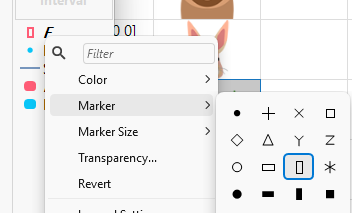
1) manually assign a marker via the legend in Graph Builder:
2) Row States: this settings allows the user to override the marker setting for specific rows:
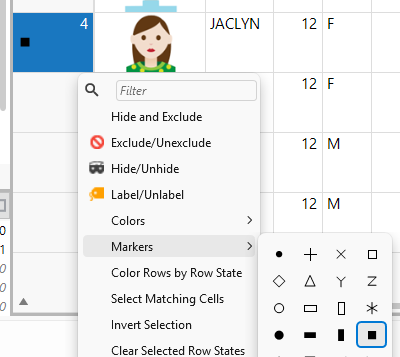
On the other hand, this setting is overruled by marker settings via the legend.
Actually there is a 3rd option to tune the marker settings: via preferences, one can choose a default marker setting
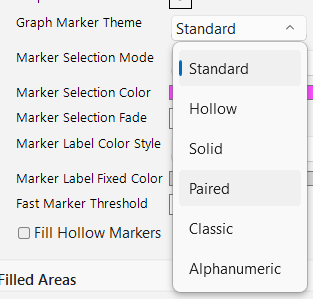
Surprisingly:
With all these options, there is no possibility available yet in JMP to control the marker settings for a specific plot like:
"In this plot I want to use Hollow markers".
Sure, the above 3 options can be used as a workaround to achieve the task - with more or less effort (just imagine there are 75 entries in the legend - and each of them has to be changed individually to prevent collateral effects on other subplots!)
... and with more or less collateral damage to other plots:
1) if the user accidentally selects a legend entry before assigning a new marker state, the new marker will be assigned to all selected entries:

So, if you assigned the new marker to 73 entries in the legend, be sure that you don't select an entry when assigning the marker to entry & # 74, 75 !!!)
2) For row states and preferences the collateral impacts on other plots is even more severe.
What is the improvement you would like to see?
Please provide a framework that allows a consistent marker control in Graph Builder.
Something like
Elements( Position( 1, 1 ), Points( X, Y, Color( 1 ), Marker Graph Theme("Hollow") ) )
to pick a specific marker set for a plot.
and
Elements( Position( 1, 1 ), Points( X, Y, Color( 1 ), Marker("circle") ) )
to assign the same Marker to all items in a plot.
Another way to interpret "consistent marker control" is proposed in this wish:new Column Property: Value Markers
It suggests a column property to get a consistent link between column entries and the assigned markers.
It could be used as an alternative to the functionality proposed in this wish.
Why is this idea important?
JMP lacks consistent marker control.
other wishes from 