キャンセル
次の結果を表示 
表示  限定  | 次の代わりに検索 
もしかして: 

JMP Wish List

We want to hear your ideas for improving JMP. Share them here.
言語を選択 翻訳バーを非表示

Specification of where to find Units in Excel Import Wizard (Units are in row: ... )

For Excel tables like shown in the attached jpg I would like to be able to specify in the Excel Import Wizard "Units are in row 2" (similar to how it works with "Column headers start on row 1").

Those imported Units would then be stored in the respective Column Properties.


The same would be possible for Limits, e.g. "Lower Limits are in row 3", "Targets are in row 4", "Upper Limits are in row 5".

Being able to access Limits stored in a separate worksheet of the same Excel file would be even more comfortable.


For Units another scenario would be to specify that Units are stored in brackets [ ] or parentheses ( ) at the end of the column header.
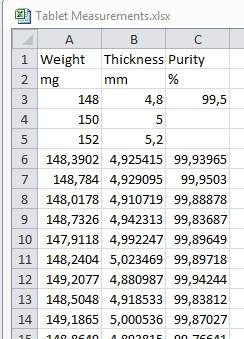
 

Excelsheet.jpg


2件のコメント
DianeG
Level I

Yes please!!!!


Scientist, most of my templates are in excel so my techs can fill them out, then I import that data into JMP.

The measurement unit can be really important, if you measure the same thing in two different units  - but if adding it in manually remains this tedious, it'll be forgotten quite often when I import - with possible consequences afterwards when I wonder what the original unit was

変更されたステータス: Acknowledged

Hi @gerd, thank you for your suggestion! We have captured your request and will take it under consideration.