キャンセル
次の結果を表示 
表示  限定  | 次の代わりに検索 
もしかして: 

JMP Wish List

We want to hear your ideas for improving JMP. Share them here.
言語を選択 翻訳バーを非表示
0 件の賞賛

Enable Paste Special (Ctrl-Alt-V hot key) Functionality

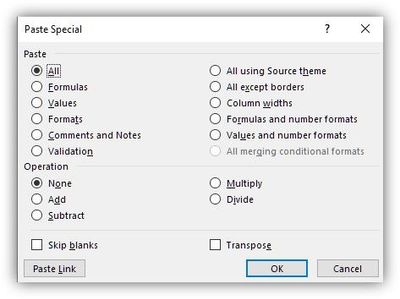
I have JMP 16. Please enable Paste Special (Ctrl-Alt-V hot key) options in JMP, similarly to Excel. The latter has a very rich dialog window reproduced below. Include check box Do not change data type of receiving columns and convert incompatible data type entries to ‘missing values’ ( • ). This check box will act similarly to changing column properties in JMP: if there are non-numerical entries in some rows of columns the user wants to make Continuous, they will become missing values.
ansouk_0-1658502610561.jpeg


5件のコメント
SamGardner
Level VII
変更されたステータス: Needs Info

@ansouk could you describe situations where this functionality would be needed, or perhaps provide us with some example data that illustrates the problem? 

@ansouk have you been able to consider this and provide more information?

ansouk
Level III

Here's a real reoccurring situation. When I try to add more rows to an existing jmp table by copying and pasting from an Excel table with many columns and rows, if JMP detects an incompatible data type in the Windows clipboard, say a human-entered string "NoData", "no file", "N/A" etc. in a column that is supposed to have continuous data type, it refuses to paste anything. Instead, I would like JMP to give me an option to replace non-conforming data in the clipboard with missing values during such pasting. JMP already does this when changing a column data type, but there's no easy way to force the data type of the receiving column onto the data being pasted.

変更されたステータス: Investigating

@ansouk - Thank you for the additional information, that is really helpful! We are now further looking into this request and discussing with development for possible inclusion in a future release.  

変更されたステータス: Acknowledged