cancel
Showing results for 
Show  only  | Search instead for 
Did you mean: 
  • Learn how to build custom Python data connectors and further customize JMP’s Data Connector Framework with the Python Data Connector Demo, available now in the JMP Marketplace!
  • See how to create experiments to support product design and ID useful product features. Register for June 12 webinar, 2pm US Eastern Time.

JMP Wish List

We want to hear your ideas for improving JMP. Share them here.
Choose Language Hide Translation Bar

Drag-and-drop Value Ordering in Graph Builder

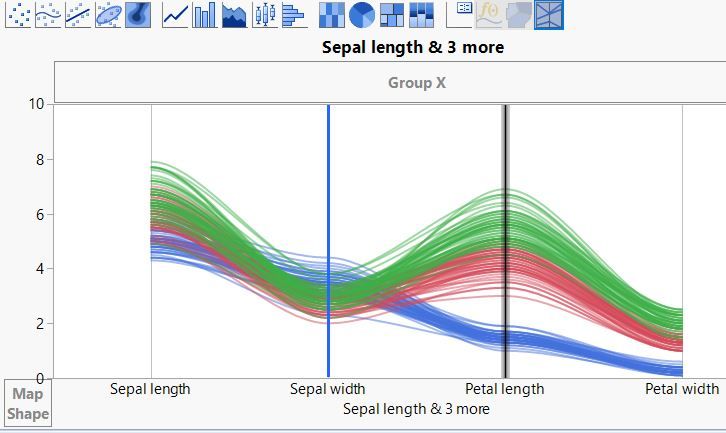
Similar to how the ordering of variables can be changed per drag-and-drop in the Parallel Plot in Graph Builder (see below), I think it would be great if the ordering of categories of nominal/ordinal variables could be changed per drag-and-drop in Graph Builder Elements that support a categorical axis.


I find it happens a lot that the default alphabetical value ordering is not what one is looking for in a given case and one needs to change it.


After dragging-and-dropping the categories in the desired positions, on a right-click one should then be able to say "Save to Column Property -> Value Ordering", similar to how this works for axis settings that are saved as a Column Property.


Parallel Plot: Per drag-and-drop the positions of Sepal width and Petal length are changed:
ParallelPlot VarDragDrop.JPG

2 Comments
Jeff_Perkinson
Community Manager
Status changed to: Delivered

In JMP 16 a click and hold on a categorical axis in Graph Builder will enter an edit mode where you can drag and drop to reorder the values. A right click on the axis now has a Save to Column Property option that will save the Value Order property.

hogi
Level XIII

wow, very helpful : )
This is exactly along the interactive spirit of JMP!


thanks for implementing it !