- JMP Statement Regarding Critical PHP Remote Code Execution Vulnerabilities (CVE-2026-109618, CVE-2026-109619)
- Don’t miss your chance to experience Discovery Summit Europe at our best available rate! Early bird registration through 31 Oct.
- Graph Builder Toolbar streamlines interactive graphing. Creates shortcuts on Report and GraphBuilder Helpers toolbars. Download and install the extension.
- Subscribe to RSS Feed
- Mark Topic as New
- Mark Topic as Read
- Float this Topic for Current User
- Bookmark
- Subscribe
- Mute
- Printer Friendly Page
JMP Scripters Club Discussions
- User Community
- :
- JMP Scripters Club
- :
- Discussions
- :
- Scripters Club Recordings: Drawing Graphical Elements


- Mark as New
- Bookmark
- Subscribe
- Mute
- Subscribe to RSS Feed
- Get Direct Link
- Report Inappropriate Content
Scripters Club Recordings: Drawing Graphical Elements
Topic: Drawing Graphical Elements
Presenters: @thickey1 and @jthi
Video 1:
Most of these different graphical objects/functions can be found in the scripting index under category Graphics:
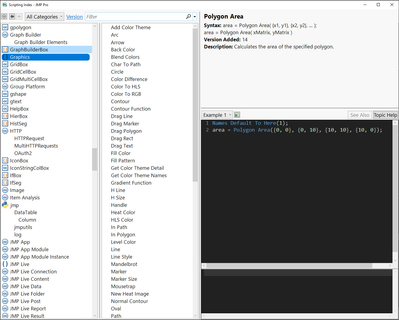
- Graphics Functions (jmp.com)
- And scripting guide Scripting Graphs (jmp.com)
GraphBox will return a reference to DisplayBox[OwnerBox] and FrameBox is somewhere under that
Names Default To Here(1);

New Window("Box Plot Seg Example",
	g = Graph Box(
		Frame Size(40, 180),
		Y Scale(0, 5),
		Box Plot Seg([1, 2, 3, 4])
	)
);
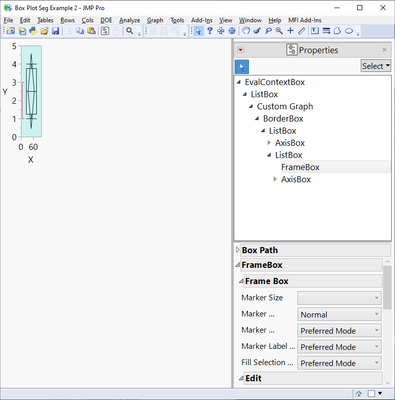
You can also use Custom Maps to display the real coordinates. All the different methods do have their pros and cons.
Video 2:
- Tags:
- jmp


- Mark as New
- Bookmark
- Subscribe
- Mute
- Subscribe to RSS Feed
- Get Direct Link
- Report Inappropriate Content
Re: Scripters Club Recordings: Drawing Graphical Elements
My material attached

- Mark as New
- Bookmark
- Subscribe
- Mute
- Subscribe to RSS Feed
- Get Direct Link
- Report Inappropriate Content
Re: Scripters Club Recordings: Drawing Graphical Elements
Are the scripts and tables working? I can't download. Thanks
- Mark as New
- Bookmark
- Subscribe
- Mute
- Subscribe to RSS Feed
- Get Direct Link
- Report Inappropriate Content
Re: Scripters Club Recordings: Drawing Graphical Elements
I managed to download them fine

Did you press 

- Mark as New
- Bookmark
- Subscribe
- Mute
- Subscribe to RSS Feed
- Get Direct Link
- Report Inappropriate Content
Re: Scripters Club Recordings: Drawing Graphical Elements
To automate the Seg creation for complicated graphs with multiple frameboxes, is there something like this Frame Box () which will simplify
Eval(
	Eval Expr(
		Report( obj )[FrameBox( 1 )] <<
		Add Graphics Script(
			p = Expr(Report( obj )[FrameBox( 1 )]);
			mysegs = p << Find Segs( );
)))
to
Report( obj )[FrameBox( 1 )] <<
Add Graphics Script( mysegs = this frame box() << Find Segs() )
- Mark as New
- Bookmark
- Subscribe
- Mute
- Subscribe to RSS Feed
- Get Direct Link
- Report Inappropriate Content
Re: Scripters Club Recordings: Drawing Graphical Elements
seems to be already available as a wish: New message to framebox, Add Graphic Function() or add possibility to use function inside add graphi...
- © 2026 JMP Statistical Discovery LLC. All Rights Reserved.
- Terms of Use
- Privacy Statement
- Contact Us