cancel
Showing results for 
Show  only  | Search instead for 
Did you mean: 
  • JMP will suspend normal business operations for our Winter Holiday beginning on Wednesday, Dec. 24, 2025, at 5:00 p.m. ET (2:00 p.m. ET for JMP Accounts Receivable).
    Regular business hours will resume at 9:00 a.m. EST on Friday, Jan. 2, 2026.
  • We’re retiring the File Exchange at the end of this year. The JMP Marketplace is now your destination for add-ins and extensions.

Discussions

Solve problems, and share tips and tricks with other JMP users.
%3CLINGO-SUB%20id%3D%22lingo-sub-10548%22%20slang%3D%22en-US%22%20mode%3D%22NONE%22%3Emapa%20de%20oblea%3C%2FLINGO-SUB%3E%3CLINGO-BODY%20id%3D%22lingo-body-10548%22%20slang%3D%22en-US%22%20mode%3D%22NONE%22%3E%26lt%3Bmeta%20http-equiv%3D%22Content-Type%22%20content%3D%22text%2Fhtml%3B%20charset%3DUTF-8%22%20%2F%26gt%3B%3CP%3EQuiero%20saber%20c%C3%B3mo%20hacer%20un%20mapa%20de%20obleas%20con%20JMP.%3C%2FP%3E%3C%2FLINGO-BODY%3E%3CLINGO-SUB%20id%3D%22lingo-sub-59058%22%20slang%3D%22en-US%22%20mode%3D%22NONE%22%3ERe%3A%20mapa%20de%20oblea%3C%2FLINGO-SUB%3E%3CLINGO-BODY%20id%3D%22lingo-body-59058%22%20slang%3D%22en-US%22%20mode%3D%22NONE%22%3E%3CP%3EUtilice%20el%20kit%20de%20herramientas%20de%20semiconductores%3A%3CA%20href%3D%22https%3A%2F%2Fcommunity.jmp.com%2Ft5%2FJMP-Add-Ins%2FSemiconductor-Toolkit%2Fta-p%2F22460%22%20target%3D%22_blank%22%3E%20https%3A%2F%2Fcommunity.jmp.com%2Ft5%2FJMP-Add-Ins%2FSemiconductor-Toolkit%2Fta-p%2F22460%3C%2FA%3E%3C%2FP%3E%0A%3CP%3E%26nbsp%3B%3C%2FP%3E%0A%3CP%3EMETRO%3C%2FP%3E%3C%2FLINGO-BODY%3E%3CLINGO-SUB%20id%3D%22lingo-sub-59053%22%20slang%3D%22en-US%22%20mode%3D%22NONE%22%3ERe%3A%20mapa%20de%20oblea%3C%2FLINGO-SUB%3E%3CLINGO-BODY%20id%3D%22lingo-body-59053%22%20slang%3D%22en-US%22%20mode%3D%22NONE%22%3E%3CP%3EHola%20murphy%2C%3C%2FP%3E%3CP%3E%C2%BFTienes%20un%20c%C3%B3digo%20de%20ejemplo%20de%20lo%20que%20mencionas%3F%3C%2FP%3E%3CP%3EGracias%3C%2FP%3E%3C%2FLINGO-BODY%3E%3CLINGO-SUB%20id%3D%22lingo-sub-41407%22%20slang%3D%22en-US%22%20mode%3D%22NONE%22%3ERe%3A%20mapa%20de%20oblea%3C%2FLINGO-SUB%3E%3CLINGO-BODY%20id%3D%22lingo-body-41407%22%20slang%3D%22en-US%22%20mode%3D%22NONE%22%3E%3CP%3ESimplemente%20puede%20utilizar%20el%20generador%20de%20gr%C3%A1ficos%20para%20crear%20mapas%20de%20obleas.%3C%2FP%3E%3CP%3Euse%20N%20niveles%20de%20vista%20(4)%2C%20primer%20nivel%20de%20vista%20(1)%20para%20organizar%20en%20columnas%20y%20filas%3C%2FP%3E%3CP%3Eluego%20agregue%20todas%20las%20vistas%20una%20por%20una.%3C%2FP%3E%3CP%3E%3CSPAN%3EN%20niveles%20de%20vista%20(4)%2C%20primer%20nivel%20de%20vista%20(2)%3C%2FSPAN%3E%3C%2FP%3E%3CP%3E%26nbsp%3B%3C%2FP%3E%3C%2FLINGO-BODY%3E%3CLINGO-SUB%20id%3D%22lingo-sub-10553%22%20slang%3D%22en-US%22%20mode%3D%22NONE%22%3ERe%3A%20mapa%20de%20oblea%3C%2FLINGO-SUB%3E%3CLINGO-BODY%20id%3D%22lingo-body-10553%22%20slang%3D%22en-US%22%20mode%3D%22NONE%22%3E%3CP%3ENormalmente%20uso%20Graph%20Builder%20para%20hacer%20esto.%3C%2FP%3E%3CP%3E%3C%2FP%3E%3CP%3ERealmente%20depende%20del%20tipo%20de%20datos%20que%20busques.%20Por%20ejemplo%2C%20suelo%20utilizar%20esto%20para%20comprobar%20los%20resultados%20de%20mis%20pruebas%20de%20oblea%20(Chip%20Probe%2C%20SORT).%3C%2FP%3E%3CP%3E%3C%2FP%3E%3CP%3E1.%20Coloque%20X-Loc%20en%20el%20eje%20X%3C%2FP%3E%3CP%3E2.%20Coloque%20Y-Loc%20en%20el%20eje%20Y%3C%2FP%3E%3CP%3E3.%20Coloque%20el%20Hardbin%20para%20superponer%3C%2FP%3E%3CP%3E%3C%2FP%3E%3CP%3EY%20puedes%20ver%20toda%20la%20oblea%20por%20su%20contenedor%20r%C3%ADgido.%3C%2FP%3E%3CP%3E%3C%2FP%3E%3CP%3E%3CSPAN%20class%3D%22lia-inline-image-display-wrapper%20lia-image-align-inline%22%20image-alt%3D%2211750_jmp_graph_builder.JPG%22%20style%3D%22width%3A%201291px%3B%22%3E%3CSPAN%20class%3D%22lia-inline-image-display-wrapper%22%20image-alt%3D%2211750_jmp_graph_builder.JPG%22%20style%3D%22width%3A%20400px%3B%22%3E%3Cspan%20class%3D%22lia-inline-image-display-wrapper%22%20image-alt%3D%2211750_jmp_graph_builder.JPG%22%20style%3D%22width%3A%20400px%3B%22%3E%3Cimg%20src%3D%22https%3A%2F%2Fcommunity.jmp.com%2Ft5%2Fimage%2Fserverpage%2Fimage-id%2F3203iF4D360F0935D076D%2Fimage-size%2Fmedium%3Fv%3Dv2%26amp%3Bpx%3D400%22%20role%3D%22button%22%20title%3D%2211750_jmp_graph_builder.JPG%22%20alt%3D%2211750_jmp_graph_builder.JPG%22%20%2F%3E%3C%2Fspan%3E%3C%2FSPAN%3E%3C%2FSPAN%3E%3C%2FP%3E%3C%2FLINGO-BODY%3E%3CLINGO-SUB%20id%3D%22lingo-sub-10552%22%20slang%3D%22en-US%22%20mode%3D%22NONE%22%3ERe%3A%20mapa%20de%20oblea%3C%2FLINGO-SUB%3E%3CLINGO-BODY%20id%3D%22lingo-body-10552%22%20slang%3D%22en-US%22%20mode%3D%22NONE%22%3E%3CP%3EPara%20mapas%20Bin%3A%20trazado%20X%2FY%20con%20Graph%20Builder.%20Usando%20la%20identificaci%C3%B3n%20de%20oblea%20y%20la%20funci%C3%B3n%20de%20envoltura%2C%20todas%20las%20obleas%20de%20un%20lote%20se%20pueden%20mostrar%20juntas.%3C%2FP%3E%3CP%3EPara%20mapas%20param%C3%A9tricos%3A%20Graph%20Builder%20(igual%20que%20arriba)%3B%20Dibujo%20de%20contorno.%3C%2FP%3E%3CP%3E%3CBR%20%2F%3E%3C%2FP%3E%3C%2FLINGO-BODY%3E%3CLINGO-SUB%20id%3D%22lingo-sub-10551%22%20slang%3D%22en-US%22%20mode%3D%22NONE%22%3ERe%3A%20mapa%20de%20oblea%3C%2FLINGO-SUB%3E%3CLINGO-BODY%20id%3D%22lingo-body-10551%22%20slang%3D%22en-US%22%20mode%3D%22NONE%22%3E%3CP%3ECreo%20que%20la%20respuesta%20depende%20del%20tipo%20de%20mapa%20de%20oblea%20que%20est%C3%A9s%20buscando.El%20script%20que%20vincul%C3%B3%20Ian%40JMP%20parece%20ser%20una%20buena%20opci%C3%B3n%20para%20mapas%20de%20obleas%20param%C3%A9tricos.%3C%2FP%3E%3CP%3E%3C%2FP%3E%3CP%3ESi%20est%C3%A1%20buscando%20crear%20un%20mapa%20de%20obleas%20de%20clasificaci%C3%B3n%20de%20contenedores%2C%20entonces%20la%20plataforma%20integrada%20que%20me%20parece%20m%C3%A1s%20%C3%BAtil%20es%20Bubble%20Plot.Algunos%20consejos%20al%20utilizar%20Bubble%20Plot%20para%20crear%20mapas%20de%20obleas%3A%3C%2FP%3E%3CP%3E%3C%2FP%3E%3CUL%3E%3CLI%3ECambie%20la%20forma%20a%20cuadrada%20para%20una%20apariencia%20m%C3%A1s%20parecida%20a%20un%20troquel.%3C%2FLI%3E%3CLI%3EUtilice%20Propiedades%20de%20columna%20para%20establecer%20propiedades%20est%C3%A1ndar%3A%3CUL%3E%3CLI%3EOrientaci%C3%B3n%20X%2FY%20con%20ordenaci%C3%B3n%20de%20valores%3C%2FLI%3E%3CLI%3EColores%20de%20contenedor%20con%20colores%20de%20valor%3C%2FLI%3E%3C%2FUL%3E%3C%2FLI%3E%3CLI%3ELa%20etiqueta%20es%20cualquier%20clasificaci%C3%B3n%20que%20desee%20mostrar%2C%20como%20un%20n%C3%BAmero%20de%20contenedor.%3C%2FLI%3E%3C%2FUL%3E%3CP%3E%3C%2FP%3E%3CP%3ETambi%C3%A9n%20logr%C3%A9%20crear%20algunos%20interesantes%2C%20lo%20que%20denomin%C3%A9%2C%20mapas%20de%20hipercalor.Al%20crear%20mapas%20personalizados%20para%20representar%20estructuras%20secundarias%2C%20puede%20usar%20Graph%20Builder%20para%20crear%20mapas%20de%20oblea%20dispuestos%20XY%20de%20estos%20mapas%20de%20calor%2C%20es%20decir%2C%20un%20mapa%20de%20hipercalor.Para%20SOC%20complejos%2C%20esta%20puede%20ser%20una%20t%C3%A9cnica%20de%20visualizaci%C3%B3n%20poderosa.%3C%2FP%3E%3CP%3E%3C%2FP%3E%3CP%3EY%2C%20como%20siempre%2C%20casi%20todo%20es%20posible%20utilizando%20scripts%20JSL%20personalizados.%3C%2FP%3E%3C%2FLINGO-BODY%3E%3CLINGO-SUB%20id%3D%22lingo-sub-10550%22%20slang%3D%22en-US%22%20mode%3D%22NONE%22%3ERe%3A%20mapa%20de%20oblea%3C%2FLINGO-SUB%3E%3CLINGO-BODY%20id%3D%22lingo-body-10550%22%20slang%3D%22en-US%22%20mode%3D%22NONE%22%3E%3CP%3EHe%20puesto%20un%20c%C3%B3digo%20antiguo%20en%3A%3C%2FP%3E%3CP%3E%3C%2FP%3E%3CP%3E%3CA%20_jive_internal%3D%22true%22%20href%3D%22https%3A%2F%2Fcommunity.jmp.com%2Fdocs%2FDOC-7137%22%20target%3D%22_blank%22%3Ehttps%3A%2F%2Fcommunity.jmp.com%2Fdocs%2FDOC-7137%3C%2FA%3E%3C%2FP%3E%3CP%3E%3C%2FP%3E%3CP%3EPuede%20que%20valga%20la%20pena%20echarle%20un%20vistazo.%20Hay%20muchas%20alternativas%2C%20especialmente%20si%20est%C3%A1%20preparado%20para%20utilizar%20JSL.%3C%2FP%3E%3C%2FLINGO-BODY%3E%3CLINGO-SUB%20id%3D%22lingo-sub-10549%22%20slang%3D%22en-US%22%20mode%3D%22NONE%22%3ERe%3A%20mapa%20de%20oblea%3C%2FLINGO-SUB%3E%3CLINGO-BODY%20id%3D%22lingo-body-10549%22%20slang%3D%22en-US%22%20mode%3D%22NONE%22%3E%3CP%3EUtilice%20el%20gr%C3%A1fico%20XY%3C%2FP%3E%3C%2FLINGO-BODY%3E
Choose Language Hide Translation Bar
n1401115788
Level I

wafer map

I  want to konw how to make wafer map with JMP.

1 ACCEPTED SOLUTION

Accepted Solutions
feihoong
Level I

Re: wafer map

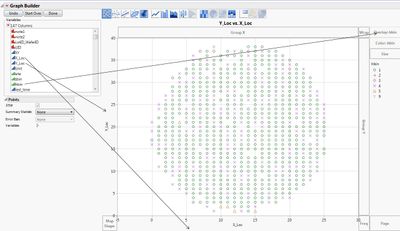
I normally use Graph Builder to do this.

It really depends on what type of data you looking for. For example, i often use this to check my Wafer testing (Chip Probe , SORT) hard bin results.

1. Put X-Loc to X-axis

2. Put Y-Loc to Y-axis

3. Put the Hardbin to Overlay

And you can see the whole wafer by its hardbin.
11750_jmp_graph_builder.JPG

View solution in original post

8 REPLIES 8
hellind
Level II

Re: wafer map

Use the X-Y plot

ian_jmp
Level X

Re: wafer map

I have put some old code at:

https://community.jmp.com/docs/DOC-7137

that may be worth a look. There are many alternatives, particularly if you are prepared to use JSL.

rmurphy
Level II

Re: wafer map

I think the answer depends on what type of wafer map you're looking for.  The script that Ian@JMP linked seems to be a good option for parametric wafer maps.

If you're looking to build a bin classification wafer map, then the built-in platform that I've found to be most useful is Bubble Plot.  A few tips when using Bubble Plot to make wafer maps:

  • Change shape to square for a more "die-like" appearance
  • Use Column Properties to set standard properties:
    • X/Y orientation with Value Ordering
    • Bin Colors with Value Colors
  • Label is whatever classification you want to show, such as a bin number

I've also managed to create some interesting - what I've termed - Hyper-heat maps.  By creating custom maps to represent sub-die structures, you can then use Graph Builder to make X-Y arranged wafer maps of these heat maps, i.e. a hyper-heat map.  For complex SOCs, this can be a powerful visualization technique.

And, as always, nearly anything is possible using custom-built JSL scripts.

jy8
jy8
Level II

Re: wafer map

For Bin maps : X/Y plot with Graph Builder. Using wafer id and the wrap function, all wafers from a lot can be displayed together.

For parametric maps : Graph Builder (same as above); Contour Plot.


samir
Level IV

Re: wafer map

Hi Murphy,

Do you have an example code of what you mention ?

Thanks

feihoong
Level I

Re: wafer map

I normally use Graph Builder to do this.

It really depends on what type of data you looking for. For example, i often use this to check my Wafer testing (Chip Probe , SORT) hard bin results.

1. Put X-Loc to X-axis

2. Put Y-Loc to Y-axis

3. Put the Hardbin to Overlay

And you can see the whole wafer by its hardbin.

11750_jmp_graph_builder.JPG

ram
ram
Level IV

Re: wafer map

You can simply use graph builder to make wafer maps.

use N View Levels( 4 ),First View Level( 1 ) to arrange in columns and rows

then append all views one by one.

N View Levels( 4 ),First View Level( 2 )

 

Re: wafer map

Recommended Articles