- Don’t miss your chance to experience Discovery Summit Europe at our best available rate! Early bird registration through 31 Oct.
- Graph Builder Toolbar streamlines interactive graphing. Creates shortcuts on Report and GraphBuilder Helpers toolbars. Download and install the extension.
- Subscribe to RSS Feed
- Mark Topic as New
- Mark Topic as Read
- Float this Topic for Current User
- Bookmark
- Subscribe
- Mute
- Printer Friendly Page
Discussions
Solve problems, and share tips and tricks with other JMP users.- User Community
- :
- Discussions
- :
- Re: titles of control charts change to standard after saving and reopening

- Mark as New
- Bookmark
- Subscribe
- Mute
- Subscribe to RSS Feed
- Get Direct Link
- Report Inappropriate Content
titles of control charts change to standard after saving and reopening
Hello everyone,
The control charts I use look like this (I use the german language):
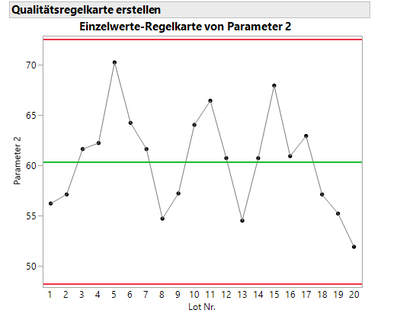
But I like to keep the titles short so "Einzelwerte-Regelkarte von Parameter 2" I changed into "Parameter 2".
Now when I save this control chart to my data table and open it again it comes up as before with that full title.
Does anyone have an idea of how to prevent that?
The hing is that I like to include more control chart into a dashboard, but then the dashboard will also open with full standard title and that makes it difficult to setup the right size of each control chart in the dashboard.
Then I need to resize each control chart within the dashboard and of course shorten the titles before.
As software I am using JMP 16.0, maybe 16.1 is better but the IT has not yet installed it on my PC.
Thanks for your help
Jan
Accepted Solutions


- Mark as New
- Bookmark
- Subscribe
- Mute
- Subscribe to RSS Feed
- Get Direct Link
- Report Inappropriate Content
Re: titles of control charts change to standard after saving and reopening
I quickly tested this with Semiconductor Capability example dataset. It seems like there is an issue when you use the exactly same name as the column has (at least in JMP15.2.1).
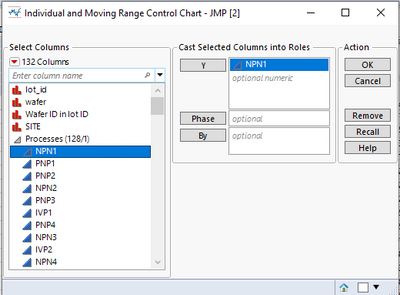
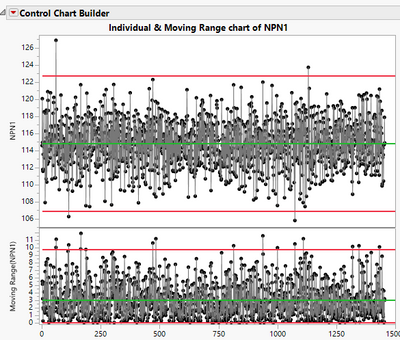
Modify title to NPN1
Script saved to data table:
Control Chart Builder(
	Show Control Panel(0),
	Variables(Y(:NPN1)),
	Chart(Position(1)),
	SendToReport(
		Dispatch({}, "graph display 1 title", TextEditBox, {Set Text("NPN1")})
	)
)
Result of table script:
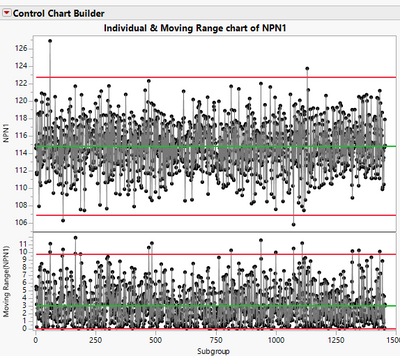
Now lets modify the title by adding space before the NPN1 and save the script to data table:
Control Chart Builder(
	Show Control Panel(0),
	Variables(Y(:NPN1)),
	Chart(Position(1)),
	SendToReport(
		Dispatch({}, "graph display 1 title", TextEditBox, {Set Text(" NPN1")})
	)
)
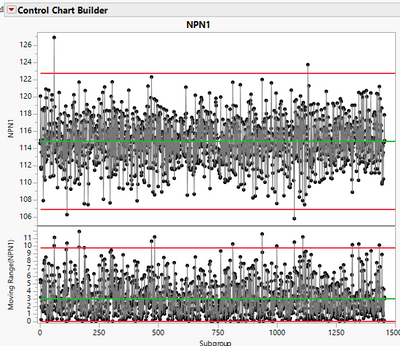
And running the script:
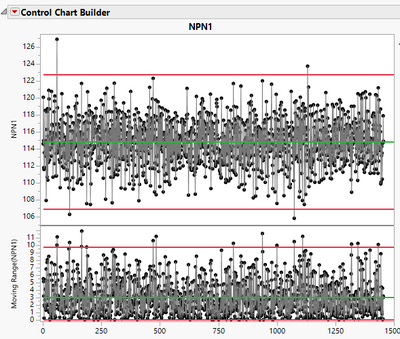
No sure why this happens, but maybe modifying the titles a bit will help at least until this is changed. Maybe add something that will directly indicate what type of control chart you have like "IMR of Parameter 2"

- Mark as New
- Bookmark
- Subscribe
- Mute
- Subscribe to RSS Feed
- Get Direct Link
- Report Inappropriate Content
Re: titles of control charts change to standard after saving and reopening
Jan, I'm not sure I have a solution for you, but the names and titles are a function of the column names you use in the data table. If you change the column names in your data table to the abbreviated names you will get this displayed on the control chart.
- Mark as New
- Bookmark
- Subscribe
- Mute
- Subscribe to RSS Feed
- Get Direct Link
- Report Inappropriate Content
Re: titles of control charts change to standard after saving and reopening
Hey there,
I tried that and change the name of Parameter 1 to P1. I saved the script to the data table and saved the file. Then opened the script for the control chart of P1 again and it worked. Only P1 was written above the graph. So I tried the same with Parameter 2 and it did not work. It always pops up again as "Individal chart of P2". So at least a change of column title does work but only for the title of the column, but for the title of the control chart it always come back to the "Individual chart of ..." The pity is that if I want to use a dashboard with lets say 8 Parameters for which I have saved the control charts I will always need to adjust the control charts inside the dashboard after opening the dashboard.
- Mark as New
- Bookmark
- Subscribe
- Mute
- Subscribe to RSS Feed
- Get Direct Link
- Report Inappropriate Content
Re: titles of control charts change to standard after saving and reopening
I quickly tested this with Semiconductor Capability example dataset. It seems like there is an issue when you use the exactly same name as the column has (at least in JMP15.2.1).
Modify title to NPN1
Script saved to data table:
Control Chart Builder(
	Show Control Panel(0),
	Variables(Y(:NPN1)),
	Chart(Position(1)),
	SendToReport(
		Dispatch({}, "graph display 1 title", TextEditBox, {Set Text("NPN1")})
	)
)
Result of table script:
Now lets modify the title by adding space before the NPN1 and save the script to data table:
Control Chart Builder(
	Show Control Panel(0),
	Variables(Y(:NPN1)),
	Chart(Position(1)),
	SendToReport(
		Dispatch({}, "graph display 1 title", TextEditBox, {Set Text(" NPN1")})
	)
)
And running the script:
No sure why this happens, but maybe modifying the titles a bit will help at least until this is changed. Maybe add something that will directly indicate what type of control chart you have like "IMR of Parameter 2"
- Mark as New
- Bookmark
- Subscribe
- Mute
- Subscribe to RSS Feed
- Get Direct Link
- Report Inappropriate Content
Re: titles of control charts change to standard after saving and reopening
Very nice! It works for me here too, so just adding a space does the job.
Thanks very much!
Recommended Articles
- © 2026 JMP Statistical Discovery LLC. All Rights Reserved.
- Terms of Use
- Privacy Statement
- Contact Us