- Don’t miss your chance to experience Discovery Summit Europe at our best available rate! Early bird registration through 31 Oct.
- Graph Builder Toolbar streamlines interactive graphing. Creates shortcuts on Report and GraphBuilder Helpers toolbars. Download and install the extension.
- Subscribe to RSS Feed
- Mark Topic as New
- Mark Topic as Read
- Float this Topic for Current User
- Bookmark
- Subscribe
- Mute
- Printer Friendly Page
Discussions
Solve problems, and share tips and tricks with other JMP users.- User Community
- :
- Discussions
- :
- Re: save script to data table

- Mark as New
- Bookmark
- Subscribe
- Mute
- Subscribe to RSS Feed
- Get Direct Link
- Report Inappropriate Content
save script to data table
I am familiar with the save script to data table command, but can I save a multipart script to one data table script?
For example:
my JSL script queries a database, then filters data, then creates a control chart. When I save the script to the data table, I can send Save Script to Data Table to the filter, and again for the control chart. This creates two table scripts respectively:
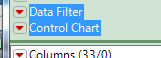
What I would like to do, is use JSL to create a single table script which does both actions, that way an end user can save off the data table and later return and just run 1 table script to generate the output (filter+control chart). I know how to manually create this (just edit one of the scripts and paste additional script portion into it), but I want the original script that is ran to do this.
thanks in advance!
Accepted Solutions


- Mark as New
- Bookmark
- Subscribe
- Mute
- Subscribe to RSS Feed
- Get Direct Link
- Report Inappropriate Content
Re: save script to data table
Here is a sample script on how I would approach creating a combined script. I move the scripts into literal strings, and then generate the New Script message in a combined literal string, and then execute the statement.
dt = open("$SAMPLE_DATA\Semiconductor Capability.jmp");
biv=Bivariate(invisible, Y( :NPN1 ), X( :PNP1 ), Fit Line( {Line Color( {213, 72, 87} )} ) );
myscript1=char(biv<<get script);
sct=Scatterplot Matrix(invisible,
Y( :NPN1, :PNP1, :PNP2, :NPN2 ),
Matrix Format( "Lower Triangular" ),
Ellipse Color( 3 ),
{},
"Scatterplot Matrix Options",
FrameBox,
{Frame Size( 51, 37 )}
);
myscript2=char(sct<<get script);
eval(parse("dt<<new script(\!"combined\!","|| myscript1||";"||myscript2||";);"));
- Mark as New
- Bookmark
- Subscribe
- Mute
- Subscribe to RSS Feed
- Get Direct Link
- Report Inappropriate Content
Re: save script to data table
Here is a sample script on how I would approach creating a combined script. I move the scripts into literal strings, and then generate the New Script message in a combined literal string, and then execute the statement.
dt = open("$SAMPLE_DATA\Semiconductor Capability.jmp");
biv=Bivariate(invisible, Y( :NPN1 ), X( :PNP1 ), Fit Line( {Line Color( {213, 72, 87} )} ) );
myscript1=char(biv<<get script);
sct=Scatterplot Matrix(invisible,
Y( :NPN1, :PNP1, :PNP2, :NPN2 ),
Matrix Format( "Lower Triangular" ),
Ellipse Color( 3 ),
{},
"Scatterplot Matrix Options",
FrameBox,
{Frame Size( 51, 37 )}
);
myscript2=char(sct<<get script);
eval(parse("dt<<new script(\!"combined\!","|| myscript1||";"||myscript2||";);"));
Recommended Articles
- © 2026 JMP Statistical Discovery LLC. All Rights Reserved.
- Terms of Use
- Privacy Statement
- Contact Us