- JMP will suspend normal business operations for our Winter Holiday beginning on Wednesday, Dec. 24, 2025, at 5:00 p.m. ET (2:00 p.m. ET for JMP Accounts Receivable).
Regular business hours will resume at 9:00 a.m. EST on Friday, Jan. 2, 2026. - We’re retiring the File Exchange at the end of this year. The JMP Marketplace is now your destination for add-ins and extensions.
- Subscribe to RSS Feed
- Mark Topic as New
- Mark Topic as Read
- Float this Topic for Current User
- Bookmark
- Subscribe
- Mute
- Printer Friendly Page
Discussions
Solve problems, and share tips and tricks with other JMP users.- JMP User Community
- :
- Discussions
- :
- refer to levels of variables

- Mark as New
- Bookmark
- Subscribe
- Mute
- Subscribe to RSS Feed
- Get Direct Link
- Report Inappropriate Content
refer to levels of variables
Dear Community
How do I perform a count of the levels of a variable?
In R i can type length(levels(x)).
example: the species of bacteria are levels of the variable "species"
best,
Accepted Solutions


- Mark as New
- Bookmark
- Subscribe
- Mute
- Subscribe to RSS Feed
- Get Direct Link
- Report Inappropriate Content
Re: refer to levels of variables
If you prefer an interactive solution, use Tables > Summary. Put the column you want as a Group variable and click OK. The number of rows in the resulting data table is the number of levels.
OR
Make the variable you want an ordinal or nominal variable. Use Analyze > Distribution.

- Mark as New
- Bookmark
- Subscribe
- Mute
- Subscribe to RSS Feed
- Get Direct Link
- Report Inappropriate Content
Re: refer to levels of variables
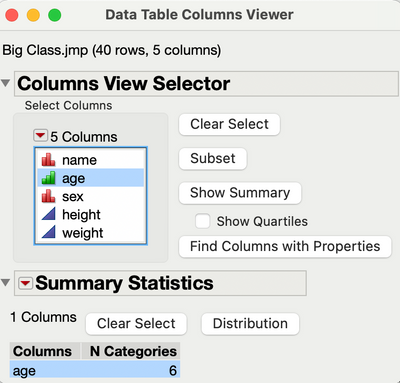
'Cols > Columns Viewer' gives this kind of output with 'Show Summary':


- Mark as New
- Bookmark
- Subscribe
- Mute
- Subscribe to RSS Feed
- Get Direct Link
- Report Inappropriate Content
Re: refer to levels of variables
If you want unique values in a list or table column here are some functions that will help. The first one is for a list:
/*
Function Name: get_unique_values
Description: Find the unique values in a list.  Uses an associative array
Arguments:
in_list		List to get unique values for
*/
Get_unique_values = Function( {in_list},
      {Default Local},
      tmp = [=> 0];
      Insert Into( tmp, in_list );
      tmp << get keys;
);
For a table column:
/* Function Name	Get_Unique_Values_col
Description:	Get the unique values for a column.  For example:

	Indications
	------------
	AAAAA
	BBBBB
	AAAAA
	CCCCC
	CCCCC

unique_list = get_unique_values_col (:Indications)

will return {"AAAAA", "BBBBB", "CCCCC"}

Arguments:
dtcol		column descriptor to calculate unique values for
*/
Get_Unique_Values_col = Function( {dtcol},{default local},
// Eval/expr trickery to get this to work.
	eval(eval expr(
		Summarize(unique_list = By(expr(dtcol)))));
	unique_list;
);- Mark as New
- Bookmark
- Subscribe
- Mute
- Subscribe to RSS Feed
- Get Direct Link
- Report Inappropriate Content
Re: refer to levels of variables
If you prefer an interactive solution, use Tables > Summary. Put the column you want as a Group variable and click OK. The number of rows in the resulting data table is the number of levels.
OR
Make the variable you want an ordinal or nominal variable. Use Analyze > Distribution.
- Mark as New
- Bookmark
- Subscribe
- Mute
- Subscribe to RSS Feed
- Get Direct Link
- Report Inappropriate Content
Re: refer to levels of variables
Thank you very much
In the histogram there is a line with "levels" , gives me exactly what i need.
still, at the risk of whining, the numbers of levels may be in the hundreds and it is cumbersome to scroll past the frequency table. I imagine there should be an easier way to find out how many unique values are in a column...
- Mark as New
- Bookmark
- Subscribe
- Mute
- Subscribe to RSS Feed
- Get Direct Link
- Report Inappropriate Content
Re: refer to levels of variables
Then use the Tables > Summary approach. You may get a table with hundreds of rows, but the row panel at the bottom will tell you how many rows are in the table.
You can also look to see if this suggestion was put into the JMP Wish List. If it is there, kudo it to cast your vote to add this feature. If you don't find it there, then add it.
- Mark as New
- Bookmark
- Subscribe
- Mute
- Subscribe to RSS Feed
- Get Direct Link
- Report Inappropriate Content
Re: refer to levels of variables
Hi thanks for this interesting answer. I could not get it to work though. it is undoubtedly due to my lack of skills.
- Mark as New
- Bookmark
- Subscribe
- Mute
- Subscribe to RSS Feed
- Get Direct Link
- Report Inappropriate Content
Re: refer to levels of variables
'Cols > Columns Viewer' gives this kind of output with 'Show Summary':
- Mark as New
- Bookmark
- Subscribe
- Mute
- Subscribe to RSS Feed
- Get Direct Link
- Report Inappropriate Content
Re: refer to levels of variables
Thank you!!
This is the best most direct way to find the number of levels.
It is a little "hidden" but at least it gives me what I need
Recommended Articles
- © 2025 JMP Statistical Discovery LLC. All Rights Reserved.
- Terms of Use
- Privacy Statement
- Contact Us