- JMP will suspend normal business operations for our Winter Holiday beginning on Wednesday, Dec. 24, 2025, at 5:00 p.m. ET (2:00 p.m. ET for JMP Accounts Receivable).
Regular business hours will resume at 9:00 a.m. EST on Friday, Jan. 2, 2026. - We’re retiring the File Exchange at the end of this year. The JMP Marketplace is now your destination for add-ins and extensions.
- Subscribe to RSS Feed
- Mark Topic as New
- Mark Topic as Read
- Float this Topic for Current User
- Bookmark
- Subscribe
- Mute
- Printer Friendly Page
Discussions
Solve problems, and share tips and tricks with other JMP users.- JMP User Community
- :
- Discussions
- :
- pasting bug?

- Mark as New
- Bookmark
- Subscribe
- Mute
- Subscribe to RSS Feed
- Get Direct Link
- Report Inappropriate Content
pasting bug?
I am having a very difficult time lately copying and pasting from excel (Excel for Macintosh version 16.12) to JMP (13.2.0).
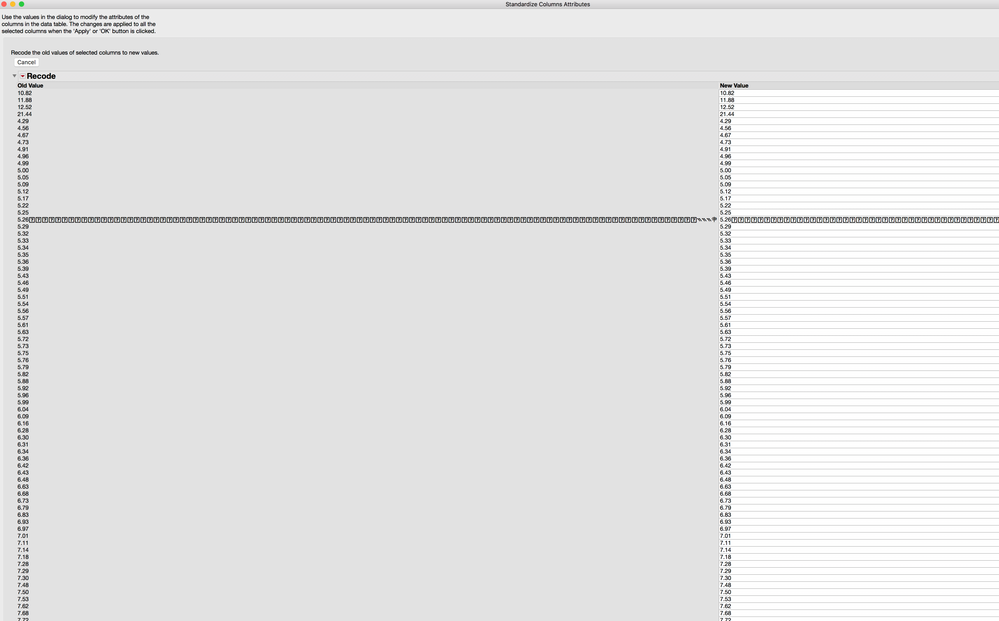
A column of numbers (not dates or text) will want to paste as characters. When I accept that and then go into Standardize attributes and recode I can always find one single value that has gibberish characters added to the number.
This can even happen if I take a numerical column of data, paste it into Excel and immediately back into JMP - junk characters are added that are invisible in Excel (Excel treats the data as numbers).
Anyone know of a fix for this?


- Mark as New
- Bookmark
- Subscribe
- Mute
- Subscribe to RSS Feed
- Get Direct Link
- Report Inappropriate Content
Re: pasting bug?
I don't have a MAC so here are 3 suggestions:
- Format the numeric columns as Numeric
- Use the Excel Clean function =Numbervalue(Clean(A1)) that removes unprintable characters.
- Use Open > Excel Wizard. A column with unprintable characters in Excel (line feedd and tables and leading and trailing spaces) did not paste correctly into JMP. However, when I opened that same file using the Excel Wizard all the junk was removed.
Neither method is easy if you have numerous columns. But I'd suggest you copy and paste into a new sheet.
Then use the JMP Excel Wizard and only select that sheet. In JMP 13, I have seen that the Excel wizard has some problems with columns with formulas, so make sure the columns have values. [JMP 14 does not have this issue].
Good Luck!


 Community Manager
- Mark as New
- Bookmark
- Subscribe
- Mute
- Subscribe to RSS Feed
- Get Direct Link
- Report Inappropriate Content
Re: pasting bug?
Without seeing the original Excel file this will likely be difficult to diagnose. If you can't post a sanitized version here, contact Tech Support and send them the file. They can probably explain what's happening and give strategies (perhaps like @gzmorgan0's above) that will help.
- Mark as New
- Bookmark
- Subscribe
- Mute
- Subscribe to RSS Feed
- Get Direct Link
- Report Inappropriate Content
Re: pasting bug?
It's always different files. A clarification from my first post is that I can take a column of numbers from JMP, paste them into Excel and then immediately paste them back into JMP and have it happen.
It usually happens in the last column of data copied over.
Here is a screenshot of one from today.
 Community Manager
- Mark as New
- Bookmark
- Subscribe
- Mute
- Subscribe to RSS Feed
- Get Direct Link
- Report Inappropriate Content
Re: pasting bug?
That is odd. I've tried to replicate the problem here but haven't been able to. I do notice that I have Excel 16.16. Is it possible for you to make sure you've got the latest release of Excel?
- Mark as New
- Bookmark
- Subscribe
- Mute
- Subscribe to RSS Feed
- Get Direct Link
- Report Inappropriate Content
Re: pasting bug?
This is a sidebar to your issue. Might I ask what you are trying to do?
Were you copying from JMP to Excel then back again, only to create a good test case, or was this what you were doing when you found the problem?
The reason I am asking is because I have seen newer JMP users do this to use Excel's filters and/or stacking and/or formulas. I do not wish to offend, I am just asking.
If your task is to just copy from Excel to JMP, please ignore my question.
- Mark as New
- Bookmark
- Subscribe
- Mute
- Subscribe to RSS Feed
- Get Direct Link
- Report Inappropriate Content
Re: pasting bug?
I go back and forth between JMP and Excel all the time. I can do basic formulas in JMP, but for logical formulas and a few other things I am much more familiar with Excel. All my statistics are JMP, but I do clean and organize data in Excel just because it's easier for me.
- Mark as New
- Bookmark
- Subscribe
- Mute
- Subscribe to RSS Feed
- Get Direct Link
- Report Inappropriate Content
Re: pasting bug?
I would encourage you to learn a few more JMP functions and table features. I have numerous experiences where Excel devotees were using JMP for the statistics and graphics and using Excel to do some data cleaning. And after a few hints, they gave up the copy and paste back and forth with Excel.
Here is a 30 minute video, you might find useful, it is titled Letting Go of Excel
https://community.jmp.com/t5/video/gallerypage/video-id/xqbW40ODE6WV5ISTJ_ASyNfZRb4i0NVv
Below is a "reading list" if you are interested in leraning more.
Good Luck!
Note Help>Scripting Index will show you JSL synatx for things that you can do in the formula editor. Even if you are not interested in scripting, this is an easy method to learn what a function does. Help>Scripting Index > Functions
- Conditional functions: If() , Match(), Choose(), And(), Or() , IsMissing()
- Character functions: Concat(), Substr(), Starts With(), End With(), Trim(), Char(), Num(), Lenght(), Word() You will be surprised how useful Word() can be for pulling items from string.
- Numeric, Transcendental, Trignometric
- Statistical
Help>Scripting Index > Objects > Data Table
- Search for Stack, Split, Subset
Learn how to use Row> Select > Select Where with Add condition...very useful
Recommended Articles
- © 2025 JMP Statistical Discovery LLC. All Rights Reserved.
- Terms of Use
- Privacy Statement
- Contact Us