Turn on suggestions
Auto-suggest helps you quickly narrow down your search results by suggesting possible matches as you type.
- Don’t miss your chance to experience Discovery Summit Europe at our best available rate! Early bird registration through 31 Oct.
- Graph Builder Toolbar streamlines interactive graphing. Creates shortcuts on Report and GraphBuilder Helpers toolbars. Download and install the extension.
Options
- Subscribe to RSS Feed
- Mark Topic as New
- Mark Topic as Read
- Float this Topic for Current User
- Bookmark
- Subscribe
- Mute
- Printer Friendly Page
Discussions
Solve problems, and share tips and tricks with other JMP users.- User Community
- :
- Discussions
- :
- move columns

Level III
- Mark as New
- Bookmark
- Subscribe
- Mute
- Subscribe to RSS Feed
- Get Direct Link
- Report Inappropriate Content
move columns
Created:
May 31, 2022 07:42 AM
| Last Modified: Jun 9, 2023 10:00 AM
(3139 views)
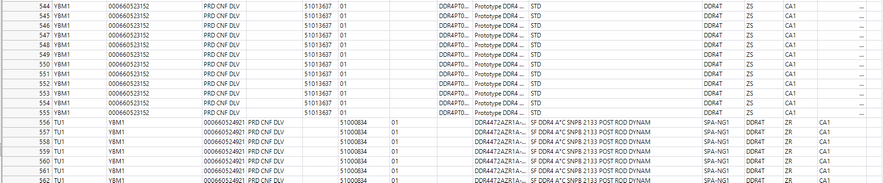
Hello everyone, I would like to shift all columns to the right by one column if the lines where the length is greater than 3 in the first column and I would like to know if this is possible? for the moment, I starting by this :
dt << delete row( 1 );

rows_to_delete = dt << Get Rows Where(Length( :Prodn Supervisor )>3);
If(N Items(rows_to_delete),
	dt << Delete Rows(rows_to_delete);
);
1 ACCEPTED SOLUTION
Accepted Solutions


Super User
Solution
- Mark as New
- Bookmark
- Subscribe
- Mute
- Subscribe to RSS Feed
- Get Direct Link
- Report Inappropriate Content
Re: move columns
Depending on your data something like this might work, it uses Data table subscripting
Names Default To Here(1);

dt = New Table("Untitled",
	Add Rows(4),
	New Column("A", Character, "Nominal", Set Values({"AAAA", "AAAA", "BBB", "BBB"})),
	New Column("B", Character, "Nominal", Set Values({"123", "456", "AAAA", "AAAA"}), Set Display Width(45)),
	New Column("C", Numeric, "Continuous", Format("Best", 12), Set Values([., ., 789, 0]))
);

rows_to_shift =  dt << Get Rows Where(Length(AsColumn(1)) > 3);
col_count = N Cols(dt);

// set all columns to character to make this easier
For Each({col_name}, dt << Get Column Names("String"),
	Column(dt, col_name) << Set Data Type("Character");
);
wait(1);

// Datatable subscripting
dt[rows_to_shift, 2::col_count] = dt[rows_to_shift, 1::col_count - 1];
dt[rows_to_shift, 1] = ""; // set first column values as missing
-Jarmo
3 REPLIES 3
Level III
- Mark as New
- Bookmark
- Subscribe
- Mute
- Subscribe to RSS Feed
- Get Direct Link
- Report Inappropriate Content
Re: move columns
For the moment I delete these columns but I would like to move them to the right as explained above
Super User
Solution
- Mark as New
- Bookmark
- Subscribe
- Mute
- Subscribe to RSS Feed
- Get Direct Link
- Report Inappropriate Content
Re: move columns
Depending on your data something like this might work, it uses Data table subscripting
Names Default To Here(1);

dt = New Table("Untitled",
	Add Rows(4),
	New Column("A", Character, "Nominal", Set Values({"AAAA", "AAAA", "BBB", "BBB"})),
	New Column("B", Character, "Nominal", Set Values({"123", "456", "AAAA", "AAAA"}), Set Display Width(45)),
	New Column("C", Numeric, "Continuous", Format("Best", 12), Set Values([., ., 789, 0]))
);

rows_to_shift =  dt << Get Rows Where(Length(AsColumn(1)) > 3);
col_count = N Cols(dt);

// set all columns to character to make this easier
For Each({col_name}, dt << Get Column Names("String"),
	Column(dt, col_name) << Set Data Type("Character");
);
wait(1);

// Datatable subscripting
dt[rows_to_shift, 2::col_count] = dt[rows_to_shift, 1::col_count - 1];
dt[rows_to_shift, 1] = ""; // set first column values as missing
-Jarmo

Super User
- Mark as New
- Bookmark
- Subscribe
- Mute
- Subscribe to RSS Feed
- Get Direct Link
- Report Inappropriate Content
Re: move columns
Something like this should work
Names Default To Here( 1 );
dt = Current Data Table();

dt << delete row( 1 );

theRows = dt << Get Rows Where( Length( :Prodn Supervisor ) > 3 );

If( N Items( theRows ) > 0,
	For( theCol = 1, theCol < N Col( dt ), theCol++,
		For( myRow = 1, myRow <= N Items( theRows ), myRow++,
			Column( theCol )[theRows[myRow]] = Column( theCol + 1 )[theRows[myRow]]
		)
	)
);
Jim
Recommended Articles
- © 2026 JMP Statistical Discovery LLC. All Rights Reserved.
- Terms of Use
- Privacy Statement
- Contact Us