Don’t miss your chance to experience Discovery Summit Europe at our best available rate! Early bird registration through 31 Oct.
Graph Builder Toolbar streamlines interactive graphing. Creates shortcuts on Report and GraphBuilder Helpers toolbars. Download and install the extension.
JMP will suspend normal business operations for our Rest and Recharge Day on Friday, October 2, 2026.
Regular business hours will resume on Monday, October 5, 2026.
Created:
Mar 17, 2022 03:43 PM
| Last Modified: Jun 11, 2023 4:22 AM(1730 views)
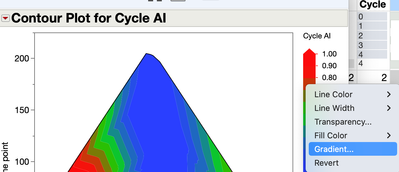
I just upgraded from JMP 15 to 16 on my Mac. Before, I could change the color theme in a contour plot under the red triangle (I prefer to look at my plots with a spectral theme). I no longer see that option with version 16. Is there somewhere else I can change the default red to blue to a spectral theme for contour plots?