cancel
Showing results for 
Show  only  | Search instead for 
Did you mean: 
  • JMP will suspend normal business operations for our Winter Holiday beginning on Wednesday, Dec. 24, 2025, at 5:00 p.m. ET (2:00 p.m. ET for JMP Accounts Receivable).
    Regular business hours will resume at 9:00 a.m. EST on Friday, Jan. 2, 2026.
  • We’re retiring the File Exchange at the end of this year. The JMP Marketplace is now your destination for add-ins and extensions.

Discussions

Solve problems, and share tips and tricks with other JMP users.
%3CLINGO-SUB%20id%3D%22lingo-sub-287196%22%20slang%3D%22en-US%22%20mode%3D%22UPDATE%22%3ETabelle%20aus%202%20CSV-Dateien%20zusammenf%C3%BChren%3C%2FLINGO-SUB%3E%3CLINGO-BODY%20id%3D%22lingo-body-287196%22%20slang%3D%22en-US%22%20mode%3D%22UPDATE%22%3E%3CP%3EHallo%2C%3C%2FP%3E%3CP%3E%20%3C%2FP%3E%3CP%3EIch%20habe%20zwei%20CSV-Dateien%20(round1.csv%20und%20Round2.csv).%20Wie%20kann%20ich%20mergeRound.csv%20in%20eine%20neue%20Tabelle%20zusammenf%C3%BChren%3F%20Ich%20habe%20versucht%2C%20damit%20herumzuspielen%3C%2FP%3E%3CP%3ENachname%2C%20Vorname%20und%20Nummer%20sollten%20identisch%20sein.%20Die%20restlichen%20Spalten%20sollten%20zusammengef%C3%BChrt%20werden.%3C%2FP%3E%3CP%3E%20%3C%2FP%3E%3CP%3EIch%20habe%20im%20Men%C3%BC%20%E2%80%9ETabellen%E2%80%9C%20herumgespielt%2C%20kann%20es%20aber%20nicht%20herausfinden%2C%20bevor%20ich%20es%20in%20JSL%20eingef%C3%BCgt%20habe.%3C%2FP%3E%3CP%3E%20%3C%2FP%3E%3CP%3EDanke.%3C%2FP%3E%3C%2FLINGO-BODY%3E%3CLINGO-LABS%20id%3D%22lingo-labs-287196%22%20slang%3D%22en-US%22%20mode%3D%22UPDATE%22%3E%3CLINGO-LABEL%3EErweiterte%20statistische%20Modellierung%3C%2FLINGO-LABEL%3E%3CLINGO-LABEL%3EAutomatisierung%20und%20Skripterstellung%3C%2FLINGO-LABEL%3E%3CLINGO-LABEL%3EInhaltsorganisation%3C%2FLINGO-LABEL%3E%3CLINGO-LABEL%3EDatenzugriff%3C%2FLINGO-LABEL%3E%3CLINGO-LABEL%3EDatenmischung%20und%20-bereinigung%3C%2FLINGO-LABEL%3E%3CLINGO-LABEL%3EMassenanpassung%3C%2FLINGO-LABEL%3E%3CLINGO-LABEL%3EQualit%C3%A4ts-%20und%20Verfahrenstechnik%3C%2FLINGO-LABEL%3E%3C%2FLINGO-LABS%3E%3CLINGO-SUB%20id%3D%22lingo-sub-287232%22%20slang%3D%22en-US%22%20mode%3D%22NONE%22%3EBetreff%3A%20Tabelle%20aus%202%20CSV-Dateien%20zusammenf%C3%BChren%3C%2FLINGO-SUB%3E%3CLINGO-BODY%20id%3D%22lingo-body-287232%22%20slang%3D%22en-US%22%20mode%3D%22NONE%22%3E%3CP%3EDas%20von%20mir%20vorgeschlagene%20Format%20wird%20in%20Graph%20Builder%20unterst%C3%BCtzt%2C%20um%20Ihre%20vorgeschlagenen%20Diagramme%20zu%20erstellen.%3C%2FP%3E%0A%3CP%3E%3CSPAN%20class%3D%22lia-inline-image-display-wrapper%20lia-image-align-inline%22%20image-alt%3D%22concat2.PNG%22%20style%3D%22width%3A%20455px%3B%22%3E%3CSPAN%20class%3D%22lia-inline-image-display-wrapper%22%20image-alt%3D%22concat2.PNG%22%20style%3D%22width%3A%20455px%3B%22%3E%3CSPAN%20class%3D%22lia-inline-image-display-wrapper%22%20image-alt%3D%22concat2.PNG%22%20style%3D%22width%3A%20455px%3B%22%3E%3Cspan%20class%3D%22lia-inline-image-display-wrapper%22%20image-alt%3D%22concat2.PNG%22%20style%3D%22width%3A%20455px%3B%22%3E%3Cimg%20src%3D%22https%3A%2F%2Fcommunity.jmp.com%2Ft5%2Fimage%2Fserverpage%2Fimage-id%2F26339i11B88B86A2CFEF4F%2Fimage-dimensions%2F455x286%3Fv%3Dv2%22%20width%3D%22455%22%20height%3D%22286%22%20role%3D%22button%22%20title%3D%22concat2.PNG%22%20alt%3D%22concat2.PNG%22%20%2F%3E%3C%2Fspan%3E%3C%2FSPAN%3E%3C%2FSPAN%3E%3C%2FSPAN%3E%3CSPAN%20class%3D%22lia-inline-image-display-wrapper%20lia-image-align-inline%22%20image-alt%3D%22concat3.PNG%22%20style%3D%22width%3A%20437px%3B%22%3E%3CSPAN%20class%3D%22lia-inline-image-display-wrapper%22%20image-alt%3D%22concat3.PNG%22%20style%3D%22width%3A%20437px%3B%22%3E%3CSPAN%20class%3D%22lia-inline-image-display-wrapper%22%20image-alt%3D%22concat3.PNG%22%20style%3D%22width%3A%20437px%3B%22%3E%3Cspan%20class%3D%22lia-inline-image-display-wrapper%22%20image-alt%3D%22concat3.PNG%22%20style%3D%22width%3A%20437px%3B%22%3E%3Cimg%20src%3D%22https%3A%2F%2Fcommunity.jmp.com%2Ft5%2Fimage%2Fserverpage%2Fimage-id%2F26340iD06FEE47411A188E%2Fimage-dimensions%2F437x304%3Fv%3Dv2%22%20width%3D%22437%22%20height%3D%22304%22%20role%3D%22button%22%20title%3D%22concat3.PNG%22%20alt%3D%22concat3.PNG%22%20%2F%3E%3C%2Fspan%3E%3C%2FSPAN%3E%3C%2FSPAN%3E%3C%2FSPAN%3E%3C%2FP%3E%0A%3CP%3ENachfolgend%20finden%20Sie%20ein%20Skript%2C%20das%20diese%20Diagramme%20aus%20der%20verketteten%20Form%20der%20Daten%20erstellt.Wenn%20Ihre%20zusammengef%C3%BChrte%20Form%20der%20Daten%20die%3C%2FP%3E%0A%3CP%3ETabellen%3D%3D%26gt%3BSplit%3C%2FP%3E%0A%3CP%3Ekann%20einfach%20verwendet%20werden%2C%20um%20die%20Daten%20in%20ein%20zeilenbasiertes%20Format%20aufzuteilen%3C%2FP%3E%0A%3CPRE%3E%3CCODE%20class%3D%22%20language-jsl%22%3ENames%20Default%20to%20Here(1)%3B%0A%0Adt%20%3D%20New%20Table(%20%22Concat%22%2C%0A%20Add%20Rows(%2013%20)%2C%0A%20New%20Column(%20%22Playoffs%22%2C%0A%20%20Character(%208%20)%2C%0A%20%20%22Nominal%22%2C%0A%20%20Set%20Values(%0A%20%20%20%7B%22Round1%22%2C%20%22Round1%22%2C%20%22Round1%22%2C%20%22Round1%22%2C%20%22Round1%22%2C%20%22Round2%22%2C%20%22Round2%22%2C%0A%20%20%20%22Round2%22%2C%20%22Round2%22%2C%20%22Round2%22%2C%20%22Round2%22%2C%20%22Round2%22%2C%20%22Round2%22%7D%0A%20%20)%0A%20)%2C%0A%20New%20Column(%20%22Last%20Name%22%2C%0A%20%20Character(%208%20)%2C%0A%20%20%22Nominal%22%2C%0A%20%20Set%20Values(%0A%20%20%20%7B%22Adam%22%2C%20%22Bell%22%2C%20%22Cody%22%2C%20%22Doe%22%2C%20%22Evan%22%2C%20%22Adam%22%2C%20%22Bell%22%2C%20%22Cody%22%2C%20%22Doe%22%2C%0A%20%20%20%22Evan%22%2C%20%22Faith%22%2C%20%22Gracie%22%2C%20%22Haley%22%7D%0A%20%20)%0A%20)%2C%0A%20New%20Column(%20%22First%20Name%22%2C%0A%20%20Character(%208%20)%2C%0A%20%20%22Nominal%22%2C%0A%20%20Set%20Values(%0A%20%20%20%7B%22Sophia%22%2C%20%22Isabella%22%2C%20%22Emma%22%2C%20%22Olivia%22%2C%20%22Ava%22%2C%20%22Sophia%22%2C%20%22Isabella%22%2C%0A%20%20%20%22Emma%22%2C%20%22Olivia%22%2C%20%22Ava%22%2C%20%22Clara%22%2C%20%22Vivian%22%2C%20%22Jada%22%7D%0A%20%20)%0A%20)%2C%0A%20New%20Column(%20%22Number%22%2C%0A%20%20Numeric%2C%0A%20%20%22Continuous%22%2C%0A%20%20Format(%20%22Best%22%2C%2012%20)%2C%0A%20%20Set%20Values(%20%5B1%2C%202%2C%203%2C%204%2C%205%2C%201%2C%202%2C%203%2C%204%2C%205%2C%2015%2C%2020%2C%2099%5D%20)%0A%20)%2C%0A%20New%20Column(%20%22Assist%22%2C%0A%20%20Numeric%2C%0A%20%20%22Continuous%22%2C%0A%20%20Format(%20%22Best%22%2C%2012%20)%2C%0A%20%20Set%20Values(%20%5B5%2C%208%2C%209%2C%207%2C%2015%2C%206%2C%204%2C%205%2C%208%2C%209%2C%201%2C%202%2C%209%5D%20)%0A%20)%2C%0A%20New%20Column(%20%22Block%22%2C%0A%20%20Numeric%2C%0A%20%20%22Continuous%22%2C%0A%20%20Format(%20%22Best%22%2C%2012%20)%2C%0A%20%20Set%20Values(%20%5B1%2C%200%2C%202%2C%208%2C%206%2C%207%2C%204%2C%205%2C%206%2C%201%2C%203%2C%20.%2C%209%5D%20)%0A%20)%2C%0A%20New%20Column(%20%22Dunk%22%2C%0A%20%20Numeric%2C%0A%20%20%22Continuous%22%2C%0A%20%20Format(%20%22Best%22%2C%2012%20)%2C%0A%20%20Set%20Values(%20%5B0%2C%200%2C%200%2C%205%2C%203%2C%207%2C%209%2C%205%2C%201%2C%203%2C%20.%2C%206%2C%205%5D%20)%0A%20)%2C%0A%20New%20Column(%20%22Score%22%2C%0A%20%20Numeric%2C%0A%20%20%22Continuous%22%2C%0A%20%20Format(%20%22Best%22%2C%2012%20)%2C%0A%20%20Set%20Values(%20%5B10%2C%205%2C%206%2C%2012%2C%2010%2C%2010%2C%205%2C%206%2C%2012%2C%2010%2C%208%2C%201%2C%205%5D%20)%0A%20)%0A)%3B%0A%0AGraph%20Builder(%0A%20Size(%20739%2C%20450%20)%2C%0A%20Show%20Control%20Panel(%200%20)%2C%0A%20Variables(%0A%20%20X(%0A%20%20%20Transform%20Column(%0A%20%20%20%20%22Concatenate%5BLas...st%20Name%2CNumber%5D%22%2C%0A%20%20%20%20Character%2C%0A%20%20%20%20Formula(%0A%20%20%20%20%20%3ALast%20Name%20%7C%7C%20%22%20%22%20%7C%7C%20%3AFirst%20Name%20%7C%7C%20%22%20%22%20%7C%7C%20Char(%20%3ANumber%20)%0A%20%20%20%20)%0A%20%20%20)%0A%20%20)%2C%0A%20%20Y(%20%3AScore%20)%2C%0A%20%20Overlay(%20%3APlayoffs%20)%0A%20)%2C%0A%20Elements(%20Bar(%20X%2C%20Y%2C%20Legend(%2011%20)%20)%20)%0A)%3B%0A%0AGraph%20Builder(%0A%20Size(%20739%2C%20500%20)%2C%0A%20Show%20Control%20Panel(%200%20)%2C%0A%20Variables(%0A%20%20X(%0A%20%20%20Transform%20Column(%0A%20%20%20%20%22Concatenate%5BLas...st%20Name%2CNumber%5D%22%2C%0A%20%20%20%20Character%2C%0A%20%20%20%20Formula(%0A%20%20%20%20%20%3ALast%20Name%20%7C%7C%20%22%20%22%20%7C%7C%20%3AFirst%20Name%20%7C%7C%20%22%20%22%20%7C%7C%20Char(%20%3ANumber%20)%0A%20%20%20%20)%0A%20%20%20)%0A%20%20)%2C%0A%20%20Y(%20%3ADunk%20)%2C%0A%20%20Y(%20%3ABlock%20)%2C%0A%20%20Y(%20%3AAssist%20)%2C%0A%20%20Y(%20%3AScore%20)%2C%0A%20%20Group%20X(%20%3APlayoffs%20)%0A%20)%2C%0A%20Elements(%20Position(%201%2C%201%20)%2C%20Bar(%20X%2C%20Y%2C%20Legend(%2015%20)%20)%20)%2C%0A%20Elements(%20Position(%201%2C%202%20)%2C%20Bar(%20X%2C%20Y%2C%20Legend(%2014%20)%20)%20)%2C%0A%20Elements(%20Position(%201%2C%203%20)%2C%20Bar(%20X%2C%20Y%2C%20Legend(%2012%20)%20)%20)%2C%0A%20Elements(%20Position(%201%2C%204%20)%2C%20Bar(%20X%2C%20Y%2C%20Legend(%2011%20)%20)%20)%0A)%3B%3C%2FCODE%3E%3C%2FPRE%3E%0A%3CP%3E%26nbsp%3B%3C%2FP%3E%3C%2FLINGO-BODY%3E%3CLINGO-SUB%20id%3D%22lingo-sub-287219%22%20slang%3D%22en-US%22%20mode%3D%22NONE%22%3EBetreff%3A%20Tabelle%20aus%202%20CSV-Dateien%20zusammenf%C3%BChren%3C%2FLINGO-SUB%3E%3CLINGO-BODY%20id%3D%22lingo-body-287219%22%20slang%3D%22en-US%22%20mode%3D%22NONE%22%3E%3CP%3EJim%2C%3C%2FP%3E%3CP%3E%26nbsp%3B%3C%2FP%3E%3CP%3ENachname%2C%20Vorname%20und%20Nummer%20sind%20mein%20eindeutiger%20Schl%C3%BCssel.%3C%2FP%3E%3CP%3E%26nbsp%3B%3C%2FP%3E%3CP%3EIch%20wollte%20jeden%20einzelnen%20Assist%2C%20Block%2C%20Score%2C%20Dunk%20usw.%20%C3%BCber%20Plot%20Nachname%2C%20Vorname%20und%20Nummer%20vergleichen.%20zwischen%20Runde%201%20und%20Runde%202.%20Deshalb%20habe%20ich%20es%20in%20die%20gleiche%20Reihe%20gestellt.%3C%2FP%3E%3CP%3E%26nbsp%3B%3C%2FP%3E%3CP%3ENicht%20sicher%2C%20ob%20das%20das%20Richtige%20ist.%3C%2FP%3E%3C%2FLINGO-BODY%3E%3CLINGO-SUB%20id%3D%22lingo-sub-287207%22%20slang%3D%22en-US%22%20mode%3D%22NONE%22%3EBetreff%3A%20Tabelle%20aus%202%20CSV-Dateien%20zusammenf%C3%BChren%3C%2FLINGO-SUB%3E%3CLINGO-BODY%20id%3D%22lingo-body-287207%22%20slang%3D%22en-US%22%20mode%3D%22NONE%22%3E%3CP%3EIch%20w%C3%BCrde%20Ihre%20Daten%20in%20analytischer%20Form%20aufbereiten.Grunds%C3%A4tzlich%20werden%20die%20Daten%20verkettet.Siehe%20Abbildung%20unten%3A%3C%2FP%3E%0A%3CP%3E%3CSPAN%20class%3D%22lia-inline-image-display-wrapper%20lia-image-align-inline%22%20image-alt%3D%22concat.PNG%22%20style%3D%22width%3A%20725px%3B%22%3E%3CSPAN%20class%3D%22lia-inline-image-display-wrapper%22%20image-alt%3D%22concat.PNG%22%20style%3D%22width%3A%20725px%3B%22%3E%3CSPAN%20class%3D%22lia-inline-image-display-wrapper%22%20image-alt%3D%22concat.PNG%22%20style%3D%22width%3A%20725px%3B%22%3E%3Cspan%20class%3D%22lia-inline-image-display-wrapper%22%20image-alt%3D%22concat.PNG%22%20style%3D%22width%3A%20725px%3B%22%3E%3Cimg%20src%3D%22https%3A%2F%2Fcommunity.jmp.com%2Ft5%2Fimage%2Fserverpage%2Fimage-id%2F26336i1342042562AC513B%2Fimage-size%2Flarge%3Fv%3Dv2%26amp%3Bpx%3D999%22%20role%3D%22button%22%20title%3D%22concat.PNG%22%20alt%3D%22concat.PNG%22%20%2F%3E%3C%2Fspan%3E%3C%2FSPAN%3E%3C%2FSPAN%3E%3C%2FSPAN%3E%3C%2FP%3E%3C%2FLINGO-BODY%3E
Choose Language Hide Translation Bar
sam_t
Level III

merge table from 2 csv files

Hi,


I have two csv files (round1.csv & round2.csv). How can I merge into a new table mergeRound.csv. I was trying to play around with the 

Last Name,First Name,Number combine should be the same. The rest of the columns should be merge.


I was playing around the Tables menu but cannot figure it out before putting it to JSL.


Thanks.

3 REPLIES 3
txnelson
Super User

Re: merge table from 2 csv files

I would set up your data in an analytical form.  Basically, the data are concatenated.  See illustration below:
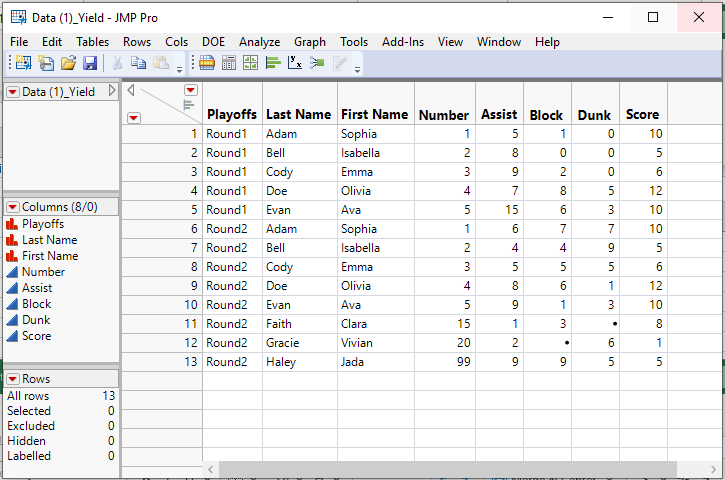
concat.PNG

Jim
sam_t
Level III

Re: merge table from 2 csv files

Jim,


Last Name, First Name, and Number will be my unique key.


I was going to compare each individual assist, block, score, dunk, etc... via plot Last Name, First Name, and Number. by between round 1 & round 2. That's why I put it in the same row. 


Not sure if that is the right thing to do.

txnelson
Super User

Re: merge table from 2 csv files

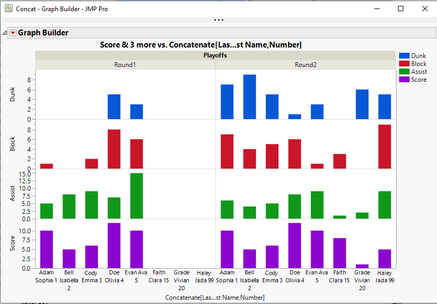
The format that I suggest is supported within Graph Builder to produce your suggested graph(s)
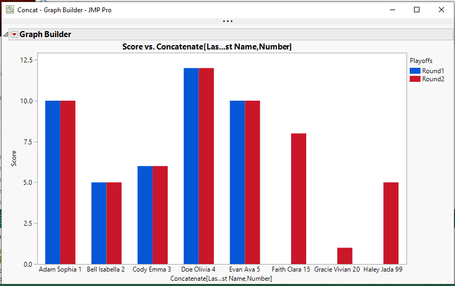
concat2.PNGconcat3.PNG

Below is a script that produces these graphs from the Concatenated form of the data.  Additionally, if your merged form of the data the

     Tables==>Split

can easily be used to split the data to a row based format

Names Default to Here(1);

dt = New Table( "Concat",
	Add Rows( 13 ),
	New Column( "Playoffs",
		Character( 8 ),
		"Nominal",
		Set Values(
			{"Round1", "Round1", "Round1", "Round1", "Round1", "Round2", "Round2",
			"Round2", "Round2", "Round2", "Round2", "Round2", "Round2"}
		)
	),
	New Column( "Last Name",
		Character( 8 ),
		"Nominal",
		Set Values(
			{"Adam", "Bell", "Cody", "Doe", "Evan", "Adam", "Bell", "Cody", "Doe",
			"Evan", "Faith", "Gracie", "Haley"}
		)
	),
	New Column( "First Name",
		Character( 8 ),
		"Nominal",
		Set Values(
			{"Sophia", "Isabella", "Emma", "Olivia", "Ava", "Sophia", "Isabella",
			"Emma", "Olivia", "Ava", "Clara", "Vivian", "Jada"}
		)
	),
	New Column( "Number",
		Numeric,
		"Continuous",
		Format( "Best", 12 ),
		Set Values( [1, 2, 3, 4, 5, 1, 2, 3, 4, 5, 15, 20, 99] )
	),
	New Column( "Assist",
		Numeric,
		"Continuous",
		Format( "Best", 12 ),
		Set Values( [5, 8, 9, 7, 15, 6, 4, 5, 8, 9, 1, 2, 9] )
	),
	New Column( "Block",
		Numeric,
		"Continuous",
		Format( "Best", 12 ),
		Set Values( [1, 0, 2, 8, 6, 7, 4, 5, 6, 1, 3, ., 9] )
	),
	New Column( "Dunk",
		Numeric,
		"Continuous",
		Format( "Best", 12 ),
		Set Values( [0, 0, 0, 5, 3, 7, 9, 5, 1, 3, ., 6, 5] )
	),
	New Column( "Score",
		Numeric,
		"Continuous",
		Format( "Best", 12 ),
		Set Values( [10, 5, 6, 12, 10, 10, 5, 6, 12, 10, 8, 1, 5] )
	)
);

Graph Builder(
	Size( 739, 450 ),
	Show Control Panel( 0 ),
	Variables(
		X(
			Transform Column(
				"Concatenate[Las...st Name,Number]",
				Character,
				Formula(
					:Last Name || " " || :First Name || " " || Char( :Number )
				)
			)
		),
		Y( :Score ),
		Overlay( :Playoffs )
	),
	Elements( Bar( X, Y, Legend( 11 ) ) )
);

Graph Builder(
	Size( 739, 500 ),
	Show Control Panel( 0 ),
	Variables(
		X(
			Transform Column(
				"Concatenate[Las...st Name,Number]",
				Character,
				Formula(
					:Last Name || " " || :First Name || " " || Char( :Number )
				)
			)
		),
		Y( :Dunk ),
		Y( :Block ),
		Y( :Assist ),
		Y( :Score ),
		Group X( :Playoffs )
	),
	Elements( Position( 1, 1 ), Bar( X, Y, Legend( 15 ) ) ),
	Elements( Position( 1, 2 ), Bar( X, Y, Legend( 14 ) ) ),
	Elements( Position( 1, 3 ), Bar( X, Y, Legend( 12 ) ) ),
	Elements( Position( 1, 4 ), Bar( X, Y, Legend( 11 ) ) )
);


Jim

Recommended Articles