- JMP will suspend normal business operations for our Winter Holiday beginning on Wednesday, Dec. 24, 2025, at 5:00 p.m. ET (2:00 p.m. ET for JMP Accounts Receivable).
Regular business hours will resume at 9:00 a.m. EST on Friday, Jan. 2, 2026. - We’re retiring the File Exchange at the end of this year. The JMP Marketplace is now your destination for add-ins and extensions.
- Subscribe to RSS Feed
- Mark Topic as New
- Mark Topic as Read
- Float this Topic for Current User
- Bookmark
- Subscribe
- Mute
- Printer Friendly Page
Discussions
Solve problems, and share tips and tricks with other JMP users.- JMP User Community
- :
- Discussions
- :
- jsl: how to plot using a list of groups?

- Mark as New
- Bookmark
- Subscribe
- Mute
- Subscribe to RSS Feed
- Get Direct Link
- Report Inappropriate Content
jsl: how to plot using a list of groups?
following up from this post: https://community.jmp.com/t5/Discussions/Script-to-loop-thru-and-group-columns-by-name-dynamically/m...
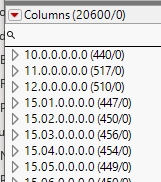
I'm grouping 10k+ columns into groups by StepID, but now trying to plot them all.
I can't quite figure out how to tell it to plot by the list of all the groups. any advice?
/*plotting a basic Fit YbyX just to get pValues. Formatting and style done on final plot*/
ow1 = Oneway(
	Y( dtAggWide<<get column group( "10.0.0.0.0.0" ) ),
	X( :ChamberId ),
	//By(:),

	//All pairs Tukey HSD test
	All Pairs(
		1,
		Confidence Quantile( 0 ),
		Difference Matrix( 0 ),
		LSD Threshold Matrix( 0 ),
		Connecting Letters Report( 0 ),
		Ordered Differences Report( 1 )
	),
	//invisible, //use this to speed up.
);Accepted Solutions


- Mark as New
- Bookmark
- Subscribe
- Mute
- Subscribe to RSS Feed
- Get Direct Link
- Report Inappropriate Content
Re: jsl: how to plot using a list of groups?
Here is a rewrite of the code, removing the need for expression building
Names Default To Here( 1 );
dt = Current Data Table();
dt<< set name( "AggWide" );

//get the column groups and put them into one long list
colgroupNames = dt << get column groups names;
colsList = {};
For( i = 1, i <= N Items( colgroupNames ), i++,
	Insert Into( colsList, dt << get column group( colgroupNames[i] ) )
);

//temporary string for testing
RecipeStepIndex = {"10.0.0.0.0.0", "11.0.0.0.0.0", "12.0.0.0.0.0"};

// Build a character string that represents the commands that need to be run
ow1 = Oneway(
	Y( Eval( colsList ) )
,
	X( :ChamberID ),
	//By(:),

	//All pairs Tukey HSD test
	All Pairs(
		1,
		Confidence Quantile( 0 ),
		Difference Matrix( 0 ),
		LSD Threshold Matrix( 0 ),
		Connecting Letters Report( 0 ),
		Ordered Differences Report( 1 )
	),
	//invisible, //use this to speed up.
);

- Mark as New
- Bookmark
- Subscribe
- Mute
- Subscribe to RSS Feed
- Get Direct Link
- Report Inappropriate Content
Re: jsl: how to plot using a list of groups?
You can most likely do it with something like this (you need EvalEvalExpr):
Names Default To Here(1);

dt = Open("$SAMPLE_DATA/Big Class.jmp");
dt << Group Columns("group1", {"height", "weight"});

Eval(
	EvalExpr(
		dt << Oneway(
			Y(Expr(dt << Get Column Group("group1"))),
			X(:age)
		)
	)
);
See Insert one expression into another using Eval Insert, Eval Expr, Parse, and Substitute for more information and examples about Eval(EvalExpr())
- Mark as New
- Bookmark
- Subscribe
- Mute
- Subscribe to RSS Feed
- Get Direct Link
- Report Inappropriate Content
Re: jsl: how to plot using a list of groups?
I'm sorry, i'm struggling here.
I'm not sure why nesting the evalexpr?
is there not a way to replace the
Y( dtAggWide<<get column group( "10.0.0.0.0.0" ) ),with a list of column groups?
I previously created this list, how can I swap this RecipeStepIndex into the Y groups
//Build and prefill an Array of names of the RecipeStepId
Summarize( dt, RecipeStepIndex = by( :RecipeStepId) );//get list of unique RecipeStepID's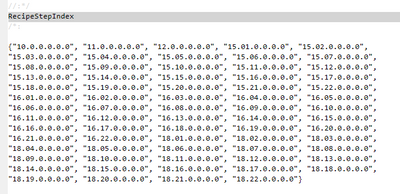
- Mark as New
- Bookmark
- Subscribe
- Mute
- Subscribe to RSS Feed
- Get Direct Link
- Report Inappropriate Content
Re: jsl: how to plot using a list of groups?
OK, so I've got this, but I'm not sure how I can keep looping and creating new terms inside the Y( section.
any advice?
colgroupNames = dt << get column groups names;

/*plotting a basic Fit YbyX just to get pValues. Formatting and style done on final plot*/
ow1 = Oneway(
Y( dtAggWide<<get column group( colgroupNames[1] )
, dtAggWide<<get column group( colgroupNames[2] )
, dtAggWide<<get column group( colgroupNames[3] )
),
X( :ChamberId ),
//By(:),

//All pairs Tukey HSD test
All Pairs(
1,
Confidence Quantile( 0 ),
Difference Matrix( 0 ),
LSD Threshold Matrix( 0 ),
Connecting Letters Report( 0 ),
Ordered Differences Report( 1 )
),
//invisible, //use this to speed up.
);dtAggWide = current data table();
dtAggWide << set name( "AggWide");

RecipeStepIndex ={"10.0.0.0.0.0", "11.0.0.0.0.0", "12.0.0.0.0.0"} // column groups names. Each group has 100+ columns.

//trying to create a series of charts using the groups, looping through the groups
ow1 = Oneway(
	Y( 	for( i = 1, i<=Nitems( RecipeStepIndex), i++,
			dtAggWide<<get column group( RecipeStepIndex[i] ))
		),
	X( :ChamberId ),
	//By(:),

	//All pairs Tukey HSD test
	All Pairs(
		1,
		Confidence Quantile( 0 ),
		Difference Matrix( 0 ),
		LSD Threshold Matrix( 0 ),
		Connecting Letters Report( 0 ),
		Ordered Differences Report( 1 )
	),
	//invisible, //use this to speed up.
);- Mark as New
- Bookmark
- Subscribe
- Mute
- Subscribe to RSS Feed
- Get Direct Link
- Report Inappropriate Content
Re: jsl: how to plot using a list of groups?
so I ripped this solution from @txnelson : https://community.jmp.com/t5/Discussions/Script-multiple-columns-grouped-in-distribution-plot/td-p/1...
but wondering if there's a way to just loop through the group names rather than doing this expression building thing.
Names Default To Here( 1 );
dtAggWide = current data table();
dtAggWide << set name( "AggWide");

//get the column groups
colgroupNames = dt << get column groups names;

//temporary string for testing
RecipeStepIndex ={"10.0.0.0.0.0", "11.0.0.0.0.0", "12.0.0.0.0.0"}

// Build a character string that represents the commands that need to be run
theExpr_start = "ow1 = Oneway(
	Y( dtAggWide<<get column group( colgroupNames[1] )";

theExpr_end = "	),
	X( :ChamberId ),
	//By(:),

	//All pairs Tukey HSD test
	All Pairs(
		1,
		Confidence Quantile( 0 ),
		Difference Matrix( 0 ),
		LSD Threshold Matrix( 0 ),
		Connecting Letters Report( 0 ),
		Ordered Differences Report( 1 )
	),
	//invisible, //use this to speed up.
);";

//Loop across the remaining column groups in the colgroupNames list and generate the series of charts
For( i = 2, i <= N Items( colgroupNames ), i++,
	theExpr_start = theExpr_start || ", dtAggWide<<get column group( colgroupNames[" || Char( i ) || "] )"
);

//combine the strings
theExpr_final = theExpr_start || theExpr_end;

//Execute the code generated and placed into the character string variable
Eval( Parse( theExpr_final ) );- Mark as New
- Bookmark
- Subscribe
- Mute
- Subscribe to RSS Feed
- Get Direct Link
- Report Inappropriate Content
Re: jsl: how to plot using a list of groups?
Here is a rewrite of the code, removing the need for expression building
Names Default To Here( 1 );
dt = Current Data Table();
dt<< set name( "AggWide" );

//get the column groups and put them into one long list
colgroupNames = dt << get column groups names;
colsList = {};
For( i = 1, i <= N Items( colgroupNames ), i++,
	Insert Into( colsList, dt << get column group( colgroupNames[i] ) )
);

//temporary string for testing
RecipeStepIndex = {"10.0.0.0.0.0", "11.0.0.0.0.0", "12.0.0.0.0.0"};

// Build a character string that represents the commands that need to be run
ow1 = Oneway(
	Y( Eval( colsList ) )
,
	X( :ChamberID ),
	//By(:),

	//All pairs Tukey HSD test
	All Pairs(
		1,
		Confidence Quantile( 0 ),
		Difference Matrix( 0 ),
		LSD Threshold Matrix( 0 ),
		Connecting Letters Report( 0 ),
		Ordered Differences Report( 1 )
	),
	//invisible, //use this to speed up.
);

- Mark as New
- Bookmark
- Subscribe
- Mute
- Subscribe to RSS Feed
- Get Direct Link
- Report Inappropriate Content
Re: jsl: how to plot using a list of groups?
Thank you very much, none of my post reading had discovered the get function helping to draw that information out.
- Mark as New
- Bookmark
- Subscribe
- Mute
- Subscribe to RSS Feed
- Get Direct Link
- Report Inappropriate Content
Re: jsl: how to plot using a list of groups?
Many thanks that solved the problem. My post reading had not discovered the get function to draw out the information I required.
Recommended Articles
- © 2025 JMP Statistical Discovery LLC. All Rights Reserved.
- Terms of Use
- Privacy Statement
- Contact Us