- Don’t miss your chance to experience Discovery Summit Europe at our best available rate! Early bird registration through 31 Oct.
- Graph Builder Toolbar streamlines interactive graphing. Creates shortcuts on Report and GraphBuilder Helpers toolbars. Download and install the extension.
- Subscribe to RSS Feed
- Mark Topic as New
- Mark Topic as Read
- Float this Topic for Current User
- Bookmark
- Subscribe
- Mute
- Printer Friendly Page
Discussions
Solve problems, and share tips and tricks with other JMP users.- User Community
- :
- Discussions
- :
- how do i apply red triangle settings to all by-group analyses

- Mark as New
- Bookmark
- Subscribe
- Mute
- Subscribe to RSS Feed
- Get Direct Link
- Report Inappropriate Content
how do i apply red triangle settings to all by-group analyses
I'm relatively new to JMP and feel like i must have missed something.
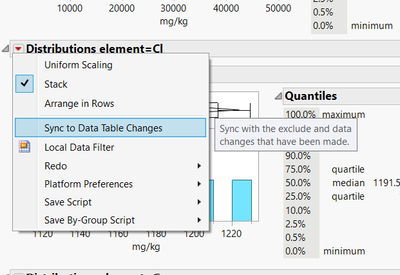
I am performing a simple distribution analysis on my continuous data but I am running the analysis grouped by nominal data.
is there a way for me to apply settings found in the red triangle to all of my grouped data such as a local data filter or synk to data table changes?
or do I have to either do it manually for each one?
Accepted Solutions


- Mark as New
- Bookmark
- Subscribe
- Mute
- Subscribe to RSS Feed
- Get Direct Link
- Report Inappropriate Content
Re: how do i apply red triangle settings to all by-group analyses
As @jthi suggest, broadcast will work well for most red-triangle commands. In the case of the Local Data Filter, you will get a separate filter for each level. When you update to JMP 18, look for the changes in the Group Platform. This adds a "group" red-triangle menu that automatically broadcasts most commands. For features like the Data Filter and Column Switcher, you will get a single object that operates across the group. In JMP 17.x you can get similar filter behavior through scripting:
dt = Open("$SAMPLE_DATA/Big Class.jmp");
New Window("shared filter",
	Data Filter Context Box(
		HListBox(
			dt << Data Filter(Local, Columns(:age)),
			VListBox(
				dt << Bivariate(X(:height),Y(:weight),By(:sex))
			)
		)
	)
);

- Mark as New
- Bookmark
- Subscribe
- Mute
- Subscribe to RSS Feed
- Get Direct Link
- Report Inappropriate Content
Re: how do i apply red triangle settings to all by-group analyses
Try holding ctrl when you click the red triangle to broadcast commands https://community.jmp.com/t5/JMP-Tips/Broadcast-Commands-Windows/ta-p/686178
- Mark as New
- Bookmark
- Subscribe
- Mute
- Subscribe to RSS Feed
- Get Direct Link
- Report Inappropriate Content
Re: how do i apply red triangle settings to all by-group analyses
As @jthi suggest, broadcast will work well for most red-triangle commands. In the case of the Local Data Filter, you will get a separate filter for each level. When you update to JMP 18, look for the changes in the Group Platform. This adds a "group" red-triangle menu that automatically broadcasts most commands. For features like the Data Filter and Column Switcher, you will get a single object that operates across the group. In JMP 17.x you can get similar filter behavior through scripting:
dt = Open("$SAMPLE_DATA/Big Class.jmp");
New Window("shared filter",
	Data Filter Context Box(
		HListBox(
			dt << Data Filter(Local, Columns(:age)),
			VListBox(
				dt << Bivariate(X(:height),Y(:weight),By(:sex))
			)
		)
	)
);Recommended Articles
- © 2026 JMP Statistical Discovery LLC. All Rights Reserved.
- Terms of Use
- Privacy Statement
- Contact Us