cancel
Showing results for 
Show  only  | Search instead for 
Did you mean: 
  • JMP will suspend normal business operations for our Winter Holiday beginning on Wednesday, Dec. 24, 2025, at 5:00 p.m. ET (2:00 p.m. ET for JMP Accounts Receivable).
    Regular business hours will resume at 9:00 a.m. EST on Friday, Jan. 2, 2026.
  • We’re retiring the File Exchange at the end of this year. The JMP Marketplace is now your destination for add-ins and extensions.

Discussions

Solve problems, and share tips and tricks with other JMP users.
%3CLINGO-SUB%20id%3D%22lingo-sub-655803%22%20slang%3D%22en-US%22%20mode%3D%22NONE%22%3E%E6%96%87%E5%AD%97%E5%88%97%E3%82%92%E6%97%A5%E4%BB%98%E6%99%82%E5%88%BB%E3%81%AB%E5%A4%89%E6%8F%9B%E3%81%99%E3%82%8B%E3%81%AB%E3%81%AF%E3%81%A9%E3%81%86%E3%81%99%E3%82%8C%E3%81%B0%E3%82%88%E3%81%84%E3%81%A7%E3%81%99%E3%81%8B%3C%2FLINGO-SUB%3E%3CLINGO-BODY%20id%3D%22lingo-body-655803%22%20slang%3D%22en-US%22%20mode%3D%22NONE%22%3E%E3%83%87%E3%83%BC%E3%82%BF%E3%81%AF202307031201%E3%81%A7%E3%81%99%3CBR%20%2F%3E%E3%83%87%E3%83%BC%E3%82%BF%E5%9E%8B%E3%81%AF%E6%96%87%E5%AD%97%E5%88%97%E3%81%A7%E3%81%99%E3%80%82%3CBR%20%2F%3E%3CBR%20%2F%3E%E6%96%87%E5%AD%97%E5%88%97%E5%9E%8B%E3%81%8B%E3%82%89%E6%99%82%E5%88%BB%E5%9E%8B%E3%81%AB%E5%A4%89%E6%9B%B4%E3%81%99%E3%82%8B%E3%81%AB%E3%81%AF%E3%81%A9%E3%81%86%E3%81%99%E3%82%8C%E3%81%B0%E3%82%88%E3%81%84%E3%81%A7%E3%81%99%E3%81%8B%3F%3C%2FLINGO-BODY%3E%3CLINGO-LABS%20id%3D%22lingo-labs-655803%22%20slang%3D%22en-US%22%20mode%3D%22NONE%22%3E%3CLINGO-LABEL%3E%E3%83%87%E3%83%BC%E3%82%BF%E3%81%AE%E3%83%96%E3%83%AC%E3%83%B3%E3%83%87%E3%82%A3%E3%83%B3%E3%82%B0%E3%81%A8%E3%82%AF%E3%83%AA%E3%83%BC%E3%83%B3%E3%82%A2%E3%83%83%E3%83%97%3C%2FLINGO-LABEL%3E%3C%2FLINGO-LABS%3E%3CLINGO-SUB%20id%3D%22lingo-sub-655816%22%20slang%3D%22en-US%22%20mode%3D%22NONE%22%3ERe%3A%20%E6%96%87%E5%AD%97%E5%88%97%E3%82%92%E6%97%A5%E4%BB%98%E6%99%82%E5%88%BB%E3%81%AB%E5%A4%89%E6%8F%9B%E3%81%99%E3%82%8B%E3%81%AB%E3%81%AF%E3%81%A9%E3%81%86%E3%81%99%E3%82%8C%E3%81%B0%E3%82%88%E3%81%84%E3%81%A7%E3%81%99%E3%81%8B%3C%2FLINGO-SUB%3E%3CLINGO-BODY%20id%3D%22lingo-body-655816%22%20slang%3D%22en-US%22%20mode%3D%22NONE%22%3E%3CP%3E%5B%E5%88%97%E6%83%85%E5%A0%B1%5D%20%E3%83%80%E3%82%A4%E3%82%A2%E3%83%AD%E3%82%B0%E3%81%AB%E7%A7%BB%E5%8B%95%E3%81%97%E3%80%81%E3%83%87%E3%83%BC%E3%82%BF%E5%9E%8B%E3%82%92%E6%95%B0%E5%80%A4%E3%81%AB%E3%80%81%E3%83%A2%E3%83%87%E3%83%AA%E3%83%B3%E3%82%B0%20%E3%82%BF%E3%82%A4%E3%83%97%E3%82%92%E9%80%A3%E7%B6%9A%E3%81%AB%E5%A4%89%E6%9B%B4%E3%81%97%E3%80%81%E5%BD%A2%E5%BC%8F%E3%82%92%20d%2Fm%2Fyh%3Am%3As%20%E3%81%AB%E8%A8%AD%E5%AE%9A%E3%81%99%E3%82%8B%E3%81%93%E3%81%A8%E3%81%A7%E3%80%81%E5%AF%BE%E8%A9%B1%E7%9A%84%E3%81%AB%E6%96%87%E5%AD%97%E5%88%97%E3%82%92%E6%97%A5%E6%99%82%E5%80%A4%E3%81%AB%E5%A4%89%E6%9B%B4%E3%81%A7%E3%81%8D%E3%81%BE%E3%81%99%E3%80%82%E5%85%A5%E5%8A%9B%E3%82%B3%E3%83%B3%E3%83%9D%E3%83%BC%E3%83%8D%E3%83%B3%E3%83%88%E3%82%92%E6%8C%87%E5%AE%9A%E3%81%99%E3%82%8B%E5%85%A5%E5%8A%9B%E5%BD%A2%E5%BC%8F%E3%81%AE%E5%BD%A2%E5%BC%8F%E3%83%91%E3%82%BF%E3%83%BC%E3%83%B3%E3%82%92%E4%BD%BF%E7%94%A8%E3%81%97%E3%81%BE%E3%81%99%E3%80%82%3C%2FP%3E%0A%3CP%3E%3CSPAN%20class%3D%22lia-inline-image-display-wrapper%20lia-image-align-inline%22%20image-alt%3D%22txnelson_0-1688614029689.png%22%20style%3D%22width%3A%20400px%3B%22%3E%3CSPAN%20class%3D%22lia-inline-image-display-wrapper%22%20image-alt%3D%22txnelson_0-1688614029689.png%22%20style%3D%22width%3A%20378px%3B%22%3E%3CSPAN%20class%3D%22lia-inline-image-display-wrapper%22%20image-alt%3D%22txnelson_0-1688614029689.png%22%20style%3D%22width%3A%20378px%3B%22%3E%3CSPAN%20class%3D%22lia-inline-image-display-wrapper%22%20image-alt%3D%22txnelson_0-1688614029689.png%22%20style%3D%22width%3A%20378px%3B%22%3E%3CSPAN%20class%3D%22lia-inline-image-display-wrapper%22%20image-alt%3D%22txnelson_0-1688614029689.png%22%20style%3D%22width%3A%20378px%3B%22%3E%3CSPAN%20class%3D%22lia-inline-image-display-wrapper%22%20image-alt%3D%22txnelson_0-1688614029689.png%22%20style%3D%22width%3A%20378px%3B%22%3E%3CSPAN%20class%3D%22lia-inline-image-display-wrapper%22%20image-alt%3D%22txnelson_0-1688614029689.png%22%20style%3D%22width%3A%20378px%3B%22%3E%3CSPAN%20class%3D%22lia-inline-image-display-wrapper%22%20image-alt%3D%22txnelson_0-1688614029689.png%22%20style%3D%22width%3A%20378px%3B%22%3E%3CSPAN%20class%3D%22lia-inline-image-display-wrapper%22%20image-alt%3D%22txnelson_0-1688614029689.png%22%20style%3D%22width%3A%20378px%3B%22%3E%3Cspan%20class%3D%22lia-inline-image-display-wrapper%22%20image-alt%3D%22txnelson_0-1688614029689.png%22%20style%3D%22width%3A%20378px%3B%22%3E%3Cimg%20src%3D%22https%3A%2F%2Fcommunity.jmp.com%2Ft5%2Fimage%2Fserverpage%2Fimage-id%2F54416iCFBBE464DB340EED%2Fimage-size%2Fmedium%3Fv%3Dv2%26amp%3Bpx%3D400%22%20role%3D%22button%22%20title%3D%22txnelson_0-1688614029689.png%22%20alt%3D%22txnelson_0-1688614029689.png%22%20%2F%3E%3C%2Fspan%3E%3C%2FSPAN%3E%3C%2FSPAN%3E%3C%2FSPAN%3E%3C%2FSPAN%3E%3C%2FSPAN%3E%3C%2FSPAN%3E%3C%2FSPAN%3E%3C%2FSPAN%3E%3C%2FSPAN%3E%3C%2FP%3E%0A%3CP%3E%26nbsp%3B%3C%2FP%3E%3C%2FLINGO-BODY%3E%3CLINGO-SUB%20id%3D%22lingo-sub-656366%22%20slang%3D%22en-US%22%20mode%3D%22NONE%22%3ERe%3A%20%E6%96%87%E5%AD%97%E5%88%97%E3%82%92%E6%97%A5%E4%BB%98%E6%99%82%E5%88%BB%E3%81%AB%E5%A4%89%E6%8F%9B%E3%81%99%E3%82%8B%E3%81%AB%E3%81%AF%E3%81%A9%E3%81%86%E3%81%99%E3%82%8C%E3%81%B0%E3%82%88%E3%81%84%E3%81%A7%E3%81%99%E3%81%8B%3C%2FLINGO-SUB%3E%3CLINGO-BODY%20id%3D%22lingo-body-656366%22%20slang%3D%22en-US%22%20mode%3D%22NONE%22%3E%E3%81%A9%E3%81%86%E3%82%82%E3%81%82%E3%82%8A%E3%81%8C%E3%81%A8%E3%81%86%E3%81%94%E3%81%96%E3%81%84%E3%81%BE%E3%81%99%3C%2FLINGO-BODY%3E
Choose Language Hide Translation Bar
Ronaldo
Level II

how can i transform string to time date

data is 202307031201
data type is string..

How do I change from a string to a time type?
2 ACCEPTED SOLUTIONS

Accepted Solutions
txnelson
Super User

Re: how can i transform string to time date

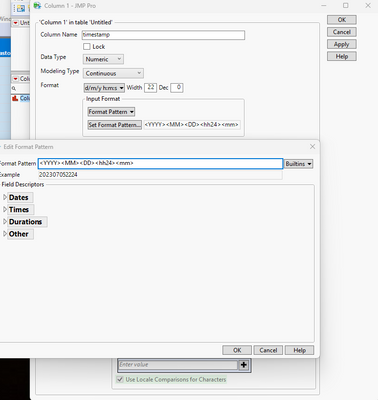
You can interactively change the character column to a datetime value by going into the Column Information dialog and changing the data type to numeric, the modeling type to continuous, and then set the Format to d/m/y h:m:s, and then use a Format Pattern for the Input Format where you specify the input components
txnelson_0-1688614029689.png


Jim

View solution in original post

Ronaldo
Level II

Re: how can i transform string to time date

thank you very much

View solution in original post

2 REPLIES 2
txnelson
Super User

Re: how can i transform string to time date

You can interactively change the character column to a datetime value by going into the Column Information dialog and changing the data type to numeric, the modeling type to continuous, and then set the Format to d/m/y h:m:s, and then use a Format Pattern for the Input Format where you specify the input components

txnelson_0-1688614029689.png


Jim
Ronaldo
Level II

Re: how can i transform string to time date

thank you very much

Recommended Articles