cancel
Showing results for 
Show  only  | Search instead for 
Did you mean: 
  • Don’t miss your chance to experience Discovery Summit Europe at our best available rate! Early bird registration through 31 Oct.
  • Graph Builder Toolbar streamlines interactive graphing. Creates shortcuts on Report and GraphBuilder Helpers toolbars. Download and install the extension.
  • JMP will suspend normal business operations for our Rest and Recharge Day on Friday, October 2, 2026.
    Regular business hours will resume on Monday, October 5, 2026.

Discussions

Solve problems, and share tips and tricks with other JMP users.
Choose Language Hide Translation Bar
nac
nac
Level III

excel add-in problem

Dear all,


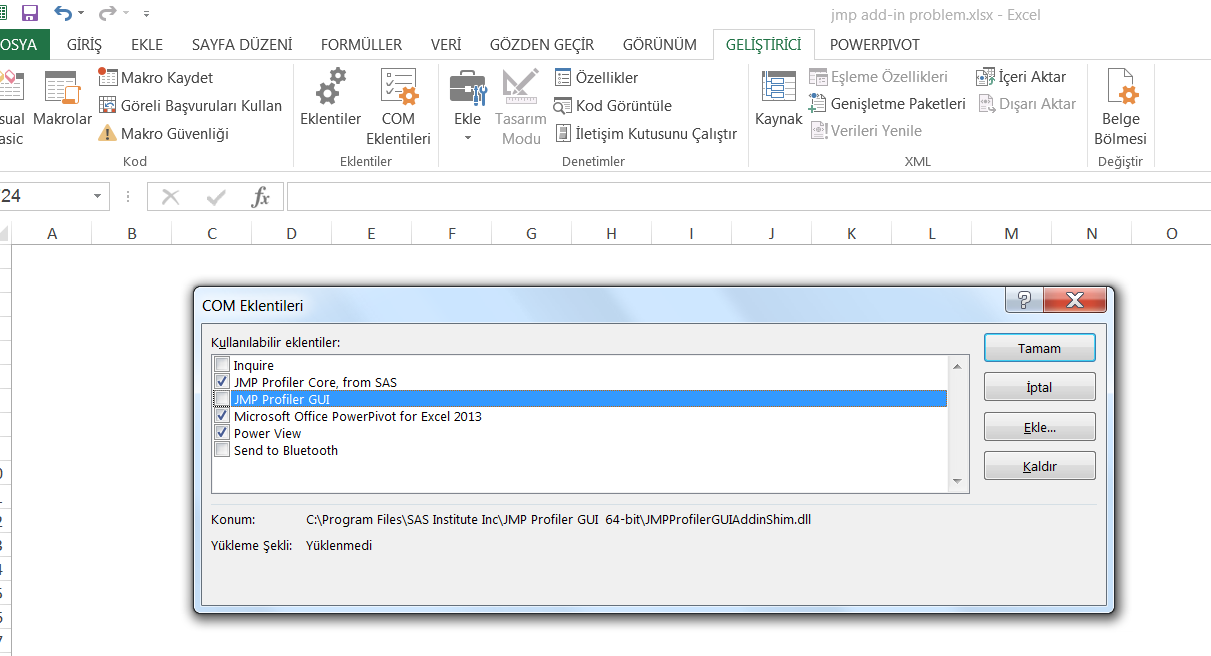
Nowadays I have a problem transfer excel results to jmp. Normaly I have jmp add-in on excel. But after a date, it is inactive. I do not understand the reason of this. I do not see jmp add-in on excel menu. When I click Developer menu on excen then COM additions as shown on the attached picture, JMP  Profiler GUI is not loaded written. When I click left box of this, JMP is seen on the menu. But when I close all excel files then reopen excel, jmp add-in is lost on top of the menu. I must go COM additions part and click this box. I reloaded excel and JMP Profiler GUI and JMP Profiler Core, the situation is not changed.

My jmp version;

JMP 12.2.0 (64-bit)

Is there anyone can help to solve this problem?

Thanks for your helps


Best Regards,



1 REPLY 1
SirBWhite
Level II

Re: excel add-in problem

Hi,


This may help:http://www.jmp.com/support/notes/56/945.html


Good Luck!


Recommended Articles