Dear all,
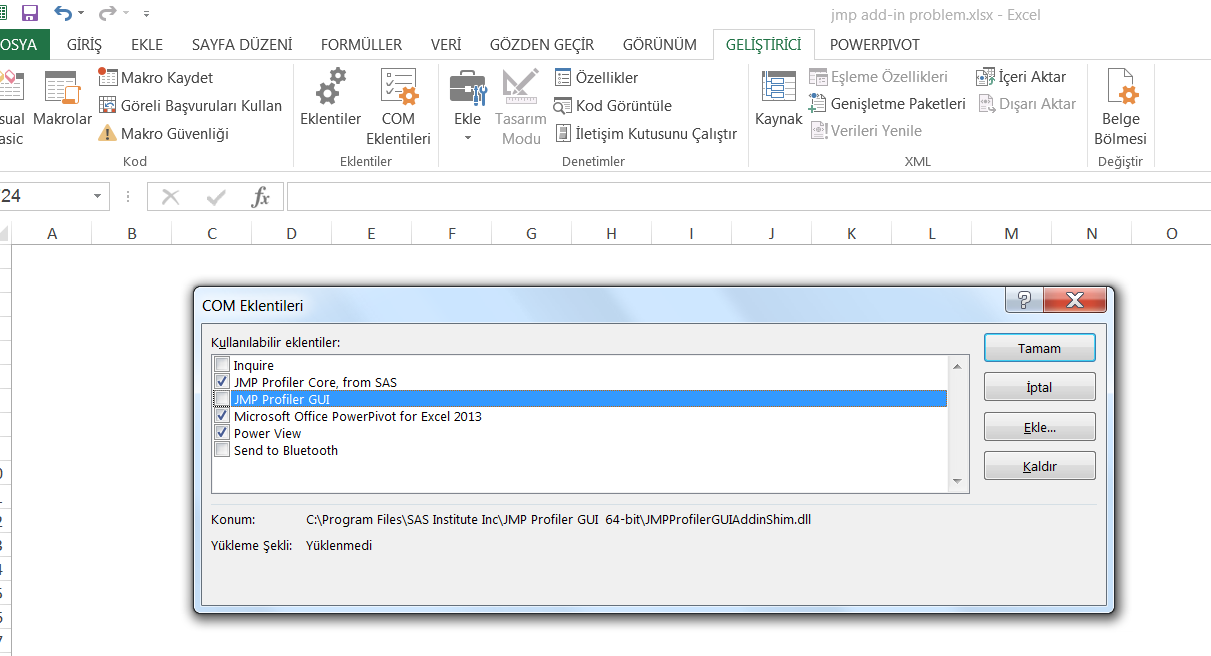
Nowadays I have a problem transfer excel results to jmp. Normaly I have jmp add-in on excel. But after a date, it is inactive. I do not understand the reason of this. I do not see jmp add-in on excel menu. When I click Developer menu on excen then COM additions as shown on the attached picture, JMP Profiler GUI is not loaded written. When I click left box of this, JMP is seen on the menu. But when I close all excel files then reopen excel, jmp add-in is lost on top of the menu. I must go COM additions part and click this box. I reloaded excel and JMP Profiler GUI and JMP Profiler Core, the situation is not changed.
My jmp version;
JMP 12.2.0 (64-bit)
Is there anyone can help to solve this problem?
Thanks for your helps
Best Regards,