cancel
Showing results for 
Show  only  | Search instead for 
Did you mean: 
  • JMP will suspend normal business operations for our Winter Holiday beginning on Wednesday, Dec. 24, 2025, at 5:00 p.m. ET (2:00 p.m. ET for JMP Accounts Receivable).
    Regular business hours will resume at 9:00 a.m. EST on Friday, Jan. 2, 2026.
  • We’re retiring the File Exchange at the end of this year. The JMP Marketplace is now your destination for add-ins and extensions.

Discussions

Solve problems, and share tips and tricks with other JMP users.
Choose Language Hide Translation Bar
Françoise
Level VI

error message

hi,

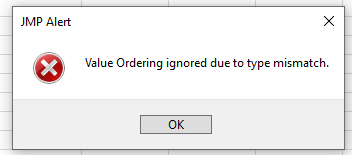
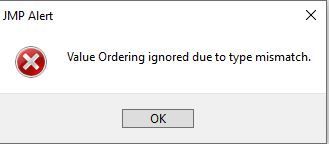
I have this message when I used a data filter:

Capture 1.JPG


what doest it means ?


best regards

1 REPLY 1
hogi
Level XIII

Re: error message

Most probably you changed the Modeling Type of a column which had some Value Order info.


In the example below, there a value order is defined for numeric height values, then the modeling type for height is changed to character.

This triggers the error message:
hogi_0-1671527333974.png


Open( "$SAMPLE_DATA/Big Class.jmp" );

Data Table( "Big Class" ):height << Set Property(
	"Value Order",
	{Custom Order(
		{56, 51, 52, 55, 68, 69, 70}
	), Common Order( 0 )}
);

Data Table( "Big Class" ):height << Data Type( Character ) <<
Set Modeling Type( "Nominal" );
Recommended Articles
