cancel
Showing results for 
Show  only  | Search instead for 
Did you mean: 

Discussions

Solve problems, and share tips and tricks with other JMP users.
%3CLINGO-SUB%20id%3D%22lingo-sub-573097%22%20slang%3D%22en-US%22%20mode%3D%22NONE%22%3ERi%3A%20abilitare%2Fdisabilitare%20le%20icone%20della%20barra%20degli%20strumenti%3C%2FLINGO-SUB%3E%3CLINGO-BODY%20id%3D%22lingo-body-573097%22%20slang%3D%22en-US%22%20mode%3D%22NONE%22%3E%3CP%3E%3CA%20href%3D%22https%3A%2F%2Fcommunity.jmp.com%2Ft5%2Fuser%2Fviewprofilepage%2Fuser-id%2F41931%22%20target%3D%22_blank%22%3E%40Jonas_Rinne%3C%2FA%3E%3C%2FP%3E%3C%2FLINGO-BODY%3E%3CLINGO-SUB%20id%3D%22lingo-sub-625061%22%20slang%3D%22en-US%22%20mode%3D%22NONE%22%3ERe%3A%20abilitare%2Fdisabilitare%20le%20icone%20della%20barra%20degli%20strumenti%3C%2FLINGO-SUB%3E%3CLINGO-BODY%20id%3D%22lingo-body-625061%22%20slang%3D%22en-US%22%20mode%3D%22NONE%22%3E%3CP%3ESe%20un'icona%20della%20barra%20degli%20strumenti%20%C3%A8%20collegata%20a%20un%20comando%20integrato%2C%20ottiene%20automaticamente%20la%20funzionalit%C3%A0%20di%20abilitazione%2Fdisabilitazione%20relativa%20al%20rispettivo%20comando.%3CBR%20%2F%3E%20...%20anche%20se%20l'utente%20sceglie%20la%20propria%20icona%3A%3C%2FP%3E%3CP%3E%3CSPAN%20class%3D%22lia-inline-image-display-wrapper%20lia-image-align-inline%22%20image-alt%3D%222023-04-21_23-23-17.gif%22%20style%3D%22width%3A%20400px%3B%22%3E%3CSPAN%20class%3D%22lia-inline-image-display-wrapper%22%20image-alt%3D%222023-04-21_23-23-17.gif%22%20style%3D%22width%3A%20224px%3B%22%3E%3CSPAN%20class%3D%22lia-inline-image-display-wrapper%22%20image-alt%3D%222023-04-21_23-23-17.gif%22%20style%3D%22width%3A%20224px%3B%22%3E%3CSPAN%20class%3D%22lia-inline-image-display-wrapper%22%20image-alt%3D%222023-04-21_23-23-17.gif%22%20style%3D%22width%3A%20224px%3B%22%3E%3CSPAN%20class%3D%22lia-inline-image-display-wrapper%22%20image-alt%3D%222023-04-21_23-23-17.gif%22%20style%3D%22width%3A%20224px%3B%22%3E%3CSPAN%20class%3D%22lia-inline-image-display-wrapper%22%20image-alt%3D%222023-04-21_23-23-17.gif%22%20style%3D%22width%3A%20224px%3B%22%3E%3CSPAN%20class%3D%22lia-inline-image-display-wrapper%22%20image-alt%3D%222023-04-21_23-23-17.gif%22%20style%3D%22width%3A%20224px%3B%22%3E%3CSPAN%20class%3D%22lia-inline-image-display-wrapper%22%20image-alt%3D%222023-04-21_23-23-17.gif%22%20style%3D%22width%3A%20224px%3B%22%3E%3CSPAN%20class%3D%22lia-inline-image-display-wrapper%22%20image-alt%3D%222023-04-21_23-23-17.gif%22%20style%3D%22width%3A%20224px%3B%22%3E%3CSPAN%20class%3D%22lia-inline-image-display-wrapper%22%20image-alt%3D%222023-04-21_23-23-17.gif%22%20style%3D%22width%3A%20224px%3B%22%3E%3Cspan%20class%3D%22lia-inline-image-display-wrapper%22%20image-alt%3D%222023-04-21_23-23-17.gif%22%20style%3D%22width%3A%20224px%3B%22%3E%3Cimg%20src%3D%22https%3A%2F%2Fcommunity.jmp.com%2Ft5%2Fimage%2Fserverpage%2Fimage-id%2F52233iB62182974F69B601%2Fimage-size%2Fmedium%3Fv%3Dv2%26amp%3Bpx%3D400%22%20role%3D%22button%22%20title%3D%222023-04-21_23-23-17.gif%22%20alt%3D%222023-04-21_23-23-17.gif%22%20%2F%3E%3C%2Fspan%3E%3C%2FSPAN%3E%3C%2FSPAN%3E%3C%2FSPAN%3E%3C%2FSPAN%3E%3C%2FSPAN%3E%3C%2FSPAN%3E%3C%2FSPAN%3E%3C%2FSPAN%3E%3C%2FSPAN%3E%3C%2FSPAN%3E%3C%2FP%3E%3CP%3E%E2%80%83%3C%2FP%3E%3CP%3EIl%20modo%20pi%C3%B9%20semplice%20per%20ottenere%20un'icona%20%22dinamica%22%20in%20un%20file%20definito%20dall'utente%3CSTRONG%3E%20barra%20degli%20strumenti%3C%2FSTRONG%3E%20%3A%3CBR%20%2F%3E%20Devo%3CSTRONG%3E%20Visualizza%2FPersonalizza%2FMenu%20e%20barre%20degli%20strumenti%3C%2FSTRONG%3E%20e%20fare%20clic%20con%20il%20pulsante%20destro%20del%20mouse%20per%20copiare%20la%20funzione%20originale%20e%20incollarla%20nella%20barra%20degli%20strumenti%20definita%20dall'utente.%3C%2FP%3E%3CP%3E%26nbsp%3B%3C%2FP%3E%3CP%3EPer%20ottenere%20tali%20icone%20di%20collegamento%20in%20definite%20dall'utente%3CSTRONG%3E%20Componenti%20aggiuntivi%3C%2FSTRONG%3E%20%2C%20bisogna%20seguire%3CA%20href%3D%22https%3A%2F%2Fcommunity.jmp.com%2Ft5%2FJMP-Wish-List%2FWorkflow-Builder-AddIns%2Fidc-p%2F625031%2Fhighlight%2Ftrue%23M4198%22%20target%3D%22_self%22%3E%20questi%20passaggi%3C%2FA%3E%20condiviso%20da%3CA%20href%3D%22https%3A%2F%2Fcommunity.jmp.com%2Ft5%2Fuser%2Fviewprofilepage%2Fuser-id%2F6878%22%20target%3D%22_blank%22%3E%20%40Jeff_Perkinson%3C%2FA%3E%3C%2FP%3E%3CP%3E%26nbsp%3B%3C%2FP%3E%3CP%3EIn%20alternativa%2C%20%C3%A8%20possibile%20modificare%20manualmente%20il%20file%20addin.jmpcust.%3CBR%20%2F%3E%20La%20sintassi%20%C3%A8%3CFONT%20face%3D%22courier%20new%2Ccourier%22%3E%20type%3D%22integrato%22%3C%2FFONT%3E%20%3A%3C%2FP%3E%3CPRE%3E%26lt%3Bjm%3Acommand%26gt%3B%0A%20%26lt%3Bjm%3Aname%26gt%3BTEXT%20TO%20COLUMNS%26lt%3B%2Fjm%3Aname%26gt%3B%0A%20%20%26lt%3Bjm%3Acaption%26gt%3BText%20to%20Columns%E2%80%A6%26lt%3B%2Fjm%3Acaption%26gt%3B%0A%20%20%26lt%3Bjm%3Aaction%20type%3D%22builtin%22%26gt%3BCOLS%3AUTILITIES%3ATEXT%20TO%20COLUMNS%26lt%3B%2Fjm%3Aaction%26gt%3B%0A%20%26lt%3B%2Fjm%3Acommand%26gt%3B%3C%2FPRE%3E%3C%2FLINGO-BODY%3E%3CLINGO-SUB%20id%3D%22lingo-sub-570738%22%20slang%3D%22en-US%22%20mode%3D%22NONE%22%3Eabilitare%2Fdisabilitare%20le%20icone%20della%20barra%20degli%20strumenti%3C%2FLINGO-SUB%3E%3CLINGO-BODY%20id%3D%22lingo-body-570738%22%20slang%3D%22en-US%22%20mode%3D%22NONE%22%3E%3CP%3ELe%20icone%20della%20barra%20degli%20strumenti%20appaiono%20grigie%20se%20la%20finestra%20ha%20il%20tipo%20sbagliato%3A%3C%2FP%3E%3CP%3E%3CSPAN%20class%3D%22lia-inline-image-display-wrapper%20lia-image-align-inline%22%20image-alt%3D%22hogi_0-1668709808567.png%22%20style%3D%22width%3A%20400px%3B%22%3E%3CSPAN%20class%3D%22lia-inline-image-display-wrapper%22%20image-alt%3D%22hogi_0-1668709808567.png%22%20style%3D%22width%3A%2023px%3B%22%3E%3Cspan%20class%3D%22lia-inline-image-display-wrapper%22%20image-alt%3D%22hogi_0-1668709808567.png%22%20style%3D%22width%3A%2023px%3B%22%3E%3Cimg%20src%3D%22https%3A%2F%2Fcommunity.jmp.com%2Ft5%2Fimage%2Fserverpage%2Fimage-id%2F47441i9121E3F402EDA798%2Fimage-size%2Fmedium%3Fv%3Dv2%26amp%3Bpx%3D400%22%20role%3D%22button%22%20title%3D%22hogi_0-1668709808567.png%22%20alt%3D%22hogi_0-1668709808567.png%22%20%2F%3E%3C%2Fspan%3E%3C%2FSPAN%3E%3C%2FSPAN%3Evs.%3CSPAN%20class%3D%22lia-inline-image-display-wrapper%20lia-image-align-inline%22%20image-alt%3D%22hogi_1-1668709841587.png%22%20style%3D%22width%3A%20400px%3B%22%3E%3CSPAN%20class%3D%22lia-inline-image-display-wrapper%22%20image-alt%3D%22hogi_1-1668709841587.png%22%20style%3D%22width%3A%2026px%3B%22%3E%3Cspan%20class%3D%22lia-inline-image-display-wrapper%22%20image-alt%3D%22hogi_1-1668709841587.png%22%20style%3D%22width%3A%2026px%3B%22%3E%3Cimg%20src%3D%22https%3A%2F%2Fcommunity.jmp.com%2Ft5%2Fimage%2Fserverpage%2Fimage-id%2F47442i4633890D227FA906%2Fimage-size%2Fmedium%3Fv%3Dv2%26amp%3Bpx%3D400%22%20role%3D%22button%22%20title%3D%22hogi_1-1668709841587.png%22%20alt%3D%22hogi_1-1668709841587.png%22%20%2F%3E%3C%2Fspan%3E%3C%2FSPAN%3E%3C%2FSPAN%3E%3C%2FP%3E%3CP%3E%26nbsp%3B%3C%2FP%3E%3CP%3Ecome%20posso%20controllare%20questo%20comportamento%20per%20le%20mie%20barre%20degli%20strumenti%3F%3C%2FP%3E%3CP%3E%26nbsp%3B%3C%2FP%3E%3CP%3E%26nbsp%3B%3C%2FP%3E%3C%2FLINGO-BODY%3E%3CLINGO-LABS%20id%3D%22lingo-labs-570738%22%20slang%3D%22en-US%22%20mode%3D%22NONE%22%3E%3CLINGO-LABEL%3EModellazione%20statistica%20avanzata%3C%2FLINGO-LABEL%3E%3CLINGO-LABEL%3EPersonalizzazione%20di%20massa%3C%2FLINGO-LABEL%3E%3CLINGO-LABEL%3EQualit%C3%A0%20e%20ingegneria%20di%20processo%3C%2FLINGO-LABEL%3E%3C%2FLINGO-LABS%3E
Choose Language Hide Translation Bar
hogi
Level XIII

enable/disable toolbar icons

Toolbar icons appear gray if the window has the wrong type:

hogi_0-1668709808567.png vs. hogi_1-1668709841587.png


how can I control this behavior for my own toolbars?


1 ACCEPTED SOLUTION

Accepted Solutions
hogi
Level XIII

Re: enable/disable toolbar icons

If a Toolbar Icon is linked to a Built-In command, it automatically gets the enable/disable functionality related to the respective command.
... even if the user chooses his own icon:
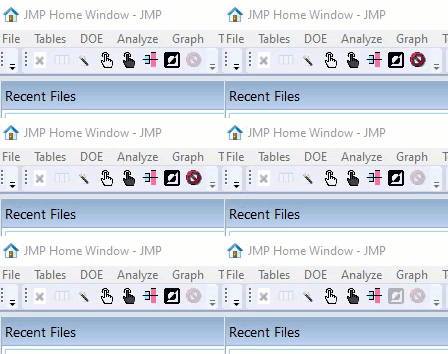
2023-04-21_23-23-17.gif

The easiest way to get a "dynamic" Icon into a user-defined toolbar
Got to View/Cutomize/Menus and Toolbars, and rightClick copy the original function and paste it into the user-defined Toolbar.


To get such Shortcut Icons into user-defined Add-Ins, one has to follow these steps shared by @Jeff_Perkinson 


Alternatively, one can edit the addin.jmpcust file manually.
The syntax is type="builtin":

<jm:command>
 <jm:name>TEXT TO COLUMNS</jm:name>
  <jm:caption>Text to Columns…</jm:caption>
  <jm:action type="builtin">COLS:UTILITIES:TEXT TO COLUMNS</jm:action>
 </jm:command>

View solution in original post

2 REPLIES 2
hogi
Level XIII

Re: enable/disable toolbar icons

hogi
Level XIII

Re: enable/disable toolbar icons

If a Toolbar Icon is linked to a Built-In command, it automatically gets the enable/disable functionality related to the respective command.
... even if the user chooses his own icon:

2023-04-21_23-23-17.gif

The easiest way to get a "dynamic" Icon into a user-defined toolbar
Got to View/Cutomize/Menus and Toolbars, and rightClick copy the original function and paste it into the user-defined Toolbar.


To get such Shortcut Icons into user-defined Add-Ins, one has to follow these steps shared by @Jeff_Perkinson 


Alternatively, one can edit the addin.jmpcust file manually.
The syntax is type="builtin":

<jm:command>
 <jm:name>TEXT TO COLUMNS</jm:name>
  <jm:caption>Text to Columns…</jm:caption>
  <jm:action type="builtin">COLS:UTILITIES:TEXT TO COLUMNS</jm:action>
 </jm:command>

Recommended Articles
