Turn on suggestions
Auto-suggest helps you quickly narrow down your search results by suggesting possible matches as you type.
- Don’t miss your chance to experience Discovery Summit Europe at our best available rate! Early bird registration through 31 Oct.
- Graph Builder Toolbar streamlines interactive graphing. Creates shortcuts on Report and GraphBuilder Helpers toolbars. Download and install the extension.
Options
- Subscribe to RSS Feed
- Mark Topic as New
- Mark Topic as Read
- Float this Topic for Current User
- Bookmark
- Subscribe
- Mute
- Printer Friendly Page
Discussions
Solve problems, and share tips and tricks with other JMP users.- User Community
- :
- Discussions
- :
- different spec limits for different variability plots

Level II
- Mark as New
- Bookmark
- Subscribe
- Mute
- Subscribe to RSS Feed
- Get Direct Link
- Report Inappropriate Content
different spec limits for different variability plots
Created:
May 31, 2022 11:08 PM
| Last Modified: Jun 9, 2023 10:00 AM
(2003 views)
Hello,
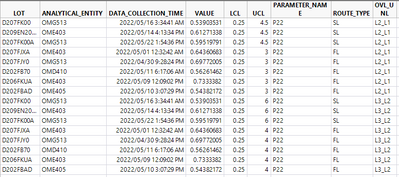
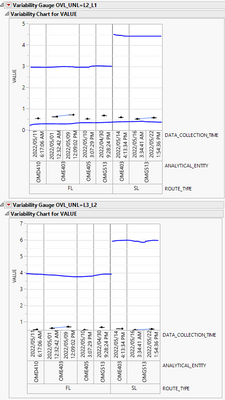
I am trying to create variability plots and show spec limits with values specified in LCL and UCL columns. I need different spec values for within graph (based on ROUTE_TYPE column, FL and SL have different limits) and for 2nd variability plot (for OVL_UNL parameter, L2_L1 has different FL/SL limits vs L3_L2)
Thanks
1 ACCEPTED SOLUTION
Accepted Solutions


Super User
Solution
- Mark as New
- Bookmark
- Subscribe
- Mute
- Subscribe to RSS Feed
- Get Direct Link
- Report Inappropriate Content
Re: different spec limits for different variability plots
Created:
Jun 1, 2022 12:37 AM
| Last Modified: May 31, 2022 9:41 PM
(1995 views)
| Posted in reply to message from newbie_4 05-31-2022
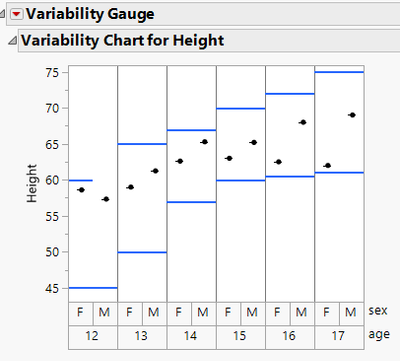
To accomplish this you will need to use << Add Graphics Script to the Variability Chart, that reads the LSL and USL values an then adds them as lines to the chart. The script below is an example
Names Default To Here( 1 );

dt = New Table( "Example",
	Add Rows( 12 ),
	New Column( "age", "Ordinal", Format( "Fixed Dec", 5, 0 ), Set Values( [12, 12, 13, 13, 14, 14, 15, 15, 16, 16, 17, 17] ) ),
	New Column( "sex", Character( 1 ), "Nominal", Set Values( {"F", "M", "F", "M", "F", "M", "F", "M", "F", "M", "F", "M"} ) ),
	New Column( "Height",
		Numeric,
		"Continuous",
		Format( "Fixed Dec", 12, 1 ),
		Set Values( [58.6, 57.3333333333333, 59, 61.25, 62.6, 65.2857142857143, 63, 65.2, 62.5, 68, 62, 69] )
	),
	New Column( "LSL",
		Numeric,
		"Continuous",
		Format( "Best", 12 ),
		Set Values( [45, 45, 50, 50, 57, 57, 60, 60, 60.5, 60.5, 61, 61] )
	),
	New Column( "USL",
		Numeric,
		"Continuous",
		Format( "Best", 12 ),
		Set Values( [60, 60, 65, 65, 67, 67, 70, 70, 72, 72, 75, 75] )
	)
);

vc = Variability Chart( Y( :Height ), X( :age, :sex ), Std Dev Chart( 0 ) );
Report( vc )[framebox( 1 )] << add graphics script(
	For( i = 1, i <= N Rows( dt ), i++,
		xstart = (:age[i] - Col Min( :age )) * 2;
		If( :sex[i] == "M",
			xstart = xstart + 1
		);
		Pen Color( blue );
		Pen Size( 2 );
		yMat = Matrix( :LSL[i] || :LSL[i] );
		xMat = Matrix( xstart || xstart + 1 );
		Line( xMat, yMat );
		yMat = Matrix( :USL[i] || :USL[i] );
		Line( xMat, yMat );
	)
);
Jim
1 REPLY 1
Super User
Solution
- Mark as New
- Bookmark
- Subscribe
- Mute
- Subscribe to RSS Feed
- Get Direct Link
- Report Inappropriate Content
Re: different spec limits for different variability plots
Created:
Jun 1, 2022 12:37 AM
| Last Modified: May 31, 2022 9:41 PM
(1996 views)
| Posted in reply to message from newbie_4 05-31-2022
To accomplish this you will need to use << Add Graphics Script to the Variability Chart, that reads the LSL and USL values an then adds them as lines to the chart. The script below is an example
Names Default To Here( 1 );

dt = New Table( "Example",
	Add Rows( 12 ),
	New Column( "age", "Ordinal", Format( "Fixed Dec", 5, 0 ), Set Values( [12, 12, 13, 13, 14, 14, 15, 15, 16, 16, 17, 17] ) ),
	New Column( "sex", Character( 1 ), "Nominal", Set Values( {"F", "M", "F", "M", "F", "M", "F", "M", "F", "M", "F", "M"} ) ),
	New Column( "Height",
		Numeric,
		"Continuous",
		Format( "Fixed Dec", 12, 1 ),
		Set Values( [58.6, 57.3333333333333, 59, 61.25, 62.6, 65.2857142857143, 63, 65.2, 62.5, 68, 62, 69] )
	),
	New Column( "LSL",
		Numeric,
		"Continuous",
		Format( "Best", 12 ),
		Set Values( [45, 45, 50, 50, 57, 57, 60, 60, 60.5, 60.5, 61, 61] )
	),
	New Column( "USL",
		Numeric,
		"Continuous",
		Format( "Best", 12 ),
		Set Values( [60, 60, 65, 65, 67, 67, 70, 70, 72, 72, 75, 75] )
	)
);

vc = Variability Chart( Y( :Height ), X( :age, :sex ), Std Dev Chart( 0 ) );
Report( vc )[framebox( 1 )] << add graphics script(
	For( i = 1, i <= N Rows( dt ), i++,
		xstart = (:age[i] - Col Min( :age )) * 2;
		If( :sex[i] == "M",
			xstart = xstart + 1
		);
		Pen Color( blue );
		Pen Size( 2 );
		yMat = Matrix( :LSL[i] || :LSL[i] );
		xMat = Matrix( xstart || xstart + 1 );
		Line( xMat, yMat );
		yMat = Matrix( :USL[i] || :USL[i] );
		Line( xMat, yMat );
	)
);
Jim
Recommended Articles
- © 2026 JMP Statistical Discovery LLC. All Rights Reserved.
- Terms of Use
- Privacy Statement
- Contact Us