- Don’t miss your chance to experience Discovery Summit Europe at our best available rate! Early bird registration through 31 Oct.
- Graph Builder Toolbar streamlines interactive graphing. Creates shortcuts on Report and GraphBuilder Helpers toolbars. Download and install the extension.
- Subscribe to RSS Feed
- Mark Topic as New
- Mark Topic as Read
- Float this Topic for Current User
- Bookmark
- Subscribe
- Mute
- Printer Friendly Page
Discussions
Solve problems, and share tips and tricks with other JMP users.- User Community
- :
- Discussions
- :
- Why time shows as HH:MM and thousands?

- Mark as New
- Bookmark
- Subscribe
- Mute
- Subscribe to RSS Feed
- Get Direct Link
- Report Inappropriate Content
Why time shows as HH:MM and thousands?
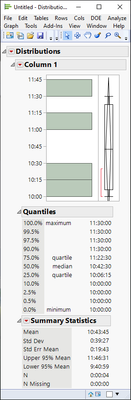
I have multiple columns with times for a procedure. I divided it into 4 stages and created a formula for time expended in each stage. However, when I try to get the mean and SD, the time appears in thousands while the median and quartiles show in HH:MM, which is the format that I want. Does anyone know why that happened?

Accepted Solutions


- Mark as New
- Bookmark
- Subscribe
- Mute
- Subscribe to RSS Feed
- Get Direct Link
- Report Inappropriate Content
Re: Why time shows as HH:MM and thousands?
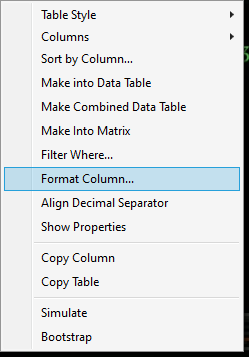
I think you will have to modify the the format of summary statistics. Right click on the numeric part of Summary Statistics and select Format Column
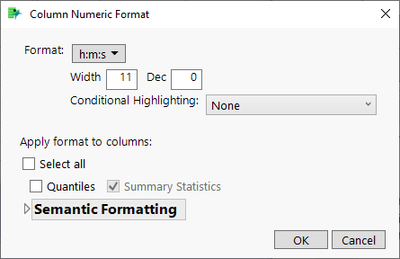
Note: this will break N and N Missing though, as they will be formatted as time so might be a good idea to hide those.
- Mark as New
- Bookmark
- Subscribe
- Mute
- Subscribe to RSS Feed
- Get Direct Link
- Report Inappropriate Content
Re: Why time shows as HH:MM and thousands?
I think you will have to modify the the format of summary statistics. Right click on the numeric part of Summary Statistics and select Format Column
Note: this will break N and N Missing though, as they will be formatted as time so might be a good idea to hide those.
Recommended Articles
- © 2026 JMP Statistical Discovery LLC. All Rights Reserved.
- Terms of Use
- Privacy Statement
- Contact Us