- JMP will suspend normal business operations for our Winter Holiday beginning on Wednesday, Dec. 24, 2025, at 5:00 p.m. ET (2:00 p.m. ET for JMP Accounts Receivable).
Regular business hours will resume at 9:00 a.m. EST on Friday, Jan. 2, 2026. - We’re retiring the File Exchange at the end of this year. The JMP Marketplace is now your destination for add-ins and extensions.
- Subscribe to RSS Feed
- Mark Topic as New
- Mark Topic as Read
- Float this Topic for Current User
- Bookmark
- Subscribe
- Mute
- Printer Friendly Page
Discussions
Solve problems, and share tips and tricks with other JMP users.- JMP User Community
- :
- Discussions
- :
- Why do the colors of different other points fade away in Graphbuilder?

- Mark as New
- Bookmark
- Subscribe
- Mute
- Subscribe to RSS Feed
- Get Direct Link
- Report Inappropriate Content
Why do the colors of different other points fade away in Graphbuilder?
Hello,
I have been able to work on a script to edit the legend, based on a Flag column. When I recreate the same plot in GraphBuilder, I get a darker shade of colors, but when I run my script, it gives me a faded shade than normal. Why is this? I know it is something related to rows being selected, and the GraphBuilder just highlights those rows or cells. I have tried incorporating
dt << Clear Column Selection();
dt << Clear Row Selection();
but it does not work. The original plot
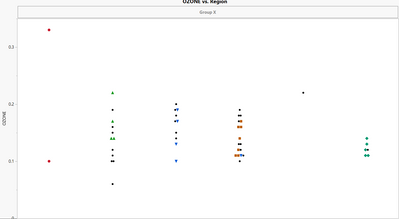
and the faded plot
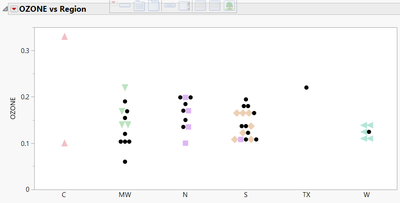
dlg = Column Dialog(
	yList = Col List( "Ys",
		Min Col(1)
	),
	xList = Col List( "Xs",
		Min Col(1),
		Max Col(1)
	),
	byList = Col List( "Color/Mark By",
		Max Col( 1 ) )
);

color_cols = dlg["byList"];

If( Is Missing( color_cols ) != {},
	dt << Color or Mark by Column( color_cols[1], Marker Theme( "solid" ), Color Theme( "JMP Dark" ) );
	for each row(
		If(As Column( dt, color_cols[1] ) == "", As Column( dt, color_cols[1] )="!!");
    );
	dt << select where(As Column( dt, color_cols[1] ) == "!!" ) << Markers(0);
	dt << select where(As Column( dt, color_cols[1] ) == "!!") << Colors(0);
);

dt << Clear Column Selection();
dt << Clear Row Selection();

meas_cols = dt << Get Column Names("String");
If(dlg["button"] == 1,

	// Get the selected X and Y columns
	x_col = dlg["xList"];
	y_cols = dlg["yList"];


	nw = New Window( "graphs", <<journal, myVLB = V List Box() );

	For(i = 1, i <= N Items(y_cols), i++,

		y_name = Char(y_cols[i]);
		x_name = Char(x_col[1]);

		gb = dt << Graph Builder(
			Size(700, 350),
			Show Control Panel(0),
			Show Footer(0),
			Variables(X(x_col[1]), Y(y_cols[i]), Color( color_cols[1] )),
			Elements(Points(X, Y, Legend(7))),
			invisible,
			SendToReport(
			Dispatch(
				{},
				"Graph Builder",
				OutlineBox,
				{Set Title( y_name || " vs " || x_name ), Image Export Display( Normal )}
				),
			Dispatch(
				{},
				"Graph Builder",
				FrameBox,
				{Marker Size( 5 ), Transparency(1)}
				),
			Dispatch(
				{},
				"400",
				ScaleBox,
				{Legend Model(
					7,
					Properties( 0, {Line Color( 0 )}, Item ID( "!!", 1 ) )
				)}
			)
		);
		lgnd = gb << Get Legend Display;
		items = lgnd << Get Items;

		For Each({item}, items,
			show(item << get label);
			If(item << Get Label == "!!",
				item << Set Visible(0)
			)
		);
		gb << Show Legend(1);
		myVLB << append( Report( gb ) );
		gb << delete;
	);
);
The flag column is stored in color_cols[1], which is the full form of region column for few cells, and empty everywhere else.
Accepted Solutions


- Mark as New
- Bookmark
- Subscribe
- Mute
- Subscribe to RSS Feed
- Get Direct Link
- Report Inappropriate Content
Re: Why do the colors of different other points fade away in Graphbuilder?
It's shaded because you selected some rows.
May be you can share the Log to check if there's any issue with the script to clear the selection ;
dt << Clear Column Selection();
dt << Clear Row Selection();
or try;
dt << Clear selection;
dt << Clear Select();
- Mark as New
- Bookmark
- Subscribe
- Mute
- Subscribe to RSS Feed
- Get Direct Link
- Report Inappropriate Content
Re: Why do the colors of different other points fade away in Graphbuilder?
It's shaded because you selected some rows.
May be you can share the Log to check if there's any issue with the script to clear the selection ;
dt << Clear Column Selection();
dt << Clear Row Selection();
or try;
dt << Clear selection;
dt << Clear Select();
- Mark as New
- Bookmark
- Subscribe
- Mute
- Subscribe to RSS Feed
- Get Direct Link
- Report Inappropriate Content
Re: Why do the colors of different other points fade away in Graphbuilder?
Yes, you are indeed correct. I checked my logs and the error is in the line
dt << Clear Row Selection();Can confirm
dt << Clear select;works! Thank you very much.
Recommended Articles
- © 2026 JMP Statistical Discovery LLC. All Rights Reserved.
- Terms of Use
- Privacy Statement
- Contact Us