cancel
Showing results for 
Show  only  | Search instead for 
Did you mean: 
  • JMP will suspend normal business operations for our Winter Holiday beginning on Wednesday, Dec. 24, 2025, at 5:00 p.m. ET (2:00 p.m. ET for JMP Accounts Receivable).
    Regular business hours will resume at 9:00 a.m. EST on Friday, Jan. 2, 2026.
  • We’re retiring the File Exchange at the end of this year. The JMP Marketplace is now your destination for add-ins and extensions.

Discussions

Solve problems, and share tips and tricks with other JMP users.
%3CLINGO-SUB%20id%3D%22lingo-sub-20377%22%20slang%3D%22en-US%22%20mode%3D%22NONE%22%3E%E7%80%91%E5%B8%83%E5%9B%BE%E5%86%8D%E8%AE%BF%3C%2FLINGO-SUB%3E%3CLINGO-BODY%20id%3D%22lingo-body-20377%22%20slang%3D%22en-US%22%20mode%3D%22NONE%22%3E%26lt%3Bmeta%20http-equiv%3D%22Content-Type%22%20content%3D%22text%2Fhtml%3B%20charset%3DUTF-8%22%20%2F%26gt%3B%3CP%3E%3CSPAN%20class%3D%22lia-inline-image-display-wrapper%20lia-image-align-inline%22%20style%3D%22width%3A%20373px%3B%22%3E%3Cspan%20class%3D%22lia-inline-image-display-wrapper%22%20image-alt%3D%2212696_Waterfall%20Example.gif%22%20style%3D%22width%3A%20373px%3B%22%3E%3Cimg%20src%3D%22https%3A%2F%2Fcommunity.jmp.com%2Ft5%2Fimage%2Fserverpage%2Fimage-id%2F3688i2FA5C1866E0D400F%2Fimage-size%2Fmedium%3Fv%3Dv2%26amp%3Bpx%3D400%22%20role%3D%22button%22%20title%3D%2212696_Waterfall%20Example.gif%22%20alt%3D%2212696_Waterfall%20Example.gif%22%20%2F%3E%3C%2Fspan%3E%3C%2FSPAN%3E%3C%2FP%3E%3CP%3E%E6%88%91%E6%AD%A3%E5%9C%A8%E5%B0%9D%E8%AF%95%E4%BD%BF%E7%94%A8Graph%20Builder%E5%B9%B3%E5%8F%B0%E5%88%9B%E5%BB%BA%E7%80%91%E5%B8%83%E5%9B%BE%E3%80%82%26nbsp%3B%20%E8%BF%99%E5%B0%B1%E6%98%AF%E6%88%91%E5%88%B0%E7%9B%AE%E5%89%8D%E4%B8%BA%E6%AD%A2%E6%89%80%E6%8B%A5%E6%9C%89%E7%9A%84%E3%80%82%26nbsp%3B%20%E6%88%91%E7%8E%B0%E5%9C%A8%E8%A6%81%E8%A7%A3%E5%86%B3%E4%B8%A4%E4%B8%AA%E9%97%AE%E9%A2%98%EF%BC%9A%E5%A6%82%E4%BD%95%E6%9B%B4%E6%94%B9%E9%A2%9C%E8%89%B2%E6%88%96%E4%BB%BB%E4%BD%95%E6%9D%A1%E5%BD%A2%3B%E6%88%91%E5%B8%8C%E6%9C%9B%E6%BD%9C%E5%9C%A8%E5%92%8C%E5%AE%9E%E9%99%85%E7%9A%84%E6%9D%A1%E5%BD%A2%E4%B8%BA%E8%93%9D%E8%89%B2%EF%BC%8C%E6%8D%9F%E5%A4%B1%E6%9D%A1%E5%BD%A2%E4%B8%BA%E7%BA%A2%E8%89%B2%EF%BC%8C%E4%BB%BB%E4%BD%95%E4%BF%A1%E7%94%A8%E6%9D%A1%E5%BD%A2%E4%B8%BA%E7%BB%BF%E8%89%B2%E3%80%82%26nbsp%3B%20%E6%AD%A4%E5%A4%96%EF%BC%8C%E6%88%91%E5%B8%8C%E6%9C%9B%E4%B8%8D%E6%98%BE%E7%A4%BA%E5%9C%A8%E7%A9%BA%E7%99%BD%E5%8C%BA%E5%9F%9F%E6%98%BE%E7%A4%BA%E7%9A%84%E6%A0%87%E7%AD%BE%E3%80%82%26nbsp%3B%20%E4%BB%BB%E4%BD%95%E5%B8%AE%E5%8A%A9%EF%BC%8C%E5%B0%86%E4%B8%8D%E8%83%9C%E6%84%9F%E6%BF%80%EF%BC%81%E8%B0%A2%E8%B0%A2%EF%BC%81%3C%2FP%3E%3C%2FLINGO-BODY%3E%3CLINGO-SUB%20id%3D%22lingo-sub-20379%22%20slang%3D%22en-US%22%20mode%3D%22NONE%22%3E%E5%9B%9E%E5%A4%8D%EF%BC%9A%E9%87%8D%E6%96%B0%E5%AE%A1%E8%A7%86%E7%80%91%E5%B8%83%E5%9B%BE%3C%2FLINGO-SUB%3E%3CLINGO-BODY%20id%3D%22lingo-body-20379%22%20slang%3D%22en-US%22%20mode%3D%22NONE%22%3E%3CP%3EMichael%EF%BC%8C%E6%98%AF%E7%9A%84%EF%BC%8C%E6%88%91%E5%B7%B2%E7%BB%8F%E5%B0%9D%E8%AF%95%E8%BF%87Brady%20Brady%E7%9A%84%E6%8F%92%E4%BB%B6%E3%80%82%E7%84%B6%E8%80%8C%EF%BC%8C%E4%BC%BC%E4%B9%8E%E5%AD%98%E5%9C%A8%E4%B8%80%E4%BA%9B%E9%97%AE%E9%A2%98%3B%20A.%EF%BC%89%E4%BF%9D%E5%AD%98%E8%84%9A%E6%9C%AC%E6%B2%A1%E6%9C%89%E7%83%AD%E7%82%B9%EF%BC%8C%E5%9B%A0%E6%AD%A4%E6%AF%8F%E6%AC%A1%E6%9B%B4%E6%96%B0%E6%95%B0%E6%8D%AE%E6%97%B6%E9%83%BD%E5%BF%85%E9%A1%BB%E5%8D%95%E7%8B%AC%E9%87%8D%E6%96%B0%E7%94%9F%E6%88%90%E7%80%91%E5%B8%83%E5%9B%BE%E3%80%82%26nbsp%3B%20%E6%88%91%E6%9C%8921%E4%B8%AA%E5%9B%BE%E8%A1%A8%EF%BC%8C%E6%88%91%E9%9C%80%E8%A6%81%E6%AF%8F%E5%91%A8%E8%87%B3%E5%B0%91%E6%9B%B4%E6%96%B0%E4%B8%A4%E6%AC%A1%E3%80%82%26nbsp%3B%20B.%EF%BC%89%E6%82%A8%E6%97%A0%E6%B3%95%E5%B0%86%E5%9B%BE%E8%A1%A8%E5%A4%8D%E5%88%B6%E5%B9%B6%E7%B2%98%E8%B4%B4%E5%88%B0PowerPoint%E3%80%82%26nbsp%3B%20%E5%BD%93%E6%88%91%E5%B0%9D%E8%AF%95%E6%97%B6%EF%BC%8C%E6%88%91%E5%8F%AA%E4%BC%9A%E5%9C%A8%E6%B2%A1%E6%9C%89%E6%9D%A1%E5%BD%A2%E5%9B%BE%E7%9A%84%E6%83%85%E5%86%B5%E4%B8%8B%E7%B2%98%E8%B4%B4%E7%BD%91%E6%A0%BC%E5%B9%B6%E6%98%BE%E7%A4%BA%E9%94%99%E8%AF%AF%E6%B6%88%E6%81%AF%EF%BC%88%E5%9B%BE%E5%BD%A2%E8%84%9A%E6%9C%AC%E5%9C%A8%E6%97%A5%E5%BF%97%E4%B8%AD%E6%8A%A5%E5%91%8A%E9%94%99%E8%AF%AF%EF%BC%89%E3%80%82%3C%2FP%3E%3C%2FLINGO-BODY%3E%3CLINGO-SUB%20id%3D%22lingo-sub-20378%22%20slang%3D%22en-US%22%20mode%3D%22NONE%22%3E%E5%9B%9E%E5%A4%8D%EF%BC%9A%E9%87%8D%E6%96%B0%E5%AE%A1%E8%A7%86%E7%80%91%E5%B8%83%E5%9B%BE%3C%2FLINGO-SUB%3E%3CLINGO-BODY%20id%3D%22lingo-body-20378%22%20slang%3D%22en-US%22%20mode%3D%22NONE%22%3E%3CP%3E%E6%82%A8%E6%98%AF%E5%90%A6%E5%B0%9D%E8%AF%95%E8%BF%87%E5%B0%86Brady%E7%9A%84%E6%8F%92%E4%BB%B6%E7%94%A8%E4%BA%8E%E7%80%91%E5%B8%83%E5%9B%BE%EF%BC%9F%3C%2FP%3E%3CP%3E%3C%2FP%3E%3CP%3E%3CA%20_jive_internal%3D%22true%22%20href%3D%22https%3A%2F%2Fcommunity.jmp.com%2Fdocs%2FDOC-6235%22%20target%3D%22_blank%22%3Ehttps%3A%2F%2Fcommunity.jmp.com%2Fdocs%2FDOC-6235%3C%2FA%3E%3C%2FP%3E%3CP%3E%3C%2FP%3E%3CP%3E%E6%88%91%E8%AE%A4%E4%B8%BA%E5%AE%83%E7%9A%84%E6%A0%B8%E5%BF%83%E6%98%AF%E4%BD%A0%E6%AD%A3%E5%9C%A8%E5%B0%9D%E8%AF%95%E4%BD%BF%E7%94%A8%E5%9B%BE%E5%BD%A2%E6%9E%84%E5%BB%BA%E5%99%A8%E3%80%82%26nbsp%3B%20%E5%8F%AF%E8%83%BD%E4%BC%9A%E8%8A%82%E7%9C%81%E4%BD%A0%E4%B8%80%E4%BA%9B%E6%97%B6%E9%97%B4%E3%80%82%3C%2FP%3E%3CP%3E%3C%2FP%3E%3CP%3E%E6%9C%80%E5%A5%BD%EF%BC%8C%3C%2FP%3E%3CP%3E%3C%2FP%3E%3CP%3E%E4%B8%AD%E5%8F%B7%3C%2FP%3E%3C%2FLINGO-BODY%3E
Choose Language Hide Translation Bar
Steven_Moore
Level VI

Waterfall Charts Revisited

12696_Waterfall Example.gif

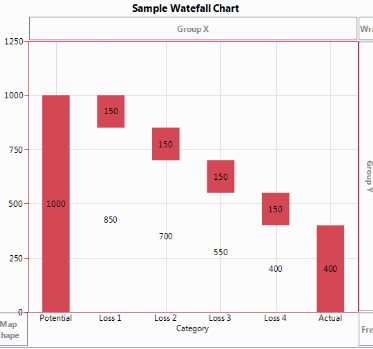
I am trying to create a waterfall chart using the Graph Builder platform.  This is what I have so far.  I now have two issues to resolve:  How to change the color or any of the bars;  I want the Potential and Actual bars to be blue, Loss bars to be red, and any credit bars to be green.  Also, I want the labels showing in the white space to not be shown.  Any help would be appreciated!  Thanks!

Steve
2 REPLIES 2

Re: Waterfall Charts Revisited

Have you tried using Brady's Add-in for waterfall charts?

https://community.jmp.com/docs/DOC-6235

I think at its core it's using the graph builder like you are trying to do.  Might save you some time.

Best,

M

Steven_Moore
Level VI

Re: Waterfall Charts Revisited

Michael,  Yes, I have tried the add-in by Brady Brady. however, there appear to be some problems;  A.)  There is no hot spot to save a script, so you have to regenerate the waterfall chart(s) individually every time you update the data.  I have 21 charts I need to update at least twice per week.  B.)  You cannot copy and paste the charts to PowerPoint.  When I try, I only get the grid to paste with an error message (Graphics script reported errors in log) without the bars.

Steve

Recommended Articles