- Don’t miss your chance to experience Discovery Summit Europe at our best available rate! Early bird registration through 31 Oct.
- Graph Builder Toolbar streamlines interactive graphing. Creates shortcuts on Report and GraphBuilder Helpers toolbars. Download and install the extension.
- JMP will suspend normal business operations for our Rest and Recharge Day on Friday, October 2, 2026.
Regular business hours will resume on Monday, October 5, 2026.
- Subscribe to RSS Feed
- Mark Topic as New
- Mark Topic as Read
- Float this Topic for Current User
- Bookmark
- Subscribe
- Mute
- Printer Friendly Page
Discussions
Solve problems, and share tips and tricks with other JMP users.- User Community
- :
- Discussions
- :
- Re: Value Colors - same color for a block of values?

- Mark as New
- Bookmark
- Subscribe
- Mute
- Subscribe to RSS Feed
- Get Direct Link
- Report Inappropriate Content
Value Colors - same color for a block of values?
When defining colors via value colors, is there an easy way to define the same color for a block of (e.g. 100) adjacent values?
I can select the block via Shift Click, but how to apply the color.
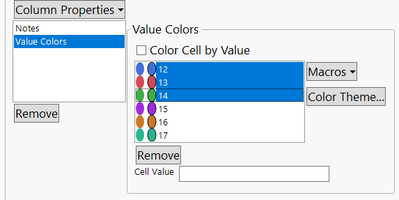
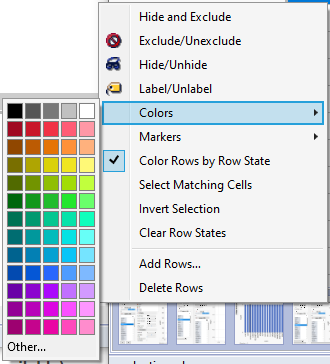
Selecting the respective rows and changing the color manually is no option because I want the rule to be applied dynamically after data changes.
Accepted Solutions


- Mark as New
- Bookmark
- Subscribe
- Mute
- Subscribe to RSS Feed
- Get Direct Link
- Report Inappropriate Content
Re: Value Colors - same color for a block of values?
Hi,
Considering your advanced level in this Discussion forum, I am unsure if this suggestion will help.
Have you considered creating a grouping formula (e.g., Quantiles) to which you could assign colors?
If(
	:X <= Col Quantile( :X, 0.25 ), 1,
	Col Quantile( :X, 0.25 ) < :X <= Col Quantile( :X, 0.5 ), 2,
	Col Quantile( :X, 0.5 ) < :X <= Col Quantile( :X, 0.75 ), 3,
	4
);

// OR a classification based on Rank //

Round( (Col Rank( :X ) * 10) / N Rows(), 0 );
These are just workarounds.
Best,
TS
- Mark as New
- Bookmark
- Subscribe
- Mute
- Subscribe to RSS Feed
- Get Direct Link
- Report Inappropriate Content
Re: Value Colors - same color for a block of values?
Hi,
Considering your advanced level in this Discussion forum, I am unsure if this suggestion will help.
Have you considered creating a grouping formula (e.g., Quantiles) to which you could assign colors?
If(
	:X <= Col Quantile( :X, 0.25 ), 1,
	Col Quantile( :X, 0.25 ) < :X <= Col Quantile( :X, 0.5 ), 2,
	Col Quantile( :X, 0.5 ) < :X <= Col Quantile( :X, 0.75 ), 3,
	4
);

// OR a classification based on Rank //

Round( (Col Rank( :X ) * 10) / N Rows(), 0 );
These are just workarounds.
Best,
TS
- Mark as New
- Bookmark
- Subscribe
- Mute
- Subscribe to RSS Feed
- Get Direct Link
- Report Inappropriate Content
Re: Value Colors - same color for a block of values?
An auxiliary variable is a good idea, thanks :)
- Mark as New
- Bookmark
- Subscribe
- Mute
- Subscribe to RSS Feed
- Get Direct Link
- Report Inappropriate Content
Re: Value Colors - same color for a block of values?
While playing around I found out that for long lists the values in a GraphBuiler plot don't match the values defined via Value Colors ( TS-00045154). According to Jmp support, this is a known issue and will be fixed in Jmp 18.
Workaround: define the colors via JSL:
dt = Open( "$SAMPLE_DATA/Aircraft Incidents.jmp" );
locs= AssociativeArray(dt:Location << get values) << get Keys;
myMax=N items(locs);
colorList = Transform Each({i},As List(Transpose(1::myMax)),
                Substitute(Expr(__a__ = __b__), Expr(__a__), locs[i], Expr(__b__), -15000000 +i)
);
dt:Location << delete property("Value Colors");
Eval(substitute(Expr(dt:Location << Set Property("Value Colors",__cols__)),Expr(__cols__),Name Expr(colorList)));
Graph Builder(
                Size( 490, 458 ),
                Show Control Panel( 0 ),
                Variables( X( :Location ), Color( :location ) ),
                Elements( Points( X ) )
);
Recommended Articles
- © 2026 JMP Statistical Discovery LLC. All Rights Reserved.
- Terms of Use
- Privacy Statement
- Contact Us