- Don’t miss your chance to experience Discovery Summit Europe at our best available rate! Early bird registration through 31 Oct.
- Graph Builder Toolbar streamlines interactive graphing. Creates shortcuts on Report and GraphBuilder Helpers toolbars. Download and install the extension.
- JMP will suspend normal business operations for our Rest and Recharge Day on Friday, October 2, 2026.
Regular business hours will resume on Monday, October 5, 2026.
- Subscribe to RSS Feed
- Mark Topic as New
- Mark Topic as Read
- Float this Topic for Current User
- Bookmark
- Subscribe
- Mute
- Printer Friendly Page
Discussions
Solve problems, and share tips and tricks with other JMP users.- User Community
- :
- Discussions
- :
- Use for loop variable in a formula

- Mark as New
- Bookmark
- Subscribe
- Mute
- Subscribe to RSS Feed
- Get Direct Link
- Report Inappropriate Content
Use for loop variable in a formula
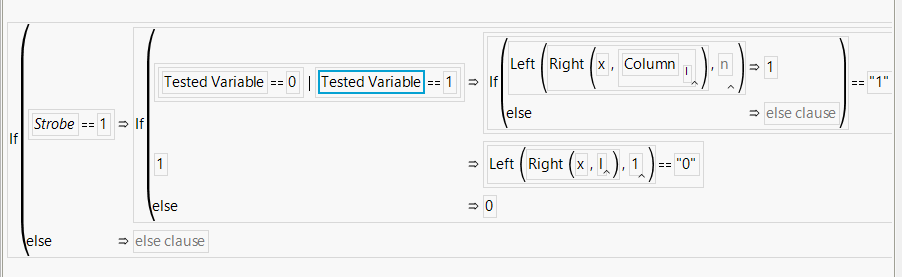
Trying with this script but variable "l" is not working, only variable "k" is working. Anyway to solve this?
For( k = 40, k <= 54, k += 2,
	x1 = 1;
	x2 = 8;
	y1 = 40;
	y2 = 54;
	m = (y2 - y1) / (x2 - x1);
	c = y2 - (m * x1);
	l = (k - c) / m;
	dt << New Column( "Test" || Char( k ),
		Numeric,
		"Continuous",
		Format( "Best", 12 ),
		Formula(
			If( :Strobe == 1,
				If(
					:Tested Variable == 0 | :Tested Plane == 1,
						If( Left( Right( :"x"n, Column[l] ) ), 1 ) == "1",
					1, Left( Right( :"x"n, (l) ), 1 ) == "0",
					0,
				),

			)
		)
	);
)Accepted Solutions



- Mark as New
- Bookmark
- Subscribe
- Mute
- Subscribe to RSS Feed
- Get Direct Link
- Report Inappropriate Content
Re: Use for loop variable in a formula
The below script appears to work. Your supplied script used \\ as comment initiators, where // is what the correct syntax is.
The real working formula really boiled down to using the Substr() function.
The addition of the Eval(Substitute(Expr())) section just changed the value of your l variable into the actual value of l, rather than having the value referenced through the variable.
Names Default To Here( 1 );
dt = Current Data Table();
//k start 40, For each loop will add 2
For( k = 40, k <= 54, k += 2,
	x1 = 1;
	x2 = 8;
	y1 = 40;
	y2 = 54;
	m = (y2 - y1) / (x2 - x1);
	c = y2 - (m * x2);
	l = (k - c) / m;

	//l is calculated based on k\
	//Tested variable & Column x & Strobe are the column in my data set
	//If k = 40;, then the readout will be 1st bit from the right of column x;
	//If k = 40;,then the readout will be 8th bit from the right of column x;

	// The variable l needs to be fully parsed in the formula, so that if the
	// value of l changes, it does not change previous formulas
	Eval(
		Substitute(
				Expr(
					dt << New Column( "Test" || Char( k ),
						Numeric,
						"Continuous",
						Format( "Best", 12 ),
						Formula(
							theVal = .;
							If( :Strobe == 1,
								If( :Tested Variable == 0 | :Tested Variable == 1,
									theVal = Num( Substr( :x, _l_ , 1 ) )
								)
							);
							theVal;
						)
					)
				),
			Expr( _l_ ), l
		)
	);
);- Mark as New
- Bookmark
- Subscribe
- Mute
- Subscribe to RSS Feed
- Get Direct Link
- Report Inappropriate Content
Re: Use for loop variable in a formula
A couple of issues
The
Column[ l ]you specified is incorrect syntax. Column is a function (), not a matrix [] therefore it needs to be specified as
Column( l )Next, the formula will have an issue with the value you are assigning. Given your formula, there are cases where no value will be assigned. Since a JMP formula returns the last value assigned, you need to explicitly assign a value to the formula for every case. In my version of your formula, I am using a variable X to assign your logic to. I initialize the value to a missing value, and then X is assigned by your If() logic. I then assure that the calculated value of X is the last value processed, by simply adding
x;as the last statement in the formula.
For( k = 40, k <= 54, k += 2,
	x1 = 1;
	x2 = 8;
	y1 = 40;
	y2 = 54;
	m = (y2 - y1) / (x2 - x1);
	c = y2 - (m * x1);
	l = (k - c) / m;
	dt << New Column( "Test" || Char( k ),
		Numeric,
		"Continuous",
		Format( "Best", 12 ),
		Formula(
			x = .;
			If( :Strobe == 1,
				If(
					:Tested Variable == 0 | :Tested Plane == 1,
						If( Left( Right( :"x"n, Column(l) ) ),
							1
						) == "1",
					x = 1,
					Left( Right( :"x"n, (l) ), 1 ) == "0",
					x = 0,
				),

			);
			x;
		)
	);
)
Finally, when entering JSL into a Discussion Question, please use the 
- Mark as New
- Bookmark
- Subscribe
- Mute
- Subscribe to RSS Feed
- Get Direct Link
- Report Inappropriate Content
Re: Use for loop variable in a formula
Ok sure sure, will use the icon for next time. Btw the script is not working. Maybe I should further elaborate what are the problems I faced
I have a column with 8bit binary number, for example x="00101101"
Then when my variable k is different, the bit read out from column x should be different
\\k start 40, For each loop will add 2
For( k = 40, k <= 54, k += 2,
	x1 = 1;
	x2 = 8;
	y1 = 40;
	y2 = 54;
	m = (y2 - y1) / (x2 - x1);
	c = y2 - (m * x2);
	l = (k - c) / m;
\\l is calculated based on k\
\\Tested variable & Column x & Strobe are the column in my data set
\\If k=40, then the readout will be 1st bit from the right of column x;
\\If k=40, then the readout will be 8th bit from the right of column x;
	dt << New Column( "Test" || Char( k ),
		Numeric,
		"Continuous",
		Format( "Best", 12 ),
		Formula(
			If( :Strobe == 1,
				If(
					:Tested Variable == 0 | :Tested Variable == 1,
						If(  Right( :"x"n, Column(l) ) ) == "1",
					1, Right( :"x"n, (l) )== "0",
					0,
				),

			)
		)
	);
)
The issue I faced is jmp cannot recognize what is the bit that I want to read out no matter I put Column(l), l in the for loop
- Mark as New
- Bookmark
- Subscribe
- Mute
- Subscribe to RSS Feed
- Get Direct Link
- Report Inappropriate Content
Re: Use for loop variable in a formula
It would be helpful to if you could attach a sample data table.
With your further explanation, try changing
If( Right( :"x"n, Column(l) ) ) == "1"to
If( Right( :"x"n, as Column( "Column" || char(l) )== "1"- Mark as New
- Bookmark
- Subscribe
- Mute
- Subscribe to RSS Feed
- Get Direct Link
- Report Inappropriate Content
Re: Use for loop variable in a formula
Hi Jim, here's data table, I put what I expect to see in data table. Column data describe what is the "l" value and which value of "x" it is coming from
- Mark as New
- Bookmark
- Subscribe
- Mute
- Subscribe to RSS Feed
- Get Direct Link
- Report Inappropriate Content
Re: Use for loop variable in a formula
The below script appears to work. Your supplied script used \\ as comment initiators, where // is what the correct syntax is.
The real working formula really boiled down to using the Substr() function.
The addition of the Eval(Substitute(Expr())) section just changed the value of your l variable into the actual value of l, rather than having the value referenced through the variable.
Names Default To Here( 1 );
dt = Current Data Table();
//k start 40, For each loop will add 2
For( k = 40, k <= 54, k += 2,
	x1 = 1;
	x2 = 8;
	y1 = 40;
	y2 = 54;
	m = (y2 - y1) / (x2 - x1);
	c = y2 - (m * x2);
	l = (k - c) / m;

	//l is calculated based on k\
	//Tested variable & Column x & Strobe are the column in my data set
	//If k = 40;, then the readout will be 1st bit from the right of column x;
	//If k = 40;,then the readout will be 8th bit from the right of column x;

	// The variable l needs to be fully parsed in the formula, so that if the
	// value of l changes, it does not change previous formulas
	Eval(
		Substitute(
				Expr(
					dt << New Column( "Test" || Char( k ),
						Numeric,
						"Continuous",
						Format( "Best", 12 ),
						Formula(
							theVal = .;
							If( :Strobe == 1,
								If( :Tested Variable == 0 | :Tested Variable == 1,
									theVal = Num( Substr( :x, _l_ , 1 ) )
								)
							);
							theVal;
						)
					)
				),
			Expr( _l_ ), l
		)
	);
);- Mark as New
- Bookmark
- Subscribe
- Mute
- Subscribe to RSS Feed
- Get Direct Link
- Report Inappropriate Content
Re: Use for loop variable in a formula
Thx Jim, I think it is working but the print out will be slightly mismatch. It works well when adding ",1" behind "_l_" in the formula. I attached my full jsl script here
Names Default To Here( 1 );
dt = Current Data Table();
//k start 40, For each loop will add 2
For( k = 40, k <= 54, k += 2,
	x1 = 1;
	x2 = 8;
	y1 = 40;
	y2 = 54;
	m = (y2 - y1) / (x2 - x1);
	c = y2 - (m * x2);
	l = (k - c) / m;

	//l is calculated based on k\
	//Tested variable & Column x & Strobe are the column in my data set
	//If k = 40;, then the readout will be 1st bit from the right of column x;
	//If k = 40;,then the readout will be 8th bit from the right of column x;

	// The variable l needs to be fully parsed in the formula, so that if the
	// value of l changes, it does not change previous formulas
	Eval(
		Substitute(
				Expr(
					dt << New Column( "Test" || Char( k ),
						Numeric,
						"Continuous",
						Format( "Best", 12 ),
						Formula(
							theVal = .;
							If( :Strobe == 1,
								If( :Tested Variable == 0 | :Tested Variable == 1,
									theVal = Num( Substr( :x, _l_ ,1) )
								)
							);
							theVal;
						)
					)
				),
			Expr( _l_ ), l
		)
	);
);- Mark as New
- Bookmark
- Subscribe
- Mute
- Subscribe to RSS Feed
- Get Direct Link
- Report Inappropriate Content
Re: Use for loop variable in a formula
You are correct, that is my error. I will correct my entry.
Recommended Articles
- © 2026 JMP Statistical Discovery LLC. All Rights Reserved.
- Terms of Use
- Privacy Statement
- Contact Us