Turn on suggestions
Auto-suggest helps you quickly narrow down your search results by suggesting possible matches as you type.
- Don’t miss your chance to experience Discovery Summit Europe at our best available rate! Early bird registration through 31 Oct.
- Graph Builder Toolbar streamlines interactive graphing. Creates shortcuts on Report and GraphBuilder Helpers toolbars. Download and install the extension.
Options
- Subscribe to RSS Feed
- Mark Topic as New
- Mark Topic as Read
- Float this Topic for Current User
- Bookmark
- Subscribe
- Mute
- Printer Friendly Page
Discussions
Solve problems, and share tips and tricks with other JMP users.- User Community
- :
- Discussions
- :
- Two Big Class.jmp drawings, how to use JSL to cut part of one of them, overlay o...

Level IX
- Mark as New
- Bookmark
- Subscribe
- Mute
- Subscribe to RSS Feed
- Get Direct Link
- Report Inappropriate Content
Two Big Class.jmp drawings, how to use JSL to cut part of one of them, overlay on the other image?
Nov 28, 2023 06:52 PM
(1543 views)
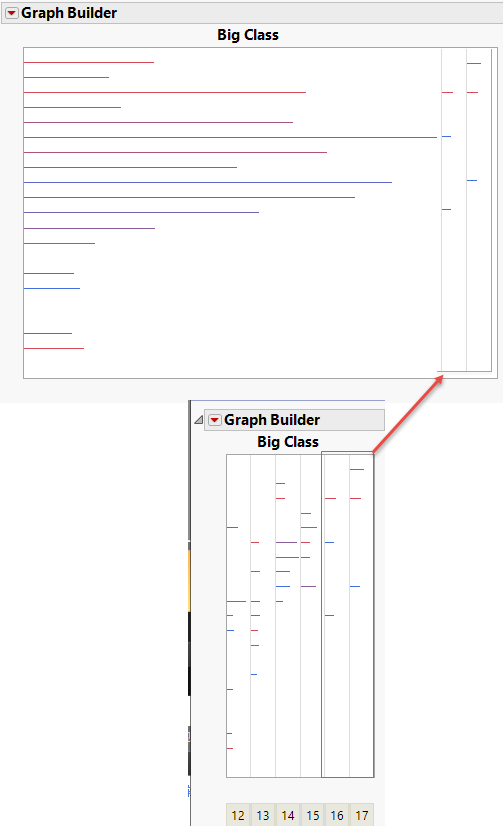
Let's draw the first picture
dt = Open( "$SAMPLE_DATA/Big Class.jmp" );
p1 = dt << Graph Builder(
	Size( 497, 379 ),
	Show Control Panel( 0 ),
	Show Legend( 0 ),
	Variables( X( :weight ), Y( :height ), Color( :sex ) ),
	Elements(
		Bar( X, Y, Legend( 5 ), Bar Style( "Needle" ), Response Axis( "X" ), Summary Statistic( "Sum" ) )
	),
	SendToReport(
		Dispatch(
			{},
			"weight",
			ScaleBox,
			{Label Row(
				{Automatic Tick Marks( 0 ), Show Major Labels( 0 ), Show Major Ticks( 0 ),
				Show Minor Ticks( 0 )}
			)}
		),
		Dispatch(
			{},
			"height",
			ScaleBox,
			{Min( 49 ), Max( 71 ), Inc( 5 ), Minor Ticks( 1 ), Label Row(
				{Automatic Tick Marks( 0 ), Show Major Labels( 0 ), Show Major Ticks( 0 ),
				Show Minor Ticks( 0 )}
			)}
		),
		Dispatch( {}, "graph title", TextEditBox, {Set Text( "Big Class" )} ),
		Dispatch( {}, "X title", TextEditBox, {Hide( 1 )} ),
		Dispatch( {}, "Y title", TextEditBox, {Hide( 1 )} )
	)
);
For the second mapping, overlay the second crop portion onto the first image to get this effect
p2 = dt << Graph Builder(
	Size( 171, 396 ),
	Show Control Panel( 0 ),
	Show Legend( 0 ),
	X Group Edge( "Bottom" ),
	Variables( X( :weight ), Y( :height ), Group X( :age, Size( 25 ), Show Title( 0 ) ), Color( :sex ) ),
	Elements(
		Bar( X, Y, Legend( 8 ), Bar Style( "Needle" ), Response Axis( "X" ), Summary Statistic( "Sum" ) )
	),
	SendToReport(
		Dispatch(
			{},
			"weight",
			ScaleBox,
			{Label Row(
				{Automatic Tick Marks( 0 ), Show Major Labels( 0 ), Show Major Ticks( 0 ),
				Show Minor Ticks( 0 )}
			)}
		),
		Dispatch(
			{},
			"height",
			ScaleBox,
			{Min( 49 ), Max( 71 ), Inc( 5 ), Minor Ticks( 1 ), Label Row(
				{Automatic Tick Marks( 0 ), Show Major Labels( 0 ), Show Major Ticks( 0 ),
				Show Minor Ticks( 0 )}
			)}
		),
		Dispatch( {}, "graph title", TextEditBox, {Set Text( "Big Class" )} ),
		Dispatch( {}, "X title", TextEditBox, {Hide( 1 )} ),
		Dispatch( {}, "Y title", TextEditBox, {Hide( 1 )} )
	)
);
1 REPLY 1
Level IX
- Mark as New
- Bookmark
- Subscribe
- Mute
- Subscribe to RSS Feed
- Get Direct Link
- Report Inappropriate Content
回复: Two Big Class.jmp drawings, how to use JSL to cut part of one of them, overlay on the other image?
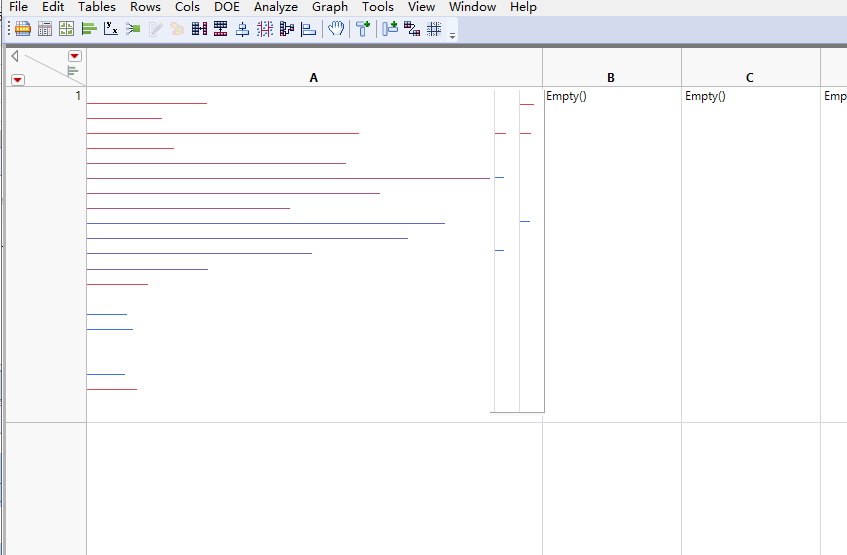
The ultimate goal is to save the combined picture to a cell in another table.
Thanks!
Recommended Articles
- © 2026 JMP Statistical Discovery LLC. All Rights Reserved.
- Terms of Use
- Privacy Statement
- Contact Us