- JMP Statement Regarding Critical PHP Remote Code Execution Vulnerabilities (CVE-2026-109618, CVE-2026-109619)
- Don’t miss your chance to experience Discovery Summit Europe at our best available rate! Early bird registration through 31 Oct.
- Graph Builder Toolbar streamlines interactive graphing. Creates shortcuts on Report and GraphBuilder Helpers toolbars. Download and install the extension.
- Subscribe to RSS Feed
- Mark Topic as New
- Mark Topic as Read
- Float this Topic for Current User
- Bookmark
- Subscribe
- Mute
- Printer Friendly Page
Discussions
Solve problems, and share tips and tricks with other JMP users.- User Community
- :
- Discussions
- :
- Re: Summary Table For Multiple Variables

- Mark as New
- Bookmark
- Subscribe
- Mute
- Subscribe to RSS Feed
- Get Direct Link
- Report Inappropriate Content
Summary Table For Multiple Variables
I have a dataset fundamentally similar to the table below on the left. I need to summarize it to look like the table on the right, calculating the % of lines for each entry in the completed column for each shift for each time period. In a practical sense, a shift completed 2 red and 1 green during FM1, so the summary would need to find the % of red and green found by a shift during FM1... etc.

It is not feasible to make subsets for shift and time, since I will need to plot Green% vs Time by Shift. I've tried several summary table options but they all fail to calculate % of total for the completed category independently for Time and Shift, have yet to find an option that can treat them separately, has anyone ran into this issue before?
Accepted Solutions


- Mark as New
- Bookmark
- Subscribe
- Mute
- Subscribe to RSS Feed
- Get Direct Link
- Report Inappropriate Content
Re: Summary Table For Multiple Variables
You can also try tabulate:
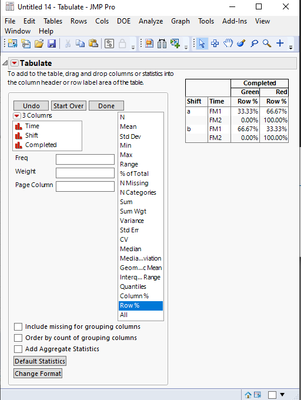
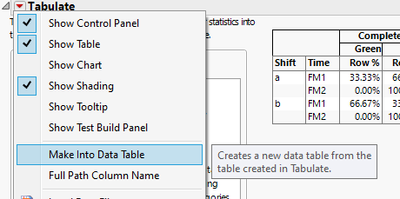
you can turn it to datatable from red triangle menu:
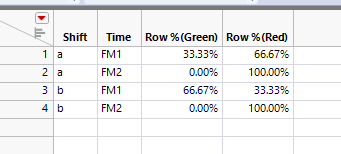
With Summary table you might need to do some extra calculations either before or after creation of the Summary. Below is example doing them after:
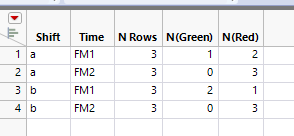
Select either N Rows and either N(Green) or N(Red), right click on selected column and create new formula column:
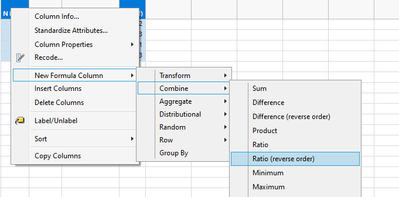
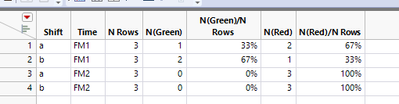
Table after sorting, additional formulas and formatting:
- Mark as New
- Bookmark
- Subscribe
- Mute
- Subscribe to RSS Feed
- Get Direct Link
- Report Inappropriate Content
Re: Summary Table For Multiple Variables
You can also try tabulate:
you can turn it to datatable from red triangle menu:
With Summary table you might need to do some extra calculations either before or after creation of the Summary. Below is example doing them after:
Select either N Rows and either N(Green) or N(Red), right click on selected column and create new formula column:
Table after sorting, additional formulas and formatting:
Recommended Articles
- © 2026 JMP Statistical Discovery LLC. All Rights Reserved.
- Terms of Use
- Privacy Statement
- Contact Us