- Don’t miss your chance to experience Discovery Summit Europe at our best available rate! Early bird registration through 31 Oct.
- Graph Builder Toolbar streamlines interactive graphing. Creates shortcuts on Report and GraphBuilder Helpers toolbars. Download and install the extension.
- Subscribe to RSS Feed
- Mark Topic as New
- Mark Topic as Read
- Float this Topic for Current User
- Bookmark
- Subscribe
- Mute
- Printer Friendly Page
Discussions
Solve problems, and share tips and tricks with other JMP users.- User Community
- :
- Discussions
- :
- Re: Statistiques de résumé

- Mark as New
- Bookmark
- Subscribe
- Mute
- Subscribe to RSS Feed
- Get Direct Link
- Report Inappropriate Content
Statistiques de résumé
Comment, dans le tableau "Statistiques de résumé" remplacer le très long libellé "Limite supérieure ..." par quelque chose du type "UpperIC95" ?
J'utilise la version 19 de JMP Education
Par avance merci
Jean-Luc
Accepted Solutions


- Mark as New
- Bookmark
- Subscribe
- Mute
- Subscribe to RSS Feed
- Get Direct Link
- Report Inappropriate Content
Re: Statistiques de résumé
To my knowledge, you can't. You could create a (shortcut) script to do that when run.
- Mark as New
- Bookmark
- Subscribe
- Mute
- Subscribe to RSS Feed
- Get Direct Link
- Report Inappropriate Content
Re: Statistiques de résumé
I assume you mean Distribution platform and this table box
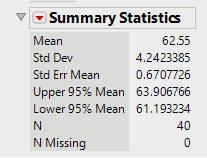
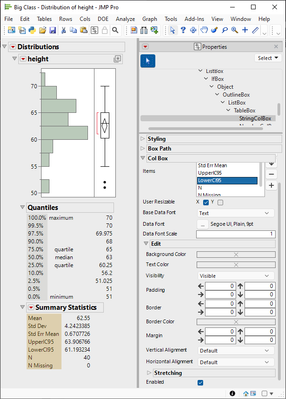
You can edit them from Properties
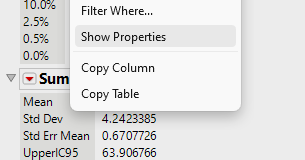
You can right click on the table and select Show Properties
Or use Properties from the toolbar and then click on the table to edit it

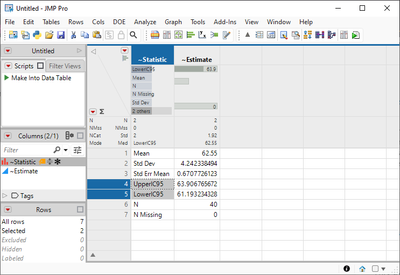
You could also it into a data table and update them there

- Mark as New
- Bookmark
- Subscribe
- Mute
- Subscribe to RSS Feed
- Get Direct Link
- Report Inappropriate Content
Re: Statistiques de résumé
ok mais j'aimerais que ce nouveau libellé soit enregistré (définitif), alors comment faire ?
- Mark as New
- Bookmark
- Subscribe
- Mute
- Subscribe to RSS Feed
- Get Direct Link
- Report Inappropriate Content
Re: Statistiques de résumé
To my knowledge, you can't. You could create a (shortcut) script to do that when run.
Recommended Articles
- © 2026 JMP Statistical Discovery LLC. All Rights Reserved.
- Terms of Use
- Privacy Statement
- Contact Us