cancel
Showing results for 
Show  only  | Search instead for 
Did you mean: 
  • JMP will suspend normal business operations for our Winter Holiday beginning on Wednesday, Dec. 24, 2025, at 5:00 p.m. ET (2:00 p.m. ET for JMP Accounts Receivable).
    Regular business hours will resume at 9:00 a.m. EST on Friday, Jan. 2, 2026.
  • We’re retiring the File Exchange at the end of this year. The JMP Marketplace is now your destination for add-ins and extensions.

Discussions

Solve problems, and share tips and tricks with other JMP users.
%3CLINGO-SUB%20id%3D%22lingo-sub-67947%22%20slang%3D%22en-US%22%20mode%3D%22NONE%22%3EShow%20means%20on%20box%20plot%20in%20graph%20builder%3C%2FLINGO-SUB%3E%3CLINGO-BODY%20id%3D%22lingo-body-67947%22%20slang%3D%22en-US%22%20mode%3D%22NONE%22%3E%3CP%3EIs%20there%20any%20way%20to%20show%20and%20connect%20means%20on%20a%20box%20plot%20in%20graph%20builder%3F%20Is%20there%20also%20a%20way%20to%20show%20the%20diamonds%20that%20point%20to%20the%20mean%20without%20bottom%20and%20top%205%25%20of%20outliers%3F%3C%2FP%3E%3C%2FLINGO-BODY%3E%3CLINGO-SUB%20id%3D%22lingo-sub-244233%22%20slang%3D%22en-US%22%20mode%3D%22NONE%22%3ERe%3A%20Show%20means%20on%20box%20plot%20in%20graph%20builder%3C%2FLINGO-SUB%3E%3CLINGO-BODY%20id%3D%22lingo-body-244233%22%20slang%3D%22en-US%22%20mode%3D%22NONE%22%3E%3CP%3EThis%20is%20easily%20done%20interactively.%3C%2FP%3E%0A%3CP%3E%26nbsp%3B%3C%2FP%3E%0A%3CP%3EStart%20with%20the%20box%20plots%20turned%20on.%20Then%20click%20and%20drag%20the%20%3CA%20href%3D%22http%3A%2F%2Fwww.jmp.com%2Fsupport%2Fhelp%2Fen%2F15.1%2F%23page%2Fjmp%2Fpoints.shtml%22%20target%3D%22_self%22%20rel%3D%22noopener%20noreferrer%22%3Epoints%20element%3C%2FA%3E%20into%20the%20graph.%20Change%20the%20summary%20statistic%20for%20the%20points%20to%20mean.%20Then%20drag%20the%20%3CA%20href%3D%22http%3A%2F%2Fwww.jmp.com%2Fsupport%2Fhelp%2Fen%2F15.1%2F%23page%2Fjmp%2Fline.shtml%23%22%20target%3D%22_self%22%20rel%3D%22noopener%20noreferrer%22%3Eline%20element%3C%2FA%3E%20into%20the%20graph.%3C%2FP%3E%0A%3CP%3E%26nbsp%3B%3C%2FP%3E%0A%3CP%3E%3CSPAN%20class%3D%22lia-inline-image-display-wrapper%20lia-image-align-inline%22%20image-alt%3D%22ScreenFlow.gif%22%20style%3D%22width%3A%20400px%3B%22%3E%3CSPAN%20class%3D%22lia-inline-image-display-wrapper%22%20image-alt%3D%22ScreenFlow.gif%22%20style%3D%22width%3A%20400px%3B%22%3E%3Cspan%20class%3D%22lia-inline-image-display-wrapper%22%20image-alt%3D%22ScreenFlow.gif%22%20style%3D%22width%3A%20400px%3B%22%3E%3Cimg%20src%3D%22https%3A%2F%2Fcommunity.jmp.com%2Ft5%2Fimage%2Fserverpage%2Fimage-id%2F21417i28B694154AC73768%2Fimage-size%2Fmedium%3Fv%3Dv2%26amp%3Bpx%3D400%22%20role%3D%22button%22%20title%3D%22ScreenFlow.gif%22%20alt%3D%22ScreenFlow.gif%22%20%2F%3E%3C%2Fspan%3E%3C%2FSPAN%3E%3C%2FSPAN%3E%3C%2FP%3E%0A%3CP%3E%E2%80%83%3C%2FP%3E%0A%3CP%3E%E2%80%83%3C%2FP%3E%3C%2FLINGO-BODY%3E%3CLINGO-SUB%20id%3D%22lingo-sub-106717%22%20slang%3D%22en-US%22%20mode%3D%22NONE%22%3ERe%3A%20Show%20means%20on%20box%20plot%20in%20graph%20builder%3C%2FLINGO-SUB%3E%3CLINGO-BODY%20id%3D%22lingo-body-106717%22%20slang%3D%22en-US%22%20mode%3D%22NONE%22%3E%3CP%3E%3CA%20href%3D%22https%3A%2F%2Fcommunity.jmp.com%2Ft5%2Fuser%2Fviewprofilepage%2Fuser-id%2F70%22%20target%3D%22_blank%22%3E%40gzmorgan0%3C%2FA%3E%26nbsp%3BOh%20My%20Gosh%2C%20It%20just%20was%20A%20perfect%20solution%20that%20I%20really%20needed.%20Now%20everything's%20preperly%20working%26nbsp%3Bwith%20no%20problem.%26nbsp%3BI%20really%20appreciate%20your%20kindness%20and%20expertise.%20Thank%20you%20so%20much!%20Have%20a%20great%20day.%3C%2FP%3E%3C%2FLINGO-BODY%3E%3CLINGO-SUB%20id%3D%22lingo-sub-106612%22%20slang%3D%22en-US%22%20mode%3D%22NONE%22%3ERe%3A%20Show%20means%20on%20box%20plot%20in%20graph%20builder%3C%2FLINGO-SUB%3E%3CLINGO-BODY%20id%3D%22lingo-body-106612%22%20slang%3D%22en-US%22%20mode%3D%22NONE%22%3E%3CP%3E%3CA%20href%3D%22https%3A%2F%2Fcommunity.jmp.com%2Ft5%2Fuser%2Fviewprofilepage%2Fuser-id%2F13685%22%20target%3D%22_blank%22%3E%40DANN%3C%2FA%3E%2C%20are%20the%204%20columns%20responses%20(results)%26nbsp%3B%20of%20the%20experiment%20or%20factors%20(input)%20for%20the%20design%3F%3C%2FP%3E%0A%3CP%3E%26nbsp%3B%3C%2FP%3E%0A%3CP%3EAs%20your%20table%20is%20setup%2C%20it%20would%20take%20a%20custom%20function%20to%20connect%20the%20box%20medians%2C%20since%20you%20have%20no%20Y%20variable.%26nbsp%3B%20I%20am%20going%20to%20use%20the%20JMP%20sample%20data%20Iris.JMP%20to%20emulate%20your%20data%20and%20the%20steps.%3C%2FP%3E%0A%3CP%3E%26nbsp%3B%3C%2FP%3E%0A%3CP%3EIf%20using%20the%20UI%20(point%20and%20click)%3A%3C%2FP%3E%0A%3COL%3E%0A%3CLI%3ESelect%20Tables%20%26gt%3B%20Stack%20choose%20your%204%20columns%20as%20the%20%3CSTRONG%3EStack%20Columns%2C%20%3C%2FSTRONG%3Echange%20the%20names%26nbsp%3B%20(Data%20and%20Label)%20if%20you%20like%20and%20select%20OK.%20%3CSTRONG%3EData%3C%2FSTRONG%3E%20will%20be%20the%20values%20of%20the%204%20columns%20and%20%3CSTRONG%3EValues%3C%2FSTRONG%3E%20will%20be%20the%20column%20names.%20For%20your%20example%20a%20better%20name%20than%20label%20might%20be%20Factors%20or%20Responses.%3C%2FLI%3E%0A%3CLI%3ENow%20select%20Graphs%20%26gt%3B%20Graphbuilder%20and%20drag%20Data%20to%20the%20Y%20column%20and%20Label%20to%20the%20X%20column.%3C%2FLI%3E%0A%3CLI%3ERight%20Click%20and%20select%20Box%20Plots%20and%20Line%20and%20select%20the%20Summary%20Statistics%20to%20be%20Median%3C%2FLI%3E%0A%3C%2FOL%3E%0A%3CP%3EHere%20is%20a%20picture%20of%20the%20Iris%20data%20table%20after%20following%20the%20instructions%20above%3C%2FP%3E%0A%3CP%3E%3CSPAN%20class%3D%22lia-inline-image-display-wrapper%20lia-image-align-inline%22%20image-alt%3D%22image.png%22%20style%3D%22width%3A%20999px%3B%22%3E%3CSPAN%20class%3D%22lia-inline-image-display-wrapper%22%20image-alt%3D%22image.png%22%20style%3D%22width%3A%20999px%3B%22%3E%3Cspan%20class%3D%22lia-inline-image-display-wrapper%22%20image-alt%3D%22image.png%22%20style%3D%22width%3A%20999px%3B%22%3E%3Cimg%20src%3D%22https%3A%2F%2Fcommunity.jmp.com%2Ft5%2Fimage%2Fserverpage%2Fimage-id%2F15129i70EB6AF41D351C29%2Fimage-size%2Flarge%3Fv%3Dv2%26amp%3Bpx%3D999%22%20role%3D%22button%22%20title%3D%22image.png%22%20alt%3D%22image.png%22%20%2F%3E%3C%2Fspan%3E%3C%2FSPAN%3E%3C%2FSPAN%3E%3C%2FP%3E%0A%3CP%3E%26nbsp%3B%3C%2FP%3E%0A%3CP%3EWithout%20stacking%20the%20data%2C%20I%20can%20only%20provide%20a%20JSL%20solution.%20My%20earlier%20post%2Fexample%20had%20one%20or%20multiple%20columns%20for%20Y%20and%20and%20a%20categorical%20X%20(Months).%26nbsp%3B%20The%20elements%20Line%20or%20Smoother%20need%20both%20and%20X%20and%20Y.%26nbsp%3B%20There%20is%20another%20graph%20called%20the%20parallel%20plot%20that%20would%20be%20appropriate%20if%20your%204%20columns%20were%20responses%20to%20an%20experiment.%26nbsp%3B%20Each%20of%20the%2020%20lines%20would%20represent%20a%20%22profile%22%20of%20each%20experimental%20trial's%20results.%3C%2FP%3E%0A%3CP%3E%26nbsp%3B%3C%2FP%3E%0A%3CP%3EHope%20that%20helps.%3C%2FP%3E%3C%2FLINGO-BODY%3E%3CLINGO-SUB%20id%3D%22lingo-sub-106573%22%20slang%3D%22en-US%22%20mode%3D%22NONE%22%3ERe%3A%20Show%20means%20on%20box%20plot%20in%20graph%20builder%3C%2FLINGO-SUB%3E%3CLINGO-BODY%20id%3D%22lingo-body-106573%22%20slang%3D%22en-US%22%20mode%3D%22NONE%22%3EOkay%2C%20thank%20you%20for%20your%20patience.%3CBR%20%2F%3EThere's%20four%20column%20and%20each%20has%20twenty%20different%20values.%3CBR%20%2F%3Eex)%20Design%201%202%203%204%3CBR%20%2F%3E1%20a%20..%20..%20..%3CBR%20%2F%3E2%20b%20..%20..%20..%3CBR%20%2F%3E3%20c%3CBR%20%2F%3E4%20..%3CBR%20%2F%3E5%3CBR%20%2F%3E6%3CBR%20%2F%3E...%3CBR%20%2F%3E20%3CBR%20%2F%3EFirst%2C%20I%20opend%20Graph%20Builder.%3CBR%20%2F%3ESecond%2C%20I%20dragged%20those%20four%20columns%20into%20x-axis(%20default%20box%20plot%20).%20As%20a%20result%2C%20I%20got%20four%20different%20box%20plots.%3CBR%20%2F%3Eat%20this%20point%2C%20I%20want%20to%20get%20the%20line%20connecting%20the%20median%20of%20each%20box%20plot.%20What%20should%20I%20do%3F%3CBR%20%2F%3EThanks%20in%20advance.%3CBR%20%2F%3E%3CBR%20%2F%3E%3C%2FLINGO-BODY%3E%3CLINGO-SUB%20id%3D%22lingo-sub-106571%22%20slang%3D%22en-US%22%20mode%3D%22NONE%22%3ERe%3A%20Show%20means%20on%20box%20plot%20in%20graph%20builder%3C%2FLINGO-SUB%3E%3CLINGO-BODY%20id%3D%22lingo-body-106571%22%20slang%3D%22en-US%22%20mode%3D%22NONE%22%3E%3CP%3EOkay%2C%20describe%20your%20steps.%20Hopefully%2C%20I%20can%20see%20what%20might%20be%20missing.%3C%2FP%3E%0A%3CP%3E%26nbsp%3B%3C%2FP%3E%3C%2FLINGO-BODY%3E%3CLINGO-SUB%20id%3D%22lingo-sub-106561%22%20slang%3D%22en-US%22%20mode%3D%22NONE%22%3ERe%3A%20Show%20means%20on%20box%20plot%20in%20graph%20builder%3C%2FLINGO-SUB%3E%3CLINGO-BODY%20id%3D%22lingo-body-106561%22%20slang%3D%22en-US%22%20mode%3D%22NONE%22%3EHi%2C%20I%20appreciate%20your%20comment.%20I'm%20a%20user%20of%20JMP%20Pro%2014%20and%20I'm%20afraid%20I%20can't%20upload%20the%20script%20you%20said.%20Because%20of%20e-scecurity%20program%20in%20my%20office%2C%20I%20can't%20upload%20any%20file%20online.%20if%20it's%20enough%20to%20describe%20what%20I've%20done%20to%20get%20a%20way%2C%20then%20I%20would.%20Thanks%20again.%3C%2FLINGO-BODY%3E%3CLINGO-SUB%20id%3D%22lingo-sub-106560%22%20slang%3D%22en-US%22%20mode%3D%22NONE%22%3ERe%3A%20Show%20means%20on%20box%20plot%20in%20graph%20builder%3C%2FLINGO-SUB%3E%3CLINGO-BODY%20id%3D%22lingo-body-106560%22%20slang%3D%22en-US%22%20mode%3D%22NONE%22%3E%3CP%3E%3CA%20href%3D%22https%3A%2F%2Fcommunity.jmp.com%2Ft5%2Fuser%2Fviewprofilepage%2Fuser-id%2F13685%22%20target%3D%22_blank%22%3E%40DANN%3C%2FA%3E%2C%20please%20specify%20which%20version%20of%20JMP%20you%20are%20using.%20Also%2C%20if%20you%20could%20use%20the%20Graphbuilder%20menu%20pull%20down%2C%20and%20select%20Save%20Script%2C%20Copy%20script%20or%20save%20to%20Script%20Window%20and%20save%20it%20and%20attach%20in%20a%20reply%2C%20I%20can%20look%20to%20see%20if%20you%20missed%20something.%26nbsp%3B%3C%2FP%3E%0A%3CP%3E%26nbsp%3B%3C%2FP%3E%3C%2FLINGO-BODY%3E%3CLINGO-SUB%20id%3D%22lingo-sub-106559%22%20slang%3D%22en-US%22%20mode%3D%22NONE%22%3ERe%3A%20Show%20means%20on%20box%20plot%20in%20graph%20builder%3C%2FLINGO-SUB%3E%3CLINGO-BODY%20id%3D%22lingo-body-106559%22%20slang%3D%22en-US%22%20mode%3D%22NONE%22%3E%3CP%3EHi%2C%20I'm%20having%20a%20trouble%20with%20making%20a%20line%20connecting%20all%20those%20middle%20value%20of%20each%20of%20box%20plots.%20What%20do%20I%20do%3F%3C%2FP%3E%3CP%3EThanks%20in%20advance%3C%2FP%3E%3C%2FLINGO-BODY%3E%3CLINGO-SUB%20id%3D%22lingo-sub-68205%22%20slang%3D%22en-US%22%20mode%3D%22NONE%22%3ERe%3A%20Show%20means%20on%20box%20plot%20in%20graph%20builder%3C%2FLINGO-SUB%3E%3CLINGO-BODY%20id%3D%22lingo-body-68205%22%20slang%3D%22en-US%22%20mode%3D%22NONE%22%3E%3CP%3EI%20am%20learning%20on%20the%20fly.%20JMP%2014%20already%20has%20a%20feature%20that%20fulfilled%20my%20wish%20list%3A%20the%20CaptionBox%20has%20a%20factor%20checkbox%20so%20it%20work%20for%20each%20category%20displayed%20on%20the%20X-Axis.%3C%2FP%3E%3CP%3EThis%20displays%20the%205%20number%20summary%20(min%2C%20Q1%2C%20Median%2C%20Q3%2C%20max)%20and%20the%20means%20as%20a%20caption%20box.%3C%2FP%3E%3CP%3E%26nbsp%3B%3C%2FP%3E%3CP%3E%3CSPAN%20class%3D%22lia-inline-image-display-wrapper%20lia-image-align-inline%22%20image-alt%3D%22image.png%22%20style%3D%22width%3A%20999px%3B%22%3E%3CSPAN%20class%3D%22lia-inline-image-display-wrapper%22%20image-alt%3D%22image.png%22%20style%3D%22width%3A%20999px%3B%22%3E%3Cspan%20class%3D%22lia-inline-image-display-wrapper%22%20image-alt%3D%22image.png%22%20style%3D%22width%3A%20999px%3B%22%3E%3Cimg%20src%3D%22https%3A%2F%2Fcommunity.jmp.com%2Ft5%2Fimage%2Fserverpage%2Fimage-id%2F12051i042921965945ED64%2Fimage-size%2Flarge%3Fv%3Dv2%26amp%3Bpx%3D999%22%20role%3D%22button%22%20title%3D%22image.png%22%20alt%3D%22image.png%22%20%2F%3E%3C%2Fspan%3E%3C%2FSPAN%3E%3C%2FSPAN%3EHere%20is%20the%20script%20showing%20the%20customization%2C%20for%20just%20the%20first%20boxplot.%3C%2FP%3E%3CPRE%3E%3CCODE%20class%3D%22%20language-jsl%22%3EGraph%20Builder(%0A%20Size(%201029%2C%20608%20)%2C%0A%20Show%20Control%20Panel(%200%20)%2C%0A%20Variables(%20X(%20%3AMonth%20)%2C%20Y(%20%3ASales%20)%20)%2C%0A%20Elements(%0A%20%20Box%20Plot(%20X%2C%20Y%2C%20Legend(%206%20)%2C%20Name(%20%225%20Number%20Summary%22%20)(1)%20)%2C%0A%20%20Line(%20X%2C%20Y%2C%20Legend(%207%20)%20)%2C%0A%20%20Caption%20Box(%0A%20%20%20X%2C%0A%20%20%20Y%2C%0A%20%20%20Legend(%209%20)%2C%0A%20%20%20X%20Position(%20%22Middle%22%20)%2C%0A%20%20%20Y%20Position(%20%22Bottom%22%20)%2C%0A%20%20%20Per%20Factor(%201%20)%0A%20%20)%0A%20)%2C%0A%20SendToReport(%0A%20%20Dispatch(%0A%20%20%20%7B%7D%2C%0A%20%20%20%22Sales%22%2C%0A%20%20%20ScaleBox%2C%0A%20%20%20%7BMin(%2050%20)%2C%20Max(%20700%20)%2C%20Inc(%20100%20)%2C%20Minor%20Ticks(%201%20)%7D%0A%20%20)%2C%0A%20%20Dispatch(%0A%20%20%20%7B%7D%2C%0A%20%20%20%22Graph%20Builder%22%2C%0A%20%20%20FrameBox%2C%0A%20%20%20%7BDispatchSeg(%0A%20%20%20%20Box%20Plot%20Seg(%20%22Box%20Plot%20(June)%22%20)%2C%0A%20%20%20%20%7BBox%20Style(%20%22Solid%22%20)%2C%20Confidence%20Diamond(%201%20)%2C%20Fences(%200%20)%2C%0A%20%20%20%20Fill%20Color(%20%7B162%2C%2043%2C%20221%7D%20)%7D%0A.....%3C%2FCODE%3E%3C%2FPRE%3E%3C%2FLINGO-BODY%3E%3CLINGO-SUB%20id%3D%22lingo-sub-68168%22%20slang%3D%22en-US%22%20mode%3D%22NONE%22%3ERe%3A%20Show%20means%20on%20box%20plot%20in%20graph%20builder%3C%2FLINGO-SUB%3E%3CLINGO-BODY%20id%3D%22lingo-body-68168%22%20slang%3D%22en-US%22%20mode%3D%22NONE%22%3E%3CBLOCKQUOTE%3E%3CHR%20%2F%3E%3CA%20href%3D%22https%3A%2F%2Fcommunity.jmp.com%2Ft5%2Fuser%2Fviewprofilepage%2Fuser-id%2F70%22%20target%3D%22_blank%22%3E%40gzmorgan0%3C%2FA%3E%26nbsp%3Bwrote%3A%3CBR%20%2F%3E%3CP%3EThank%20you%2C%20Dan.%20I%20never%20investigated%20Float%20bar%20type.%26nbsp%3B%20Your%20post%20got%20me%20thinking%20of%20alternative%20methods%20to%20add%20the%20means%20and%20hav%20them%20appear%20at%20the%20bottom%20or%20the%20top%20of%20the%20graph.%3C%2FP%3E%3CP%3E%26nbsp%3B%3C%2FP%3E%3CP%3EOne%20method%20was%20interesting%20but%20messy%20and%20changed%20the%20original%20table.%20%5BSee%20***%20below%5D.%20Then%20I%20notoced%20that%20JMP%20has%20a%20new%20element%20called%20a%20Caption%20Box.%26nbsp%3B%20It%20is%20very%20cool%2C%20but%20each%20Caption%20Box%20seems%20to%20allow%20only%20one%20caption%20per%20FrameBox.%20This%20can%20be%20easy%20by%20making%20the%20categorical%20X-axis%20the%20X%20Group%20variable.%26nbsp%3B%20See%20the%20picture%20and%20script.%20However%2C%20now%20the%20connected%20means%20gets%20tough.%26nbsp%3B%20%26nbsp%3BThis%20might%20be%20a%20nice%20wish%20list%20item%20for%20future%20versions%3A%20%3CFONT%20color%3D%22%230000FF%22%3Eadd%20a%20caption%20box%20option%20for%20nominal%20X-axis%20plots%3C%2FFONT%3E.%20So%20for%20boxplots%2C%20one%20option%20could%20be%20the%20Five%20number%20Summary%20another%20N%2C%20Mean%2C%20Std%20dev.%3C%2FP%3E%3CBLOCKQUOTE%3E%3CHR%20%2F%3E%3CA%20href%3D%22https%3A%2F%2Fcommunity.jmp.com%2Ft5%2Fuser%2Fviewprofilepage%2Fuser-id%2F70%22%20target%3D%22_blank%22%3E%40gzmorgan0%3C%2FA%3E%26nbsp%3Bwrote%3A%3CBR%20%2F%3E%3CP%3EThank%20you%2C%20Dan.%20I%20never%20investigated%20Float%20bar%20type.%26nbsp%3B%20Your%20post%20got%20me%20thinking%20of%20alternative%20methods%20to%20add%20the%20means%20and%20hav%20them%20appear%20at%20the%20bottom%20or%20the%20top%20of%20the%20graph.%3C%2FP%3E%3CP%3E%26nbsp%3B%3C%2FP%3E%3CP%3EOne%20method%20was%20interesting%20but%20messy%20and%20changed%20the%20original%20table.%20%5BSee%20***%20below%5D.%20Then%20I%20notoced%20that%20JMP%20has%20a%20new%20element%20called%20a%20Caption%20Box.%26nbsp%3B%20It%20is%20very%20cool%2C%20but%20each%20Caption%20Box%20seems%20to%20allow%20only%20one%20caption%20per%20FrameBox.%20This%20can%20be%20easy%20by%20making%20the%20categorical%20X-axis%20the%20X%20Group%20variable.%26nbsp%3B%20See%20the%20picture%20and%20script.%20However%2C%20now%20the%20connected%20means%20gets%20tough.%26nbsp%3B%20%26nbsp%3BThis%20might%20be%20a%20nice%20wish%20list%20item%20for%20future%20versions%3A%20%3CFONT%20color%3D%22%230000FF%22%3Eadd%20a%20caption%20box%20option%20for%20nominal%20X-axis%20plots%3C%2FFONT%3E.%20So%20for%20boxplots%2C%20one%20option%20could%20be%20the%20Five%20number%20Summary%20another%20N%2C%20Mean%2C%20Std%20dev.%3C%2FP%3E%3CP%3E%3CSPAN%20class%3D%22lia-inline-image-display-wrapper%20lia-image-align-inline%22%20image-alt%3D%22image.png%22%20style%3D%22width%3A%20999px%3B%22%3E%3CSPAN%20class%3D%22lia-inline-image-display-wrapper%22%20image-alt%3D%22image.png%22%20style%3D%22width%3A%20999px%3B%22%3E%3Cspan%20class%3D%22lia-inline-image-display-wrapper%22%20image-alt%3D%22image.png%22%20style%3D%22width%3A%20999px%3B%22%3E%3Cimg%20src%3D%22https%3A%2F%2Fcommunity.jmp.com%2Ft5%2Fimage%2Fserverpage%2Fimage-id%2F12039iFC3FF22F63B29008%2Fimage-size%2Flarge%3Fv%3Dv2%26amp%3Bpx%3D999%22%20role%3D%22button%22%20title%3D%22image.png%22%20alt%3D%22image.png%22%20%2F%3E%3C%2Fspan%3E%3C%2FSPAN%3E%3C%2FSPAN%3E%3C%2FP%3E%3CP%3E%26nbsp%3B%20%26nbsp%3B%3C%2FP%3E%3CPRE%3E%3CCODE%20class%3D%22%20language-jsl%22%3Egb2%20%3D%20dt%20%26lt%3B%26lt%3B%20Graph%20Builder(%0A%20Size(%201065%2C%20516%20)%2C%0A%20Show%20Control%20Panel(%200%20)%2C%0A%20Variables(%20Y(%20%3ASales%20)%2C%20Group%20X(%20%3AMonth%20)%20)%2C%0A%20Elements(%0A%20%20Box%20Plot(%20Y%2C%20Legend(%206%20)%2C%20Box%20Style(%20%22Solid%22%20)%20)%2C%0A%20%20Line(%20Y%2C%20Legend(%207%20)%20)%2C%0A%20%20Caption%20Box(%20Y%2C%20Legend(%209%20)%20)%0A%20)%2C%0A%20SendToReport(%0A%20%20Dispatch(%0A%20%20%20%7B%7D%2C%0A%20%20%20%22Sales%22%2C%0A%20%20%20ScaleBox%2C%0A%20%20%20%7BMin(%2050%20)%2C%20Max(%20700%20)%2C%20Inc(%20100%20)%2C%20Minor%20Ticks(%201%20)%7D%0A%20%20)%2C%0A%20%0A%20)%0A)%3B%0Abpseg%20%3D%20gb2%20%26lt%3B%26lt%3B%20Xpath(%22%2F%2FBoxPlotSeg%22)%3B%0Abpseg%20%26lt%3B%26lt%3B%20%7BBox%20Style(%20%22Solid%22%20)%2C%20Confidence%20Diamond(%201%20)%2C%20Fences(%200%20)%7D%3B%0A%0A%2F%2Fif%20you%20want%20to%20color%20each%20by%20month%0Afor(i%3D1%2C%20i%26lt%3B%3Dnitems(bpseg)%2C%20i%2B%2B%2C%0A%20bpseg%5Bi%5D%20%26lt%3B%26lt%3B%20Fill%20Color(Color%20Of(As%20Row%20State(cc%5Bi%5D)))%20%0A)%3B%3C%2FCODE%3E%3C%2FPRE%3E%3CP%3EThe%20full%20script%20is%20attached.%3C%2FP%3E%3CP%3E%26nbsp%3B%3C%2FP%3E%3CP%3E***Method%20takes%20some%20work%20all%20UI.%20I%20might%20do%20this%20once.%26nbsp%3B%20Scripting%20seems%20easier%2C%20especially%20if%20the%20Caption%20Box%20wish%3C%2FP%3E%3CUL%3E%3CLI%3EConcatenate%20the%20original%20table%20and%20the%20table%20summary.%26nbsp%3B%3C%2FLI%3E%3CLI%3EAdd%20a%20column%20called%20Means%20that%20is%20really%20the%20positon%20where%20you%20want%20the%20means%20to%20appear.%3C%2FLI%3E%3CLI%3EMake%20the%20Mean(Sales)%20column%20a%20label.%26nbsp%3B%3C%2FLI%3E%3CLI%3EPlot%20both%20Sales%20and%20Means%20versus%20Month%3C%2FLI%3E%3CLI%3EMove%20Mean%20sales%20to%20the%20right%20and%20align%20tick%20marks%26nbsp%3B%20%26nbsp%3B%3C%2FLI%3E%3CLI%3EMake%20the%20changes%20as%20shown%20previously%20for%20the%20left%20axis%20(chaging%20points%20to%20the%20boxplot%2C%20add%20a%20line)%3C%2FLI%3E%3CLI%3EChange%20the%20Points%20on%20the%20right%20to%20a%20bar%20style%20single%20and%20Label%20(%22Label%20by%20Row%22)%3C%2FLI%3E%3C%2FUL%3E%3CP%3E%3CSPAN%20class%3D%22lia-inline-image-display-wrapper%20lia-image-align-inline%22%20image-alt%3D%22image.png%22%20style%3D%22width%3A%20999px%3B%22%3E%3CSPAN%20class%3D%22lia-inline-image-display-wrapper%22%20image-alt%3D%22image.png%22%20style%3D%22width%3A%20999px%3B%22%3E%3Cspan%20class%3D%22lia-inline-image-display-wrapper%22%20image-alt%3D%22image.png%22%20style%3D%22width%3A%20999px%3B%22%3E%3Cimg%20src%3D%22https%3A%2F%2Fcommunity.jmp.com%2Ft5%2Fimage%2Fserverpage%2Fimage-id%2F12040iA2125E433E8BFF35%2Fimage-size%2Flarge%3Fv%3Dv2%26amp%3Bpx%3D999%22%20role%3D%22button%22%20title%3D%22image.png%22%20alt%3D%22image.png%22%20%2F%3E%3C%2Fspan%3E%3C%2FSPAN%3E%3C%2FSPAN%3E%3C%2FP%3E%3CHR%20%2F%3E%3C%2FBLOCKQUOTE%3E%3CP%3EYou%20can%20add%20as%20much%20caption%20boxes%20as%20you%20want%20by%20drag%20%26amp%3B%20drop.%20By%20default%20they%20are%20displaying%20the%20mean.%20This%20however%20can%20be%20changed%20to%20Std%20Dev%2C%20N%20etc.%3C%2FP%3E%3CP%3EHowever%2C%20in%20case%20of%20the%20mean%2C%20I%20prefer%20to%20show%20him%20at%20the%20box%20plot.%3C%2FP%3E%3CP%3E%3CSPAN%20class%3D%22lia-inline-image-display-wrapper%20lia-image-align-inline%22%20image-alt%3D%22image.png%22%20style%3D%22width%3A%20999px%3B%22%3E%3CSPAN%20class%3D%22lia-inline-image-display-wrapper%22%20image-alt%3D%22image.png%22%20style%3D%22width%3A%20999px%3B%22%3E%3Cspan%20class%3D%22lia-inline-image-display-wrapper%22%20image-alt%3D%22image.png%22%20style%3D%22width%3A%20999px%3B%22%3E%3Cimg%20src%3D%22https%3A%2F%2Fcommunity.jmp.com%2Ft5%2Fimage%2Fserverpage%2Fimage-id%2F12039iFC3FF22F63B29008%2Fimage-size%2Flarge%3Fv%3Dv2%26amp%3Bpx%3D999%22%20role%3D%22button%22%20title%3D%22image.png%22%20alt%3D%22image.png%22%20%2F%3E%3C%2Fspan%3E%3C%2FSPAN%3E%3C%2FSPAN%3E%3C%2FP%3E%3CP%3E%26nbsp%3B%20%26nbsp%3B%3C%2FP%3E%3CPRE%3E%3CCODE%20class%3D%22%20language-jsl%22%3Egb2%20%3D%20dt%20%26lt%3B%26lt%3B%20Graph%20Builder(%0A%20Size(%201065%2C%20516%20)%2C%0A%20Show%20Control%20Panel(%200%20)%2C%0A%20Variables(%20Y(%20%3ASales%20)%2C%20Group%20X(%20%3AMonth%20)%20)%2C%0A%20Elements(%0A%20%20Box%20Plot(%20Y%2C%20Legend(%206%20)%2C%20Box%20Style(%20%22Solid%22%20)%20)%2C%0A%20%20Line(%20Y%2C%20Legend(%207%20)%20)%2C%0A%20%20Caption%20Box(%20Y%2C%20Legend(%209%20)%20)%0A%20)%2C%0A%20SendToReport(%0A%20%20Dispatch(%0A%20%20%20%7B%7D%2C%0A%20%20%20%22Sales%22%2C%0A%20%20%20ScaleBox%2C%0A%20%20%20%7BMin(%2050%20)%2C%20Max(%20700%20)%2C%20Inc(%20100%20)%2C%20Minor%20Ticks(%201%20)%7D%0A%20%20)%2C%0A%20%0A%20)%0A)%3B%0Abpseg%20%3D%20gb2%20%26lt%3B%26lt%3B%20Xpath(%22%2F%2FBoxPlotSeg%22)%3B%0Abpseg%20%26lt%3B%26lt%3B%20%7BBox%20Style(%20%22Solid%22%20)%2C%20Confidence%20Diamond(%201%20)%2C%20Fences(%200%20)%7D%3B%0A%0A%2F%2Fif%20you%20want%20to%20color%20each%20by%20month%0Afor(i%3D1%2C%20i%26lt%3B%3Dnitems(bpseg)%2C%20i%2B%2B%2C%0A%20bpseg%5Bi%5D%20%26lt%3B%26lt%3B%20Fill%20Color(Color%20Of(As%20Row%20State(cc%5Bi%5D)))%20%0A)%3B%3C%2FCODE%3E%3C%2FPRE%3E%3CP%3EThe%20full%20script%20is%20attached.%3C%2FP%3E%3CP%3E%26nbsp%3B%3C%2FP%3E%3CP%3E***Method%20takes%20some%20work%20all%20UI.%20I%20might%20do%20this%20once.%26nbsp%3B%20Scripting%20seems%20easier%2C%20especially%20if%20the%20Caption%20Box%20wish%3C%2FP%3E%3CUL%3E%3CLI%3EConcatenate%20the%20original%20table%20and%20the%20table%20summary.%26nbsp%3B%3C%2FLI%3E%3CLI%3EAdd%20a%20column%20called%20Means%20that%20is%20really%20the%20positon%20where%20you%20want%20the%20means%20to%20appear.%3C%2FLI%3E%3CLI%3EMake%20the%20Mean(Sales)%20column%20a%20label.%26nbsp%3B%3C%2FLI%3E%3CLI%3EPlot%20both%20Sales%20and%20Means%20versus%20Month%3C%2FLI%3E%3CLI%3EMove%20Mean%20sales%20to%20the%20right%20and%20align%20tick%20marks%26nbsp%3B%20%26nbsp%3B%3C%2FLI%3E%3CLI%3EMake%20the%20changes%20as%20shown%20previously%20for%20the%20left%20axis%20(chaging%20points%20to%20the%20boxplot%2C%20add%20a%20line)%3C%2FLI%3E%3CLI%3EChange%20the%20Points%20on%20the%20right%20to%20a%20bar%20style%20single%20and%20Label%20(%22Label%20by%20Row%22)%3C%2FLI%3E%3C%2FUL%3E%3CP%3E%3CSPAN%20class%3D%22lia-inline-image-display-wrapper%20lia-image-align-inline%22%20image-alt%3D%22image.png%22%20style%3D%22width%3A%20999px%3B%22%3E%3CSPAN%20class%3D%22lia-inline-image-display-wrapper%22%20image-alt%3D%22image.png%22%20style%3D%22width%3A%20999px%3B%22%3E%3Cspan%20class%3D%22lia-inline-image-display-wrapper%22%20image-alt%3D%22image.png%22%20style%3D%22width%3A%20999px%3B%22%3E%3Cimg%20src%3D%22https%3A%2F%2Fcommunity.jmp.com%2Ft5%2Fimage%2Fserverpage%2Fimage-id%2F12040iA2125E433E8BFF35%2Fimage-size%2Flarge%3Fv%3Dv2%26amp%3Bpx%3D999%22%20role%3D%22button%22%20title%3D%22image.png%22%20alt%3D%22image.png%22%20%2F%3E%3C%2Fspan%3E%3C%2FSPAN%3E%3C%2FSPAN%3E%3C%2FP%3E%3CHR%20%2F%3E%3C%2FBLOCKQUOTE%3E%3CP%3E%26nbsp%3B%3C%2FP%3E%3C%2FLINGO-BODY%3E%3CLINGO-SUB%20id%3D%22lingo-sub-68137%22%20slang%3D%22en-US%22%20mode%3D%22NONE%22%3ERe%3A%20Show%20means%20on%20box%20plot%20in%20graph%20builder%3C%2FLINGO-SUB%3E%3CLINGO-BODY%20id%3D%22lingo-body-68137%22%20slang%3D%22en-US%22%20mode%3D%22NONE%22%3E%3CP%3EThank%20you%2C%20Dan.%20I%20never%20investigated%20Float%20bar%20type.%26nbsp%3B%20Your%20post%20got%20me%20thinking%20of%20alternative%20methods%20to%20add%20the%20means%20and%20hav%20them%20appear%20at%20the%20bottom%20or%20the%20top%20of%20the%20graph.%3C%2FP%3E%3CP%3E%26nbsp%3B%3C%2FP%3E%3CP%3EOne%20method%20was%20interesting%20but%20messy%20and%20changed%20the%20original%20table.%20%5BSee%20***%20below%5D.%20Then%20I%20notoced%20that%20JMP%20has%20a%20new%20element%20called%20a%20Caption%20Box.%26nbsp%3B%20It%20is%20very%20cool%2C%20but%20each%20Caption%20Box%20seems%20to%20allow%20only%20one%20caption%20per%20FrameBox.%20This%20can%20be%20easy%20by%20making%20the%20categorical%20X-axis%20the%20X%20Group%20variable.%26nbsp%3B%20See%20the%20picture%20and%20script.%20However%2C%20now%20the%20connected%20means%20gets%20tough.%26nbsp%3B%20%26nbsp%3BThis%20might%20be%20a%20nice%20wish%20list%20item%20for%20future%20versions%3A%20%3CFONT%20color%3D%22%230000FF%22%3Eadd%20a%20caption%20box%20option%20for%20nominal%20X-axis%20plots%3C%2FFONT%3E.%20So%20for%20boxplots%2C%20one%20option%20could%20be%20the%20Five%20number%20Summary%20another%20N%2C%20Mean%2C%20Std%20dev.%3C%2FP%3E%3CP%3E%3CSPAN%20class%3D%22lia-inline-image-display-wrapper%20lia-image-align-inline%22%20image-alt%3D%22image.png%22%20style%3D%22width%3A%20999px%3B%22%3E%3CSPAN%20class%3D%22lia-inline-image-display-wrapper%22%20image-alt%3D%22image.png%22%20style%3D%22width%3A%20999px%3B%22%3E%3Cspan%20class%3D%22lia-inline-image-display-wrapper%22%20image-alt%3D%22image.png%22%20style%3D%22width%3A%20999px%3B%22%3E%3Cimg%20src%3D%22https%3A%2F%2Fcommunity.jmp.com%2Ft5%2Fimage%2Fserverpage%2Fimage-id%2F12039iFC3FF22F63B29008%2Fimage-size%2Flarge%3Fv%3Dv2%26amp%3Bpx%3D999%22%20role%3D%22button%22%20title%3D%22image.png%22%20alt%3D%22image.png%22%20%2F%3E%3C%2Fspan%3E%3C%2FSPAN%3E%3C%2FSPAN%3E%3C%2FP%3E%3CP%3E%26nbsp%3B%20%26nbsp%3B%3C%2FP%3E%3CPRE%3E%3CCODE%20class%3D%22%20language-jsl%22%3Egb2%20%3D%20dt%20%26lt%3B%26lt%3B%20Graph%20Builder(%0A%20Size(%201065%2C%20516%20)%2C%0A%20Show%20Control%20Panel(%200%20)%2C%0A%20Variables(%20Y(%20%3ASales%20)%2C%20Group%20X(%20%3AMonth%20)%20)%2C%0A%20Elements(%0A%20%20Box%20Plot(%20Y%2C%20Legend(%206%20)%2C%20Box%20Style(%20%22Solid%22%20)%20)%2C%0A%20%20Line(%20Y%2C%20Legend(%207%20)%20)%2C%0A%20%20Caption%20Box(%20Y%2C%20Legend(%209%20)%20)%0A%20)%2C%0A%20SendToReport(%0A%20%20Dispatch(%0A%20%20%20%7B%7D%2C%0A%20%20%20%22Sales%22%2C%0A%20%20%20ScaleBox%2C%0A%20%20%20%7BMin(%2050%20)%2C%20Max(%20700%20)%2C%20Inc(%20100%20)%2C%20Minor%20Ticks(%201%20)%7D%0A%20%20)%2C%0A%20%0A%20)%0A)%3B%0Abpseg%20%3D%20gb2%20%26lt%3B%26lt%3B%20Xpath(%22%2F%2FBoxPlotSeg%22)%3B%0Abpseg%20%26lt%3B%26lt%3B%20%7BBox%20Style(%20%22Solid%22%20)%2C%20Confidence%20Diamond(%201%20)%2C%20Fences(%200%20)%7D%3B%0A%0A%2F%2Fif%20you%20want%20to%20color%20each%20by%20month%0Afor(i%3D1%2C%20i%26lt%3B%3Dnitems(bpseg)%2C%20i%2B%2B%2C%0A%20bpseg%5Bi%5D%20%26lt%3B%26lt%3B%20Fill%20Color(Color%20Of(As%20Row%20State(cc%5Bi%5D)))%20%0A)%3B%3C%2FCODE%3E%3C%2FPRE%3E%3CP%3EThe%20full%20script%20is%20attached.%3C%2FP%3E%3CP%3E%26nbsp%3B%3C%2FP%3E%3CP%3E***Method%20takes%20some%20work%20all%20UI.%20I%20might%20do%20this%20once.%26nbsp%3B%20Scripting%20seems%20easier%2C%20especially%20if%20the%20Caption%20Box%20wish%3C%2FP%3E%3CUL%3E%3CLI%3EConcatenate%20the%20original%20table%20and%20the%20table%20summary.%26nbsp%3B%3C%2FLI%3E%3CLI%3EAdd%20a%20column%20called%20Means%20that%20is%20really%20the%20positon%20where%20you%20want%20the%20means%20to%20appear.%3C%2FLI%3E%3CLI%3EMake%20the%20Mean(Sales)%20column%20a%20label.%26nbsp%3B%3C%2FLI%3E%3CLI%3EPlot%20both%20Sales%20and%20Means%20versus%20Month%3C%2FLI%3E%3CLI%3EMove%20Mean%20sales%20to%20the%20right%20and%20align%20tick%20marks%26nbsp%3B%20%26nbsp%3B%3C%2FLI%3E%3CLI%3EMake%20the%20changes%20as%20shown%20previously%20for%20the%20left%20axis%20(chaging%20points%20to%20the%20boxplot%2C%20add%20a%20line)%3C%2FLI%3E%3CLI%3EChange%20the%20Points%20on%20the%20right%20to%20a%20bar%20style%20single%20and%20Label%20(%22Label%20by%20Row%22)%3C%2FLI%3E%3C%2FUL%3E%3CP%3E%3CSPAN%20class%3D%22lia-inline-image-display-wrapper%20lia-image-align-inline%22%20image-alt%3D%22image.png%22%20style%3D%22width%3A%20999px%3B%22%3E%3CSPAN%20class%3D%22lia-inline-image-display-wrapper%22%20image-alt%3D%22image.png%22%20style%3D%22width%3A%20999px%3B%22%3E%3Cspan%20class%3D%22lia-inline-image-display-wrapper%22%20image-alt%3D%22image.png%22%20style%3D%22width%3A%20999px%3B%22%3E%3Cimg%20src%3D%22https%3A%2F%2Fcommunity.jmp.com%2Ft5%2Fimage%2Fserverpage%2Fimage-id%2F12040iA2125E433E8BFF35%2Fimage-size%2Flarge%3Fv%3Dv2%26amp%3Bpx%3D999%22%20role%3D%22button%22%20title%3D%22image.png%22%20alt%3D%22image.png%22%20%2F%3E%3C%2Fspan%3E%3C%2FSPAN%3E%3C%2FSPAN%3E%3C%2FP%3E%3C%2FLINGO-BODY%3E%3CLINGO-SUB%20id%3D%22lingo-sub-68124%22%20slang%3D%22en-US%22%20mode%3D%22NONE%22%3ERe%3A%20Show%20means%20on%20box%20plot%20in%20graph%20builder%3C%2FLINGO-SUB%3E%3CLINGO-BODY%20id%3D%22lingo-body-68124%22%20slang%3D%22en-US%22%20mode%3D%22NONE%22%3E%3CP%3EThanks%20Dan.%20That%20is%20great%26nbsp%3Bway%20to%20show%20the%20mean%20right%20at%20the%20box%20plot.%3C%2FP%3E%3C%2FLINGO-BODY%3E%3CLINGO-SUB%20id%3D%22lingo-sub-68084%22%20slang%3D%22en-US%22%20mode%3D%22NONE%22%3ERe%3A%20Show%20means%20on%20box%20plot%20in%20graph%20builder%3C%2FLINGO-SUB%3E%3CLINGO-BODY%20id%3D%22lingo-body-68084%22%20slang%3D%22en-US%22%20mode%3D%22NONE%22%3E%3CP%3EI%20think%20the%20easiest%20way%20to%20get%20the%20mean%20labeled%20on%20the%20boxplot%20graph%20is%20to%20add%20another%20element.%20Use%20the%20Shift-click%20on%20the%20bar%20chart%20icon.%20Make%20sure%20that%20the%20summary%20statistic%20for%20the%20bar%20chart%20is%20the%20Mean.%20Change%20the%20bar%20style%20to%20%22Float%22.%20You%20then%20have%20the%20option%20to%20%22Label%20by%20Value%22.%20All%20interactive%20and%20provides%20the%20label.%20Enclosed%20is%20an%20example%20using%20Big%20Class%20Families%20(with%20the%20control%20panel%20still%20on%20so%20you%20can%20see%20those%20options).%3CSPAN%20class%3D%22lia-inline-image-display-wrapper%20lia-image-align-center%22%20image-alt%3D%22Boxplot%20with%20Labeled%20Mean.PNG%22%20style%3D%22width%3A%20578px%3B%22%3E%3CSPAN%20class%3D%22lia-inline-image-display-wrapper%22%20image-alt%3D%22Boxplot%20with%20Labeled%20Mean.PNG%22%20style%3D%22width%3A%20578px%3B%22%3E%3Cspan%20class%3D%22lia-inline-image-display-wrapper%22%20image-alt%3D%22Boxplot%20with%20Labeled%20Mean.PNG%22%20style%3D%22width%3A%20578px%3B%22%3E%3Cimg%20src%3D%22https%3A%2F%2Fcommunity.jmp.com%2Ft5%2Fimage%2Fserverpage%2Fimage-id%2F12032i96EC46A0FD384BB1%2Fimage-dimensions%2F578x444%3Fv%3Dv2%22%20width%3D%22578%22%20height%3D%22444%22%20role%3D%22button%22%20title%3D%22Boxplot%20with%20Labeled%20Mean.PNG%22%20alt%3D%22Boxplot%20with%20Labeled%20Mean.PNG%22%20%2F%3E%3C%2Fspan%3E%3C%2FSPAN%3E%3C%2FSPAN%3E%3C%2FP%3E%0A%3CP%3E%26nbsp%3B%3C%2FP%3E%0A%3CP%3E%26nbsp%3B%3C%2FP%3E%0A%3CP%3E%26nbsp%3B%3C%2FP%3E%3C%2FLINGO-BODY%3E%3CLINGO-SUB%20id%3D%22lingo-sub-68061%22%20slang%3D%22en-US%22%20mode%3D%22NONE%22%3ERe%3A%20Show%20means%20on%20box%20plot%20in%20graph%20builder%3C%2FLINGO-SUB%3E%3CLINGO-BODY%20id%3D%22lingo-body-68061%22%20slang%3D%22en-US%22%20mode%3D%22NONE%22%3E%3CP%20class%3D%22p1%22%3E%3CSPAN%20class%3D%22s1%22%3EThanks%20for%20your%20advice%20on%20how%20to%20customize%20graphs.%20What%20are%20the%205%20numbers%20within%20the%26nbsp%3B5%26nbsp%3BNumbers%26nbsp%3BSummary%20in%20JMP%2014%3F%20Could%20you%20display%20an%20example%3F%20Unfortunately%20I%20don't%20have%20access%20to%20JMP%2014%20yet.%3C%2FSPAN%3E%3C%2FP%3E%3C%2FLINGO-BODY%3E%3CLINGO-SUB%20id%3D%22lingo-sub-68046%22%20slang%3D%22en-US%22%20mode%3D%22NONE%22%3ERe%3A%20Show%20means%20on%20box%20plot%20in%20graph%20builder%3C%2FLINGO-SUB%3E%3CLINGO-BODY%20id%3D%22lingo-body-68046%22%20slang%3D%22en-US%22%20mode%3D%22NONE%22%3E%3CP%3ERight%20click%20on%20the%20Graph%20Builder%20Frame%20Box.%20Select%20Customize.%26nbsp%3B%20Select%20the%26nbsp%3B%20plus%20sign%20(%2B)%26nbsp%3B%20above%20the%20list%20of%20boxplots.%3C%2FP%3E%3CP%3ESelect%20the%26nbsp%3B%26nbsp%3B%3CSTRONG%3ETemplates%3C%2FSTRONG%3E%26nbsp%3Bmenu%20above%20the%20Script%20Box%2C%20and%20select%20Text%2C%20then%20fill%20in%20the%20information.%20Select%20Text%20again%20and%20add%20the%20information%20for%20the%20next%20box.%26nbsp%3B%20Note%20there%20is%20an%20option%20available%20in%20JMP%2014%20Graph%20Builder%20boxplots%20to%20show%20the%205%20number%20summay%20for%20the%20box%2C%20but%20that%20does%20not%20include%20the%20mean.%3C%2FP%3E%3CP%3E%3CSPAN%20class%3D%22lia-inline-image-display-wrapper%20lia-image-align-inline%22%20image-alt%3D%22image.png%22%20style%3D%22width%3A%20936px%3B%22%3E%3CSPAN%20class%3D%22lia-inline-image-display-wrapper%22%20image-alt%3D%22image.png%22%20style%3D%22width%3A%20936px%3B%22%3E%3Cspan%20class%3D%22lia-inline-image-display-wrapper%22%20image-alt%3D%22image.png%22%20style%3D%22width%3A%20936px%3B%22%3E%3Cimg%20src%3D%22https%3A%2F%2Fcommunity.jmp.com%2Ft5%2Fimage%2Fserverpage%2Fimage-id%2F12024iA9837005EB08071C%2Fimage-size%2Flarge%3Fv%3Dv2%26amp%3Bpx%3D999%22%20role%3D%22button%22%20title%3D%22image.png%22%20alt%3D%22image.png%22%20%2F%3E%3C%2Fspan%3E%3C%2FSPAN%3E%3C%2FSPAN%3E%3C%2FP%3E%3CP%3E%3CSPAN%20class%3D%22lia-inline-image-display-wrapper%20lia-image-align-inline%22%20image-alt%3D%22image.png%22%20style%3D%22width%3A%20357px%3B%22%3E%3CSPAN%20class%3D%22lia-inline-image-display-wrapper%22%20image-alt%3D%22image.png%22%20style%3D%22width%3A%20357px%3B%22%3E%3Cspan%20class%3D%22lia-inline-image-display-wrapper%22%20image-alt%3D%22image.png%22%20style%3D%22width%3A%20357px%3B%22%3E%3Cimg%20src%3D%22https%3A%2F%2Fcommunity.jmp.com%2Ft5%2Fimage%2Fserverpage%2Fimage-id%2F12023i8F7FB1862E7161BC%2Fimage-size%2Flarge%3Fv%3Dv2%26amp%3Bpx%3D999%22%20role%3D%22button%22%20title%3D%22image.png%22%20alt%3D%22image.png%22%20%2F%3E%3C%2Fspan%3E%3C%2FSPAN%3E%3C%2FSPAN%3E%3C%2FP%3E%3C%2FLINGO-BODY%3E%3CLINGO-SUB%20id%3D%22lingo-sub-68042%22%20slang%3D%22en-US%22%20mode%3D%22NONE%22%3ERe%3A%20Show%20means%20on%20box%20plot%20in%20graph%20builder%3C%2FLINGO-SUB%3E%3CLINGO-BODY%20id%3D%22lingo-body-68042%22%20slang%3D%22en-US%22%20mode%3D%22NONE%22%3E%3CP%20class%3D%22p1%22%3E%3CSPAN%20class%3D%22s1%22%3EThanks.%20That%20is%20a%20great%20solution.%20Is%20there%20a%20way%20to%20do%20this%20without%20scripting%2C%20by%20using%20default%20built%20in%20features%20in%20JMP%3F%3C%2FSPAN%3E%3C%2FP%3E%3C%2FLINGO-BODY%3E%3CLINGO-SUB%20id%3D%22lingo-sub-68041%22%20slang%3D%22en-US%22%20mode%3D%22NONE%22%3ERe%3A%20Show%20means%20on%20box%20plot%20in%20graph%20builder%3C%2FLINGO-SUB%3E%3CLINGO-BODY%20id%3D%22lingo-body-68041%22%20slang%3D%22en-US%22%20mode%3D%22NONE%22%3E%3CP%3EThe%20attached%20script%20has%20been%20updated.%20Note%20this%20script%20shows%20hardcoded%20column%20names%20and%20rounding%20units%2C%20it%20does%20not%26nbsp%3B%20include%20data%20prep%20etc.%20Both%20the%20mean%20and%20n%20has%20been%20added%26nbsp%3B%3C%2FP%3E%3CP%3E%3CSPAN%20class%3D%22lia-inline-image-display-wrapper%20lia-image-align-inline%22%20image-alt%3D%22image.png%22%20style%3D%22width%3A%20999px%3B%22%3E%3CSPAN%20class%3D%22lia-inline-image-display-wrapper%22%20image-alt%3D%22image.png%22%20style%3D%22width%3A%20999px%3B%22%3E%3Cspan%20class%3D%22lia-inline-image-display-wrapper%22%20image-alt%3D%22image.png%22%20style%3D%22width%3A%20999px%3B%22%3E%3Cimg%20src%3D%22https%3A%2F%2Fcommunity.jmp.com%2Ft5%2Fimage%2Fserverpage%2Fimage-id%2F12022i83FD9D7DBB537735%2Fimage-size%2Flarge%3Fv%3Dv2%26amp%3Bpx%3D999%22%20role%3D%22button%22%20title%3D%22image.png%22%20alt%3D%22image.png%22%20%2F%3E%3C%2Fspan%3E%3C%2FSPAN%3E%3C%2FSPAN%3E%26nbsp%3B%26nbsp%3B%3C%2FP%3E%3C%2FLINGO-BODY%3E%3CLINGO-SUB%20id%3D%22lingo-sub-68037%22%20slang%3D%22en-US%22%20mode%3D%22NONE%22%3ERe%3A%20Show%20means%20on%20box%20plot%20in%20graph%20builder%3C%2FLINGO-SUB%3E%3CLINGO-BODY%20id%3D%22lingo-body-68037%22%20slang%3D%22en-US%22%20mode%3D%22NONE%22%3E%3CP%3EI'm%20also%20interested%20in%20this%20topic.%20What%26nbsp%3Bis%20the%20best%20way%20to%20show%20the%20numeric%20mean%20of%20each%20box%20at%20the%20corresponding%20box%3F%3C%2FP%3E%3C%2FLINGO-BODY%3E%3CLINGO-SUB%20id%3D%22lingo-sub-68025%22%20slang%3D%22en-US%22%20mode%3D%22NONE%22%3ERe%3A%20Show%20means%20on%20box%20plot%20in%20graph%20builder%3C%2FLINGO-SUB%3E%3CLINGO-BODY%20id%3D%22lingo-body-68025%22%20slang%3D%22en-US%22%20mode%3D%22NONE%22%3E%3CP%3ERight%20click%20on%20the%20graph%20builder%20frame%20box%20and%20select%20Customize.%20Then%20select%20a%20box%20and%20there%20is%20a%20check%20box%20for%20Confidence%20Interval.%3C%2FP%3E%3CP%3E%26nbsp%3B%3C%2FP%3E%3CP%3EVia%20the%20UI%20you%20have%20to%20edit%20each%20box.%20Below%20is%20a%20picture%20with%20several%20options%20that%20you%20can%20select.%3C%2FP%3E%3CP%3E%3CSPAN%20class%3D%22lia-inline-image-display-wrapper%20lia-image-align-inline%22%20image-alt%3D%22image.png%22%20style%3D%22width%3A%20999px%3B%22%3E%3CSPAN%20class%3D%22lia-inline-image-display-wrapper%22%20image-alt%3D%22image.png%22%20style%3D%22width%3A%20999px%3B%22%3E%3Cspan%20class%3D%22lia-inline-image-display-wrapper%22%20image-alt%3D%22image.png%22%20style%3D%22width%3A%20999px%3B%22%3E%3Cimg%20src%3D%22https%3A%2F%2Fcommunity.jmp.com%2Ft5%2Fimage%2Fserverpage%2Fimage-id%2F12019iCBDA438DC95CC792%2Fimage-size%2Flarge%3Fv%3Dv2%26amp%3Bpx%3D999%22%20role%3D%22button%22%20title%3D%22image.png%22%20alt%3D%22image.png%22%20%2F%3E%3C%2Fspan%3E%3C%2FSPAN%3E%3C%2FSPAN%3E%3C%2FP%3E%3CP%3EHowever%2C%20it%20is%20much%20easier%20to%20do%20this%20via%20a%20script.%20The%20script%20to%20create%20the%20picture%20below%20is%20attached.%3C%2FP%3E%3CP%3E%26nbsp%3B%3CSPAN%20class%3D%22lia-inline-image-display-wrapper%20lia-image-align-inline%22%20image-alt%3D%22image.png%22%20style%3D%22width%3A%20999px%3B%22%3E%3CSPAN%20class%3D%22lia-inline-image-display-wrapper%22%20image-alt%3D%22image.png%22%20style%3D%22width%3A%20999px%3B%22%3E%3Cspan%20class%3D%22lia-inline-image-display-wrapper%22%20image-alt%3D%22image.png%22%20style%3D%22width%3A%20999px%3B%22%3E%3Cimg%20src%3D%22https%3A%2F%2Fcommunity.jmp.com%2Ft5%2Fimage%2Fserverpage%2Fimage-id%2F12020i6F8253C0C0A25B64%2Fimage-size%2Flarge%3Fv%3Dv2%26amp%3Bpx%3D999%22%20role%3D%22button%22%20title%3D%22image.png%22%20alt%3D%22image.png%22%20%2F%3E%3C%2Fspan%3E%3C%2FSPAN%3E%3C%2FSPAN%3E%3C%2FP%3E%3CP%3E%26nbsp%3B%3C%2FP%3E%3C%2FLINGO-BODY%3E
Choose Language Hide Translation Bar
twillkickers
Level III

Show means on box plot in graph builder

Is there any way to show and connect means on a box plot in graph builder? Is there also a way to show the diamonds that point to the mean without bottom and top 5% of outliers?

1 ACCEPTED SOLUTION

Accepted Solutions
Jeff_Perkinson
Community Manager Community Manager

Re: Show means on box plot in graph builder

This is easily done interactively.


Start with the box plots turned on. Then click and drag the points element into the graph. Change the summary statistic for the points to mean. Then drag the line element into the graph.
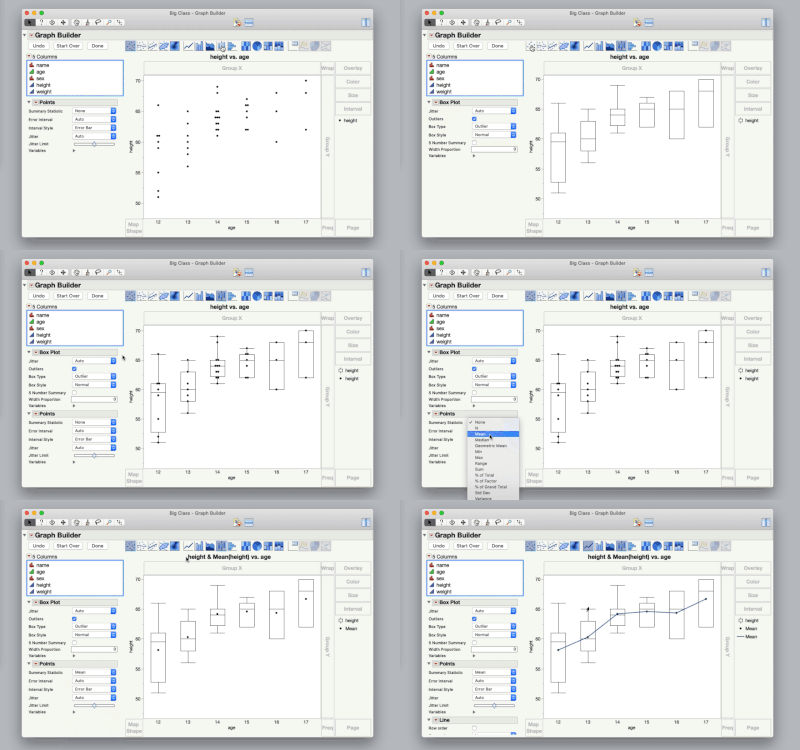

 

ScreenFlow.gif

-Jeff

View solution in original post

19 REPLIES 19
gzmorgan0
Super User (Alumni)

Re: Show means on box plot in graph builder

Right click on the graph builder frame box and select Customize. Then select a box and there is a check box for Confidence Interval.


Via the UI you have to edit each box. Below is a picture with several options that you can select.
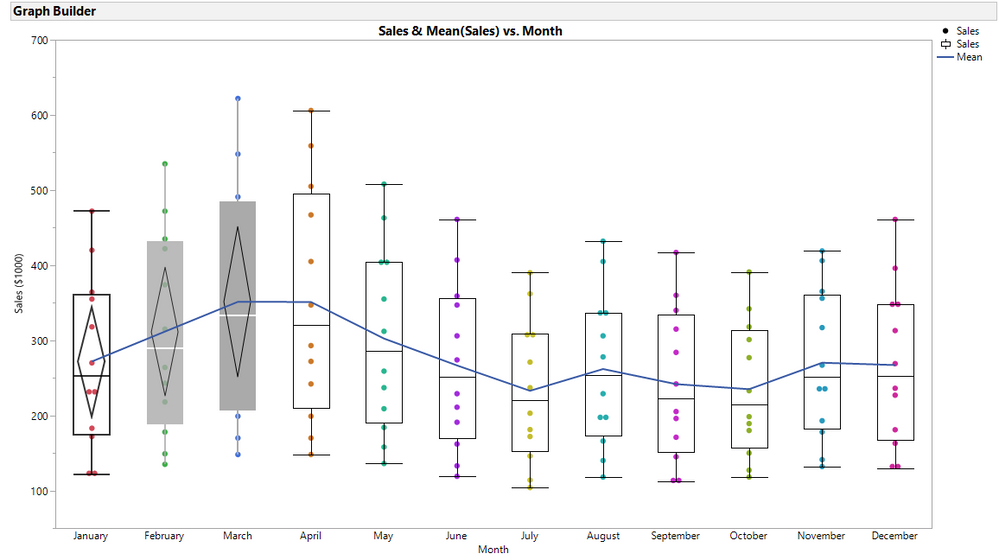
image.png

However, it is much easier to do this via a script. The script to create the picture below is attached.
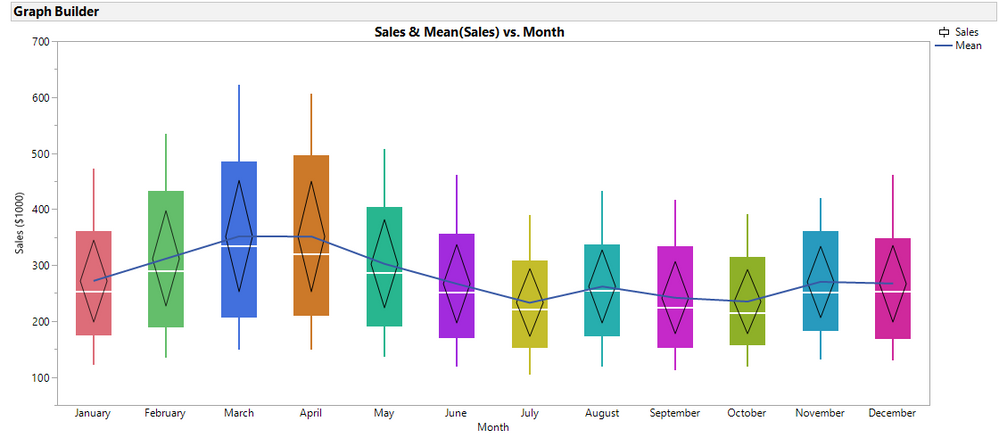

 image.png


Thomas1
Level V

Re: Show means on box plot in graph builder

I'm also interested in this topic. What is the best way to show the numeric mean of each box at the corresponding box?

gzmorgan0
Super User (Alumni)

Re: Show means on box plot in graph builder

The attached script has been updated. Note this script shows hardcoded column names and rounding units, it does not  include data prep etc. Both the mean and n has been added 
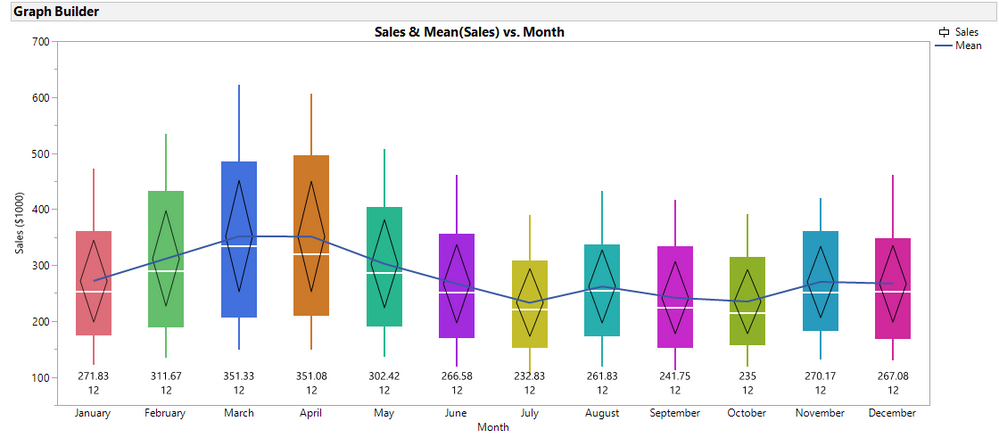
image.png  

Thomas1
Level V

Re: Show means on box plot in graph builder

Thanks. That is a great solution. Is there a way to do this without scripting, by using default built in features in JMP?

gzmorgan0
Super User (Alumni)

Re: Show means on box plot in graph builder

Right click on the Graph Builder Frame Box. Select Customize.  Select the  plus sign (+)  above the list of boxplots.

Select the  Templates menu above the Script Box, and select Text, then fill in the information. Select Text again and add the information for the next box.  Note there is an option available in JMP 14 Graph Builder boxplots to show the 5 number summay for the box, but that does not include the mean.
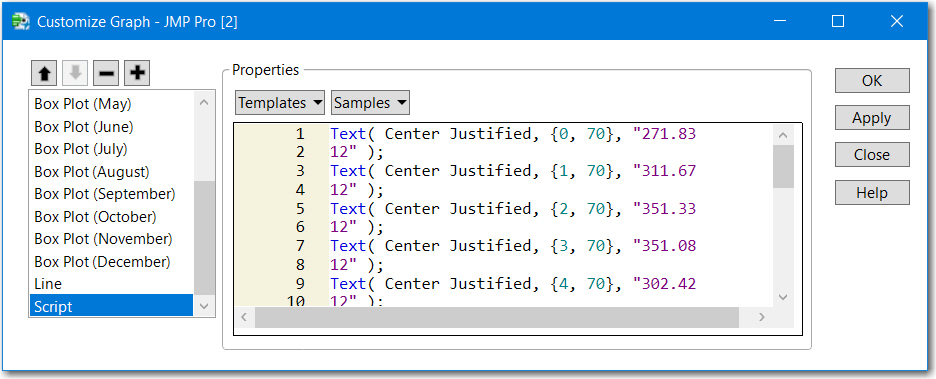
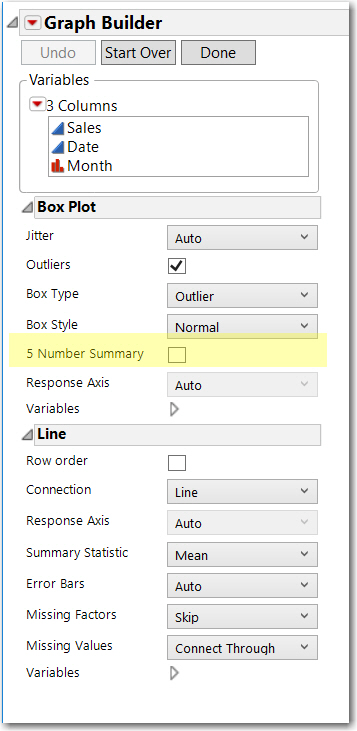
image.png

image.png

Thomas1
Level V

Re: Show means on box plot in graph builder

Thanks for your advice on how to customize graphs. What are the 5 numbers within the 5 Numbers Summary in JMP 14? Could you display an example? Unfortunately I don't have access to JMP 14 yet.

gzmorgan0
Super User (Alumni)

Re: Show means on box plot in graph builder

I am learning on the fly. JMP 14 already has a feature that fulfilled my wish list: the CaptionBox has a factor checkbox so it work for each category displayed on the X-Axis.

This displays the 5 number summary (min, Q1, Median, Q3, max) and the means as a caption box.
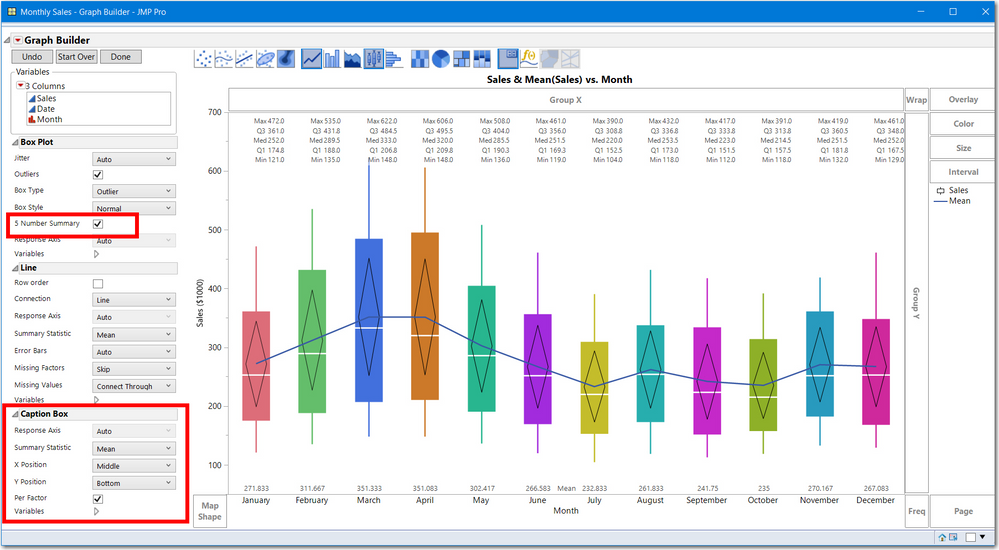
 

image.pngHere is the script showing the customization, for just the first boxplot.

Graph Builder(
	Size( 1029, 608 ),
	Show Control Panel( 0 ),
	Variables( X( :Month ), Y( :Sales ) ),
	Elements(
		Box Plot( X, Y, Legend( 6 ), Name( "5 Number Summary" )(1) ),
		Line( X, Y, Legend( 7 ) ),
		Caption Box(
			X,
			Y,
			Legend( 9 ),
			X Position( "Middle" ),
			Y Position( "Bottom" ),
			Per Factor( 1 )
		)
	),
	SendToReport(
		Dispatch(
			{},
			"Sales",
			ScaleBox,
			{Min( 50 ), Max( 700 ), Inc( 100 ), Minor Ticks( 1 )}
		),
		Dispatch(
			{},
			"Graph Builder",
			FrameBox,
			{DispatchSeg(
				Box Plot Seg( "Box Plot (June)" ),
				{Box Style( "Solid" ), Confidence Diamond( 1 ), Fences( 0 ),
				Fill Color( {162, 43, 221} )}
.....

Re: Show means on box plot in graph builder

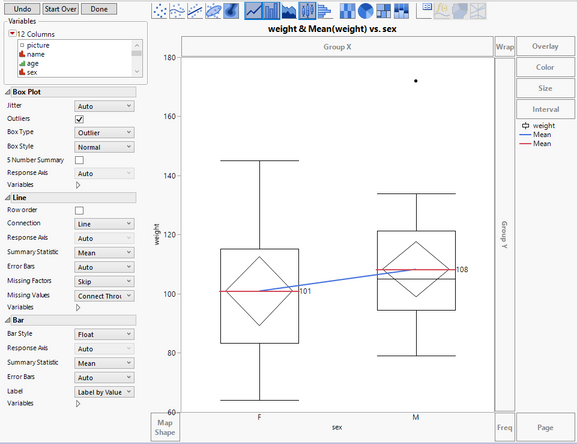
I think the easiest way to get the mean labeled on the boxplot graph is to add another element. Use the Shift-click on the bar chart icon. Make sure that the summary statistic for the bar chart is the Mean. Change the bar style to "Float". You then have the option to "Label by Value". All interactive and provides the label. Enclosed is an example using Big Class Families (with the control panel still on so you can see those options).Boxplot with Labeled Mean.PNG


Dan Obermiller
Thomas1
Level V

Re: Show means on box plot in graph builder

Thanks Dan. That is great way to show the mean right at the box plot.

Recommended Articles